ADVERTISING DISCLOSURE: THIS POST CONTAINS AFFILIATE LINKS. READ FULL DISCLAIMER
Last updated: May 2026
Quick verdict: Planoly is a visual-first social media scheduler built around Instagram, with planning tools that suit real estate agents who care about how their feed looks before it posts. The pricing is reasonable for solo agents, and the grid planner is genuinely useful. The catch is reliability: documented auto-posting failures and billing complaints mean it works well when it works, and creates real friction when it does not.
What Planoly Is
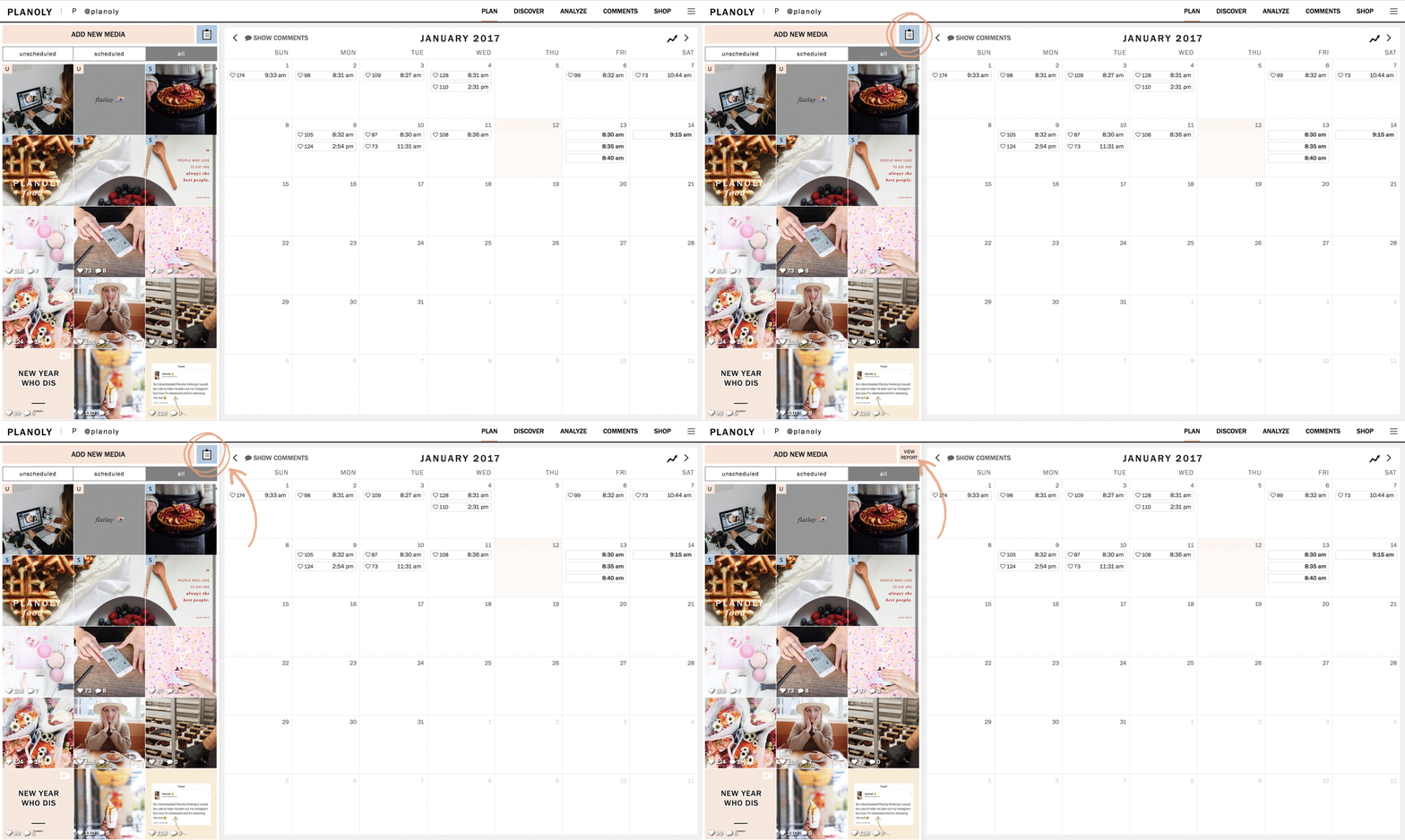
Planoly is a social media planning and scheduling platform built primarily for Instagram, with support for TikTok, Pinterest, Facebook, X, LinkedIn, YouTube, Threads, and Amazon. The core feature is a drag-and-drop grid planner that lets users see how their Instagram feed will look before posts go live.
For real estate agents, the platform fits a specific use case: maintaining a consistent, polished visual presence on Instagram for branding, listing showcases, and lead generation. It is not a real-estate-specific tool and does not integrate with MLS systems or CRM platforms, but the visual planning approach maps well to how agents already think about presenting properties and personal brand.
Planoly Pricing
Planoly has a free tier and three paid plans. Prices reflect monthly billing first, then annual. Pricing can change.
| Plan | Price | Best for |
|---|---|---|
| Free | $0 | Agents testing the platform (30 uploads cap) |
| Starter | $16/mo ($14/mo annual) | Solo agents posting moderately on 1 Instagram |
| Growth | $28/mo ($24/mo annual) | Small teams or agents handling multiple accounts |
| Pro | ~$43/mo | Brokerages managing multiple agent accounts |
The pricing detail worth knowing: Starter and Growth each include only one “social set” (one Instagram plus one Pinterest, or similar pairing). Adding social sets on Growth costs $10 per month each, and additional users are $5 per month. A solo agent managing one Instagram is fine. A team lead at a brokerage handling separate accounts for several agents can find the per-set add-on cost meaningful by month three.
Annual billing saves roughly 15 percent. The free plan is functionally a trial, not a viable long-term option, since 30 uploads typically lasts two to three weeks for an active agent.
Where Planoly Stands Out
The grid planner is the best in its class
Real estate agents tend to think visually. Planoly’s grid preview lets you arrange posts in a 3-column Instagram layout, see how they will look as a feed, and rearrange them before scheduling. This matters when an agent is alternating between listing photos, personal branding posts, and market updates and wants the overall feed to feel intentional rather than chaotic. Most competing tools treat the calendar as the primary view; Planoly treats the grid as the primary view, and for Instagram-led marketing, that is the right framing.
The visual editor saves agents from outsourcing simple design work
Planoly includes built-in image editing, filters, and access to stock photography through its Dupe integration. For an agent who does not want to subscribe separately to Canva or hire a designer for every social post, the in-app editing is enough for most listing announcements, open house promos, and just-sold posts. The trade-off is that the editor is less powerful than dedicated design tools, but for the volume most agents need, it is sufficient.
The AI caption writer handles repetitive post types
Agents post the same handful of templates over and over: new listing, just listed, price reduction, open house, just sold, testimonial. Planoly’s AI caption writer can produce serviceable first drafts for all of these, in a voice the agent picks. It will not produce award-winning copy, but it will save real time on posts that do not need to be perfect.
The Linkit link-in-bio tool covers a real need
Every agent needs somewhere to send Instagram traffic, since Instagram itself only allows one bio link. Planoly’s Linkit creates a custom landing page with multiple buttons, which agents can use to point traffic at active listings, an MLS search page, a contact form, or a lead magnet. It is simpler than dedicated tools like Linktree but it is included in the subscription, which eliminates one separate monthly cost.
Where Planoly Falls Short
Auto-posting reliability is a documented issue
This is the single biggest concern. Posts failing to auto-publish, while still counting against the monthly upload limit, is a pattern documented across App Store reviews and Better Business Bureau complaints from 2024 through 2026. The failures are particularly common with Instagram Reels and Stories. For an agent timing posts around an open house or a listing launch, a missed auto-post is not a minor inconvenience. Agents who depend on scheduled timing should test reliability during the 14-day trial before committing to an annual plan.
Customer support response times are slow
Documented response times for initial support contact run three to seven days. For a billing dispute or a posting failure on a time-sensitive listing launch, that is not fast enough. Agents who hit a problem on a Friday afternoon will typically not hear back until midweek.
Billing and cancellation complaints are concerning
BBB records include cases of continued charges after cancellation attempts. The pattern is not unique to Planoly in the SaaS world, but it is worth knowing before subscribing annually. Cancel through the platform with confirmation emails saved, and check credit card statements for at least two months after.
It is Instagram-first, with other platforms feeling secondary
Planoly supports nine platforms on paper, but the experience is meaningfully better on Instagram than on TikTok, Pinterest, or anywhere else. Agents who lead with Facebook for older client demographics or LinkedIn for referral partners will find the platform less suited to those channels.
No CRM, no MLS, no lead capture
Planoly schedules content. It does not capture leads, qualify them, or push them into a CRM. Agents need a separate stack for that part of the funnel. This is not a flaw in Planoly’s design; it is a scope limitation buyers should understand. The platform sits at the top of the funnel only.
How Planoly Compares
The social media scheduling category is crowded. Planoly’s main alternatives for real estate agents are Later, Buffer, and Hootsuite, each with a different center of gravity.
Against Later: Later is the closest direct competitor and arguably the better choice for multi-platform agents. Later handles TikTok and Pinterest more capably, offers stronger analytics on mid-tier plans, and has a more polished Linkin.bio tool. Planoly wins on visual grid planning specifically. If Instagram aesthetics are the priority, Planoly is better. If multi-platform breadth matters more, Later wins.
Against Buffer: Buffer is simpler and cheaper but lacks the visual grid preview. For agents who do not care about Instagram aesthetics and just need scheduled posting across several platforms, Buffer is the lower-cost option. For agents who care how their feed looks, Buffer cannot replace what Planoly offers.
Against Hootsuite: Hootsuite is built for teams, agencies, and brands posting at high volume across many accounts. For a solo agent or small brokerage, Hootsuite is overpowered and overpriced. Planoly is a better fit at the agent scale.
Who Should Use Planoly
Planoly is the right call for solo real estate agents and small brokerage marketing leads who lead with Instagram, care about how their feed looks, and post moderately enough to live within the upload limits on Starter or Growth. Agents who treat Instagram as a professional storefront, not just a posting channel, get the most value from the grid planner.
It is less ideal for agents whose primary platform is Facebook or LinkedIn, brokerages running content for many agents at once at agency scale, or anyone with no patience for occasional auto-post failures during a time-sensitive listing launch. For those scenarios, Later for multi-platform breadth or a more team-oriented tool will fit better.
Final Verdict
Planoly is a competent visual-first scheduler with one genuinely best-in-class feature (the grid planner) and one documented weakness (auto-posting reliability). For solo real estate agents whose marketing strategy lives on Instagram, it offers more than enough to justify the subscription cost, particularly on the $14-16/month Starter plan.
The honest framing is this: Planoly works well most of the time, and when it does not, the cost is a missed scheduled post during a window that mattered. Agents who can absorb that occasional friction will find it useful. Agents who cannot will be happier on Later or running posts manually. Use the 14-day trial to test auto-posting with the specific content types you actually publish, particularly Reels, before committing annually.
Frequently Asked Questions
Is Planoly real-estate-specific?
No. Planoly is a general social media scheduling tool used by creators, small businesses, and brands across industries. It does not integrate with MLS systems, real estate CRMs, or listing platforms. Real estate agents use it because the visual planning approach fits how they think about Instagram marketing, not because the tool is built for the industry.
How reliable is the auto-posting?
Reliability is the main weakness. Posts failing to auto-publish are documented across user reviews and BBB complaints, particularly with Instagram Reels. Most posts go through fine, but the failures happen often enough that agents should test reliability during the 14-day trial before relying on it for time-sensitive content.
Does Planoly have a free plan?
Yes, but with significant limits. The free plan caps at 30 total uploads, supports one platform, and is best treated as a trial rather than a long-term option. Most active agents will exhaust the free uploads within two to three weeks.
What is a “social set” in Planoly’s pricing?
A social set is a bundle of one Instagram plus one Pinterest, or similar paired-platform groupings. Starter includes one social set, Growth includes two, and additional sets cost about $10 per month on the Growth plan. For most solo agents, one set is enough.
Can Planoly schedule to TikTok and YouTube?
Yes, but the experience is meaningfully less polished than Instagram scheduling. Agents who post heavy video content to TikTok specifically may find Later or a TikTok-native tool better suited.
How does the Linkit link-in-bio compare to Linktree?
Linkit is included in any paid Planoly plan, while Linktree is a separate subscription. Linkit’s design is more limited and the analytics are basic, but for an agent who just needs a custom page with several buttons pointing to listings, MLS searches, and contact forms, Linkit is enough.
Is the AI caption writer any good?
It produces serviceable first drafts for common real estate post types like new listings, open houses, and just-sold announcements. It will not produce copy that wins over a skilled human writer, but it will save time on routine posts that do not need to be perfect.
What happens if a scheduled post fails?
Failed posts typically still count against the monthly upload limit, which is one of the most common user complaints. Agents who notice failure should manually republish and contact support, though response times typically run several days.
Does Planoly offer analytics?
Yes, but analytics are basic compared to dedicated analytics tools or competitors like Later. Agents who need deep performance data on engagement rates, audience demographics, or best posting times may find the data thin. For directional insight, it is enough.
Can multiple agents share one Planoly account?
The Growth plan supports two users included, with additional seats at $5 per month each. Pro supports more users at $3 each. For a small team of two to four agents sharing branded content, Growth handles it without much extra cost.
How do I cancel Planoly?
Cancel through the account settings within the platform and save the confirmation email. Given documented billing complaints, monitor credit card statements for at least two months after cancellation to confirm charges stop.
This article is for informational purposes only. Software features, pricing, and terms change frequently and may differ from what is described here. Verify current details directly with Planoly before purchasing.Last updated on May 13, 2026