ADVERTISING DISCLOSURE: THIS POST CONTAINS AFFILIATE LINKS. READ FULL DISCLAIMER
The Verdict: Indy is a well-priced, genuinely all-in-one platform for solo freelancers and independent professionals who want proposals, contracts, invoicing, and project tracking under one roof. At $12.50 per month on the biennial plan, the value is hard to argue with. It is not the right fit for growing teams, accountants who need robust bookkeeping, or anyone who requires strong third-party integrations beyond Zapier and Google Calendar.
Last updated May 3, 2026.
In This Review
What Indy Is
Indy is an all-in-one business management platform built specifically for freelancers and independent professionals. It covers the full administrative lifecycle of a solo practice: attracting leads with forms, converting them with proposals, protecting both parties with contracts, tracking time on projects, and collecting payment with invoices. The pitch is consolidation. Instead of paying for separate tools for each of those functions, you run them all from one dashboard.
The platform was founded by Sebastian Gyr, who built it after experiencing firsthand the friction of juggling multiple freelance tools and chasing unpaid invoices. That origin story shows in the product. Indy is designed for the solo operator, not the small agency. The features are aimed squarely at the person who is both the service provider and the business administrator at the same time.
Who Uses Indy
The typical Indy user is a freelance designer, writer, consultant, photographer, or other independent professional who needs to look professional to clients without hiring a team to support them. Indy also has a presence in the French market, where a separate Indy product (not the same platform) serves as an accounting tool for auto-entrepreneurs. This review covers the English-language Indy at weareindy.com, which is the freelancer workflow platform.
Indy is not an accounting tool in the traditional sense. It does not generate profit and loss statements, track business expenses in depth, or connect to a bank feed for reconciliation. If you need those functions, you are looking for QuickBooks, FreshBooks, or Wave, not Indy.
Indy vs. Indy: Two Different Products Share the Name
If you searched for “Indy” and landed on something about AI-powered accounting for French freelancers, you found the wrong product. There are two separate companies operating under the Indy name. This review covers weareindy.com, the English-language freelance management platform for proposals, contracts, and invoicing. The other Indy (indy.fr) is a French AI accounting robot built for auto-entrepreneurs and liberal professions in France. It automatically syncs with French bank accounts, categorizes transactions for French tax rules, and files VAT returns with the French tax administration. The two products are unrelated, serve different markets, and solve different problems. If you are a French auto-entrepreneur looking for bookkeeping automation, indy.fr is what you want. If you are an English-speaking freelancer looking for an all-in-one business platform, keep reading.
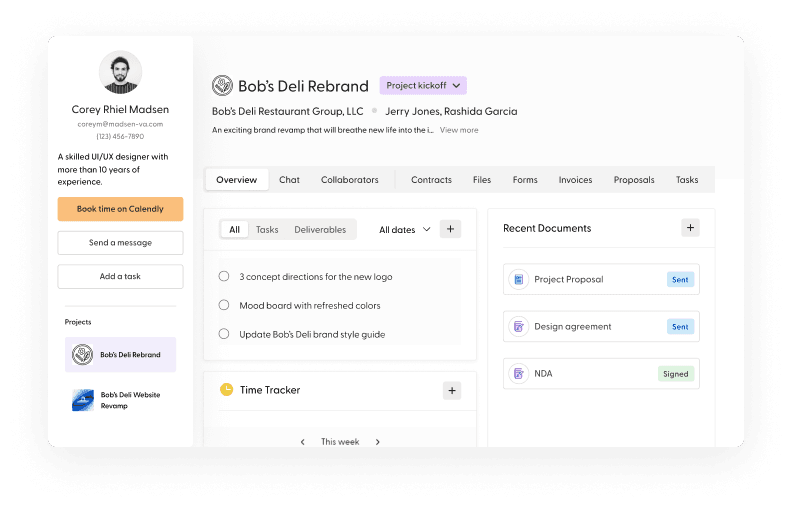
Source: weareindy.com
Indy Pricing
Indy keeps pricing simple: two tiers, one of which is permanently free.
| Plan | Price | What’s Included |
|---|---|---|
| Free | $0 forever | Proposals, contracts, invoices (3 per month), projects, tasks, time tracker, calendar, forms, 10 GB file storage. Up to 3 clients in CRM. |
| Pro Bundle | $12.50/month (billed every 2 years) | Everything in Free, plus unlimited proposals, contracts, invoices, and clients. Branded client portal, recurring invoices, AI writing assistant, white labeling, Gmail integration, Google Calendar sync, Zapier integration, 1 TB file storage, live chat support. |
Billing note: The $12.50/month rate requires a two-year commitment paid upfront. Indy does not prominently display a standard annual rate on its current pricing page. If paying month-to-month or annually is important to you, confirm current options directly with Indy before purchasing. A 7-day free trial and a 30-day money-back guarantee apply to the Pro Bundle.
On pure price, Indy is one of the most affordable full-featured platforms in its category. Bonsai starts at $25/month billed monthly, and HoneyBook’s entry plan is higher still. For a solo freelancer on a tight budget, the free tier is genuinely usable if you have fewer than three active clients and don’t need recurring invoices.
Key Features
Proposals
Indy’s proposal builder is one of the stronger tools on the platform. You can customize layouts, embed media like YouTube videos or Spotify links, and pull in project details from templates. The builder is drag-and-drop, and proposals look polished without requiring design experience.
One limitation worth knowing: the proposal editor has some rigidity around line item formatting. A few users on Capterra have noted that the discount field appears by default and cannot be removed, which can create an awkward impression when sending to clients. It is a minor issue, but it is a real one.
Contracts
Indy offers legally vetted contract templates for common freelance engagements. You fill in project details, send to the client, and collect an e-signature, all inside the platform. For a freelancer who has historically sent informal agreements or nothing at all, this feature alone is worth the price of admission.
Cross-tool automation (available on Pro) means you can trigger a contract to send automatically once a client approves a proposal. That kind of workflow is normally reserved for more expensive CRM tools.
Invoicing and Payments
Invoice creation is fast. You can build invoices from scratch, pull in line items from templates, or connect time-tracked hours directly to a billable invoice. Payment is collected via PayPal, Stripe, or Zelle. Recurring invoice series are a Pro-only feature.
Indy does not process payments itself, so you are subject to whatever transaction fees Stripe or PayPal charges. This is standard across most freelance platforms, but it is worth factoring into your effective cost.
Time Tracking
The time tracker is built in, and it connects to projects and invoices. You can start a timer, assign it to a project, and convert tracked hours into invoice line items. Reviewers on Capterra describe it as functional but slightly clunky, particularly around the steps required to log and assign time. It does the job, but dedicated time tracking tools like Toggl or Harvest are more polished.
Project and Task Management
Projects in Indy serve as a container for everything related to a client engagement: tasks, files, invoices, contracts, and messages. The task management is straightforward with deadlines and status tracking. It is built for a solo operator managing a handful of clients, not a team with complex dependencies.
Client Portal
The branded client portal (Pro only) gives clients a shared space to view project files, leave feedback, and communicate without email. It is one of the more differentiated features in Indy’s set, since many competitors at this price point do not offer a client-facing portal at all. White labeling on Pro means your branding appears on the portal rather than Indy’s.
Forms and Lead Capture
Indy’s forms tool lets you build intake forms, embed them on your website, and funnel responses into your CRM as new leads. It is a simple but useful addition for freelancers who want to capture leads without a separate form tool like Typeform or JotForm.
Where Indy Stands Out
Price-to-Feature Ratio
At $12.50 per month (on the biennial plan), Indy includes tools that competitors bundle separately or charge significantly more for. A comparable stack built from individual tools (a proposal tool, a contract tool, an invoice tool, a time tracker, and a project management app) could easily run $50 to $100 per month. The consolidation argument is real, not just marketing copy.
The Free Plan Is Actually Useful
Most “freemium” tools in this space give you just enough to see the product before hitting a paywall. Indy’s free tier covers proposals, contracts, invoices, tasks, time tracking, and file storage, all with no expiration. The limit is three per month for proposals, contracts, and invoices, and a cap of three clients. For a freelancer who is just starting out or managing a very small client roster, that is functional, not just a trial.
Workflow Automation Across Tools
The cross-tool automation that triggers a contract after a proposal is approved, or an invoice after a contract is signed, is a meaningful time saver. It removes manual handoffs between steps that most freelancers handle by memory. This feature is available on Pro and works inside Indy without needing Zapier.
Where Indy Falls Short
Limited Native Integrations
Indy connects natively to Google Calendar, Gmail (Pro only), PayPal, Stripe, Zelle, and Zapier. That is it. If you rely on specific tools, say Notion, Slack, or a dedicated accounting platform, you are going through Zapier, which adds friction and cost. Competitors like Bonsai have bookkeeping and tax estimate features built in. Indy does not.
If your accounting setup requires real bank reconciliation, expense categorization, or tax reporting, you will need a separate tool. Indy does not replace FreshBooks or QuickBooks for bookkeeping purposes.
Not Built for Teams
Indy is a single-user platform. There is a community feature where you can connect with other freelancers and add them to projects, but it is not a multi-seat team management tool. If you have employees, subcontractors you need to manage under one workspace, or a client-facing agency workflow, Indy will feel limiting quickly.
Development Pace and Support Concerns
This is the most important flag in this review. As of late 2025 and into 2026, a pattern emerged in AppSumo reviews and on Indy’s own feedback boards: users reporting that the product changelog had gone quiet for over a year, that feature requests were going unanswered by the company, and that support response times had become very slow or nonexistent in some cases.
Worth knowing: Indy’s own support team acknowledged in an April 2026 response that they had been “rebuilding” and apologized for a lack of communication. If you are committing to a two-year plan, it is worth checking the current state of the product changelog at feedback.weareindy.com before purchasing.
This does not mean Indy is a dead product. The core tools still work, and reviews on G2 and Capterra remain positive for users on the free and Pro plans. But it is a real consideration for anyone weighing a long-term commitment.
Proposal and Invoice Customization Has Limits
For most freelancers, the built-in templates will be sufficient. But if you need granular control over invoice formatting, custom line item types (like per-word billing for writers), or highly branded proposal documents, Indy will feel a bit rigid. These are common complaints in Capterra reviews, and they are accurate.
What Real Users Say
Indy holds a 4.8/5 rating on G2 across 62 reviews, and comparable scores on Capterra. The review patterns are fairly consistent across platforms.
Common praise: Users consistently highlight the all-in-one value, the quality of contract templates, and the ease of going from proposal to invoice inside one platform. The free plan receives specific positive mentions from freelancers who were previously juggling multiple subscriptions.
Common complaints: Time tracking is described as functional but clunky. Proposal customization has friction points (the forced discount field being the most cited). The CRM (called “People” in the app) is underdeveloped compared to what users want. More recent reviews on AppSumo raise concerns about slowed development and slow or absent support responses.
Who Should Use Indy
- Solo freelancers who want one platform for proposals, contracts, invoices, and project tracking, without paying for several separate subscriptions.
- Independent professionals just starting out who need to look professional to clients but are not yet generating enough revenue to justify $50 to $100 per month across multiple tools.
- Consultants and service providers with a small, stable client roster (three to ten active clients) who need clean workflows without complexity.
- Creatives in fields like design, photography, writing, or marketing who need proposal and contract tools more than deep accounting functionality.
Who Should Not Use Indy
- Growing agencies or teams that need multi-user workspaces, team permissions, or subcontractor management.
- Freelancers who need real bookkeeping, including expense tracking, profit and loss reporting, bank reconciliation, or tax preparation. Indy is not an accounting tool.
- Businesses with complex integration needs who rely on a specific tech stack and need native connections beyond Google Calendar and Zapier.
- Anyone risk-averse about software commitment who wants a product with a clear and active development roadmap before locking into a two-year plan.
Indy vs. Alternatives
| Platform | Best For | Starting Price | Key Difference |
|---|---|---|---|
| Indy | Solo freelancers, budget-conscious independents | Free / $12.50/mo (biennial) | Most affordable full-featured option; free plan is genuinely usable |
| Bonsai | Freelancers who want bookkeeping and tax tools built in | $25/mo (monthly) | Includes expense tracking and quarterly tax estimates; no free plan |
| HoneyBook | Creatives and client-heavy service businesses | Varies by plan | Stronger client pipeline and onboarding experience; less affordable than Indy |
| FreshBooks | Freelancers who need real invoicing plus accounting | $19/mo | True accounting features including expense tracking and financial reports; no contract or proposal tools |
Quick Pick Guide
- You are a freelancer who has never sent a proper contract: Start with Indy’s free plan. The contract templates alone are worth it.
- You need expense tracking and quarterly tax estimates: Bonsai has those built in; Indy does not.
- You are managing three or more clients and send recurring invoices: Indy Pro is worth the upgrade from the free tier.
- You need full accounting, profit and loss reporting, or bank reconciliation: FreshBooks or QuickBooks are the right tools, not Indy.
- You are not sure you will stick with any platform for two years: Check if Indy offers a monthly option before committing to the biennial plan.
Popular Integrations
Indy’s native integration list is short but covers the essentials for most solo freelancers:
- Payments: Stripe, PayPal, Zelle
- Calendar: Google Calendar (Pro)
- Email: Gmail (Pro)
- Automation: Zapier (connects to 5,000+ apps on Pro)
- Plaid: Listed as a connected service for account verification
For anything beyond this list, you will need Zapier. Indy does not have native integrations with QuickBooks, Xero, Slack, Notion, or most dedicated CRM tools.
Frequently Asked Questions
Does Indy offer a free trial?
Yes. Indy has a permanently free plan with no time limit, plus a 7-day free trial of the Pro Bundle. The Pro Bundle also comes with a 30-day money-back guarantee.
Is Indy worth it for a solo freelancer, or should I use Bonsai instead?
If budget is your primary concern and you do not need bookkeeping or tax tools, Indy is the stronger value. Bonsai is worth the higher price if you want quarterly tax estimates and expense tracking built in, which Indy does not offer.
Can Indy replace my accounting software?
No. Indy handles invoicing and payment collection, but it is not accounting software. It does not track business expenses, reconcile bank accounts, or generate financial statements. If you need those functions, you will need a dedicated tool like FreshBooks or QuickBooks alongside Indy.
How long does Indy take to set up?
Most users report being operational within a day. The templates for proposals and contracts are ready to customize, and the interface is simple enough that there is no meaningful learning curve for solo operators.
Does Indy support international payments or non-USD currencies?
Indy is primarily US-focused. Currency support has been a recurring request from international users. Check directly with Indy for the current status of multi-currency support before signing up if you operate outside the US.
Is Indy good for teams or agencies?
Not really. Indy is built for solo operators. There is a community feature where you can collaborate with other Indy users, but it is not a proper multi-seat team workspace. Agencies should look at tools built for team management.
Does Indy integrate with QuickBooks?
Not natively. You would need to connect them via Zapier on a Pro plan, and the workflow would require custom setup. If QuickBooks integration is critical, FreshBooks or HoneyBook handle this more cleanly.
Is Indy HIPAA-compliant?
Indy does not publish HIPAA compliance documentation. If you are a healthcare-adjacent independent professional who handles protected health information, Indy is not the right platform for sensitive document management.
Does Indy offer a nonprofit or student discount?
No specific nonprofit or student pricing is listed on Indy’s pricing page. The free plan may be sufficient for qualifying organizations with a small client volume.
What is Indy’s cancellation policy?
You can cancel at any time. The Pro Bundle includes a 30-day money-back guarantee from the start of the plan. After that window, you retain access for the duration of the billing period but will not receive a prorated refund.
Can Indy handle project management for complex engagements?
Indy’s task management is designed for solo freelancers with straightforward projects. It does not support task dependencies, workload balancing, or team-level project views. For complex project delivery, a dedicated tool like Asana or ClickUp would be a better fit.
Is Indy right for a consultant who bills hourly?
Yes, with a caveat. The time tracker connects to invoices, which makes hourly billing workable. Some reviewers find the time tracking interface slightly clunky. If precise, seamless time tracking is critical to your workflow, test the free plan before upgrading.
Final Verdict
Indy earns its place as one of the most accessible freelance management platforms on the market. The combination of a genuinely useful free plan and a low-cost Pro tier makes it a reasonable first choice for independent professionals who are tired of paying separately for proposals, contracts, invoices, and project tracking.
The value proposition is straightforward: if you are a solo freelancer and you need those core tools, Indy is hard to beat on price. The contract templates are solid, the workflow automation is a real time-saver, and the client portal (on Pro) gives you something most competitors charge significantly more for.
The honest caveats are worth repeating. Indy is not an accounting tool. It does not replace bookkeeping software. Its integration list is thin. And the questions raised by users in late 2025 and early 2026 about development pace and support responsiveness are legitimate things to verify before locking into a two-year commitment. Check the current changelog at feedback.weareindy.com and look at recent reviews before you pay upfront.
If those limitations do not apply to your situation, Indy is a fair deal for what it does.
Last updated on May 14, 2026