ADVERTISING DISCLOSURE: THIS POST CONTAINS AFFILIATE LINKS. READ FULL DISCLAIMER
The Verdict: Paychex is a proven payroll and HR platform that earns its reputation for compliance depth and scalability, but its pricing opacity and inconsistent customer support make it a risky choice for businesses that just want to get payroll done cleanly at a predictable cost. It is well-suited for growing companies (roughly 20 to 500 employees) that need multi-state tax filing, PEO options, and the credibility of a name that accountants and HR professionals recognize. Startups, solo operators, and businesses that value transparent flat-rate pricing will find better fits in Gusto, OnPay, or Patriot Payroll.
Last updated May 2, 2026.
In This Review
What Paychex Is
A Legacy Player With Enterprise Ambitions
Paychex has been in the payroll business since 1971 and currently serves approximately 800,000 clients across the United States. That 50-plus year track record is a real differentiator in a market crowded with software startups that launched five years ago. When a company of that scale handles your payroll, you get infrastructure, compliance depth, and a name that your accountant and HR attorney will immediately recognize.
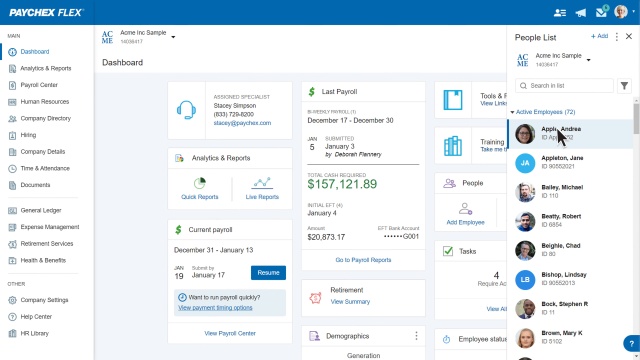
The core platform is called Paychex Flex, a cloud-based system that combines payroll processing, HR tools, benefits administration, compliance support, and time and attendance tracking in one place. The platform scales from solo operators to companies with thousands of employees, and Paychex also offers PEO (Professional Employer Organization) and HRO (Human Resource Outsourcing) arrangements for businesses that want to hand off HR entirely.
Who Paychex Targets
Paychex positions itself as a solution for businesses of all sizes, but it performs best in the 20 to 500 employee range. At the low end of that range, the platform has enough structure to handle growing complexity (multi-state payroll, benefits enrollment, onboarding workflows) without requiring a dedicated HR team. At the upper end, the Enterprise plan and PEO options make Paychex a genuine alternative to larger HCM platforms.
Very small businesses (under 10 employees) often find Paychex more than they need and more than they want to pay. The platform’s compliance-heavy feature set and opaque pricing model can feel like overkill when the job is simply running payroll for a handful of people every two weeks.
Paychex Pricing
The Transparency Problem
Paychex does not publish most of its pricing online. This is intentional: custom quoting lets Paychex negotiate per client and makes direct comparison with competitors harder. If you want a firm number, you will need to speak with a sales representative. That said, third-party pricing research and aggregated buyer data give a reasonable picture of what to expect.
The one price Paychex does publish is the starting point for its entry-level plan: $39 per month base fee plus $5 per employee for Paychex Go (also referenced in some materials as Flex Essentials). For a 10-person team, that is roughly $89 per month before any add-ons. Per-payroll-run fees may apply on some configurations, adding $1.50 to $3 per run, which can add $30 to $80 per month for businesses that run payroll weekly.
Estimated Plan Tiers
Based on aggregated third-party data and buyer reports, the Paychex Flex plan structure works roughly as follows. These are estimates, not guaranteed prices.
| Plan | Estimated Price | What’s Included |
|---|---|---|
| Paychex Go / Flex Essentials | ~$39/mo + $5/employee | Payroll processing, direct deposit, tax calculations, year-end reporting, employee self-service |
| Flex Select | ~$119/mo + $12/employee (estimated) | Essentials features plus foundational HR tools, state unemployment insurance, learning management |
| Flex Pro | Custom quote (~$149/mo+ base, negotiated per employee rate) | Select features plus garnishment services, general ledger, employee handbook builder, guided setup, background checks |
| Flex Enterprise | Custom quote | Pro features plus performance management, document management, paycheck previews, dedicated account support |
Important: Multi-state tax filing is not included in the base Essentials plan and typically requires upgrading to a higher tier or paying an add-on fee. If you operate in more than one state, confirm this in writing before signing. Setup fees ranging from $150 to $500 are also common, and year-end W-2 processing is billed separately at approximately $2 to $5 per form. Early termination fees have been reported in the $1,500 range.
Get a Custom Quote from Paychex
Key Features
Payroll Processing
Paychex Flex is built around a cloud-based payroll engine that handles W-2 employees and 1099 contractors across all 50 states. The platform automates federal, state, and local tax calculations, and higher-tier plans include Paychex’s TaxPay service, which files and deposits payroll taxes on your behalf. Paychex markets its payroll as a two-click process: enter your data, confirm, and submit. That experience holds up in practice for straightforward weekly or biweekly payroll runs.
Employees can access pay stubs, tax forms, and personal information through a self-service portal and mobile app. Direct deposit is standard across all plans. Payroll frequency options include weekly, biweekly, semi-monthly, and monthly.
HR and Compliance Tools
This is where Paychex separates itself from pure-play payroll tools. Even at the Essentials level, you get digital onboarding, new hire reporting, and compliance alerts for labor law changes like minimum wage updates and overtime rule shifts. Higher tiers add applicant tracking, performance management, employee handbook builder, and HR analytics dashboards.
Paychex’s compliance infrastructure is the platform’s clearest strength for regulated industries. Healthcare, manufacturing, and financial services companies, which face more complex payroll tax obligations and labor law exposure, consistently cite compliance coverage as the reason they stay with Paychex despite the higher cost.
Time and Attendance
Paychex offers time tracking as an add-on, with options ranging from web-based clock-in to physical time clocks and mobile GPS-enabled tracking. Hours sync directly into the payroll run, reducing manual data entry. This integration is genuinely useful for businesses with hourly workers or multiple locations, though it does add to your monthly cost.
Benefits Administration and PEO
Paychex is the largest 401(k) provider in the United States by plan count, which gives it real infrastructure for retirement plan administration. The platform also handles health, dental, vision, HSA, FSA, and workers’ compensation. For businesses that want to hand off HR entirely, Paychex’s PEO service enters a co-employment arrangement where Paychex manages HR compliance, benefits, and risk while you retain day-to-day management of your team.
Where Paychex Stands Out
Scale and Longevity
Paychex has been processing payroll for over 50 years. The infrastructure is enterprise-grade. If you are running payroll for 100 employees across five states, you want a platform that has handled that scenario thousands of times before. Paychex has processed more complex payrolls than almost any other vendor on the market. That experience shows in its compliance depth, audit support, and tax filing accuracy at scale.
Dedicated Account Representatives
Higher-tier plans include dedicated account representatives, and businesses that have one consistently report better experiences. Users with an assigned specialist describe the relationship as a genuine asset, particularly when navigating tax notices, garnishment questions, or state compliance issues. This is a meaningful differentiator from software-first competitors where your only support option is a chat queue.
PEO and Full HR Outsourcing
Very few payroll providers can also act as your HR department. Paychex can. The PEO option allows small businesses to access large-employer benefit rates, offload compliance management, and essentially have an outsourced HR team without hiring one. For businesses in regulated industries or those scaling rapidly, this option is worth pricing out seriously.
Where Paychex Falls Short
Pricing Opacity and Hidden Costs
The biggest complaint about Paychex, documented across hundreds of reviews, is surprise billing. Users report charges for multi-state filings that were not disclosed at signup, year-end W-2 fees billed separately, and per-payroll-run fees that inflate monthly costs beyond what the base rate implied. Negotiation is possible, especially for businesses with 20 or more employees, but you have to know to ask and get everything in writing.
Early termination fees averaging around $1,500 also create lock-in that buyers do not always anticipate when signing an annual contract. If you switch providers after six months because support issues become untenable, you may still owe Paychex for the remainder of the contract term.
Customer Support Quality
Paychex earns a 4.1 to 4.2 out of 5 on G2 (over 1,600 verified reviews), which is respectable for a platform of this complexity. But user reviews on consumer-oriented platforms are far more critical. Common complaints include long hold times, representatives who are unfamiliar with specific plan features, high agent turnover that causes dedicated reps to change frequently, and tax filing errors that required manual correction.
Important: Paychex historically offered 24/7 phone support, which was a key differentiator. As of early 2026, support hours have been reduced to 8 AM to 8 PM EST in most configurations, with round-the-clock access limited to select plans and regions. Verify current support terms before signing.
Essentials Plan Limitations
The entry-level plan excludes features that many buyers assume are standard. Multi-state tax filing, HR support, and document management all require upgrades. A business that signs up for Essentials to keep costs down may find itself pressured to upgrade within months, at which point the pricing advantage over competitors narrows considerably.
What Real Users Say
Review patterns across G2, Capterra, and TrustRadius are consistent: users who have a dedicated account representative are generally satisfied. Users who do not have one often report frustration.
Common praise: Reviewers consistently highlight ease of running routine payroll, the value of having one platform for payroll, benefits, and compliance, and the quality of service from assigned account specialists. Long-tenured users (5 or more years) describe the system as reliable and the tax compliance automation as a genuine time-saver.
Common complaints: Billing surprises top the list: unexpected charges for multi-state processing, year-end forms, and add-ons that were not clearly priced at the point of sale. Customer support quality is the second major complaint, with reviewers citing long hold times, high rep turnover, and tax filing errors. Some users also report significant issues when trying to cancel, including post-cancellation billing.
Who Should Use Paychex
- Businesses with 20 to 500 employees that need scalable payroll infrastructure with compliance depth they can grow into
- Companies operating in multiple states that need multi-state tax filing handled by a vendor with documented experience at that scale (confirm this is included in your quoted plan)
- Regulated industries (healthcare, financial services, manufacturing) where compliance support and audit-readiness justify a higher price point
- Businesses considering PEO that want to evaluate full HR outsourcing from a vendor that also handles payroll
- Companies whose accountants or HR attorneys are already familiar with Paychex, since the relationship often reduces switching friction
Who Should Not Use Paychex
- Solo operators and businesses with fewer than 10 employees who need simple payroll at a predictable monthly cost
- Budget-sensitive small businesses where hidden fees and contract lock-in create real financial risk
- Businesses that need fully transparent pricing before speaking with a sales rep
- Teams that want all-inclusive flat-rate payroll without negotiating what is and is not included
- Businesses that run payroll weekly and want unlimited runs included without per-run fees
Paychex vs. Alternatives
| Platform | Best For | Starting Price | Key Difference |
|---|---|---|---|
| Paychex | Growing businesses, regulated industries | ~$39/mo + $5/employee | 50+ year track record, PEO option, deep compliance |
| Gusto | Small to mid businesses wanting HR + payroll in one | $49/mo + $6/employee | Transparent pricing, stronger HR tools at base tier |
| OnPay | Small businesses wanting all-inclusive single-plan pricing | $49/mo + $6/employee | No tiers, no hidden fees, multi-state included |
| ADP | Mid to large enterprise | Custom quote | Stronger enterprise HCM, more complex and more expensive |
| Patriot Payroll | Very small businesses wanting the lowest price | $17/mo + $4/employee | Lowest cost in the market, US-based support, no HR layer |
Quick Pick Guide
- If you need compliance support across multiple states and your headcount is growing past 20, Paychex is worth a serious look.
- If you want transparent flat-rate pricing with no negotiation required, choose OnPay or Patriot Payroll.
- If you want payroll plus strong HR tools in a modern platform, Gusto has an edge on Paychex at the small business tier.
- If your accountant or HR attorney already works with Paychex clients, stay in the ecosystem. The switching cost in advisory fees often exceeds the savings from a cheaper tool.
- If you are evaluating Paychex, get multi-state fees, per-run fees, setup costs, and early termination terms in writing before signing anything.
Popular Integrations
Paychex Flex supports integrations across accounting, time tracking, HR, and point-of-sale categories through its open API platform and Marketplace.
Accounting: QuickBooks Online, QuickBooks Desktop, Xero, Sage Intacct, general ledger sync
Time and Attendance: When I Work, Buddy Punch, Timeero, Workyard, PayClock, various physical time clock hardware
HR and Benefits: BambooHR, health insurance carriers, 401(k) plan administrators, COBRA administration
Business Operations: Point-of-sale systems, scheduling platforms, job costing tools, learning management systems
Developer Access: Paychex offers a public API for custom integrations; developers must apply to the Paychex partner program, which typically requires passing technical requirements and business development review.
Frequently Asked Questions
Does Paychex offer a free trial?
Paychex does not offer a traditional free trial. Most plans begin with a demo and a custom quote from a sales representative. Some promotional pricing for the first few months is occasionally available.
How much does Paychex cost for a 10-person company?
Based on publicly available pricing data, a 10-person team on the entry-level plan costs approximately $89 per month (base fee plus per-employee charge). Add-ons like time tracking, multi-state filing, or additional HR modules will increase that number. Request a written itemized quote to understand your actual cost.
Is Paychex worth it, or should I use Gusto instead?
For businesses with more than 20 employees that need compliance infrastructure and are willing to negotiate pricing, Paychex can justify its cost. For small businesses under 20 employees that want transparent all-in pricing, modern HR tools, and no contract lock-in, Gusto is the stronger choice. The two platforms serve different needs at different sizes.
Can Paychex handle payroll in multiple states?
Yes, but multi-state payroll is typically not included in the base Essentials plan. It generally requires upgrading to a higher tier or paying an add-on fee. Confirm this in writing during your sales conversation.
How long does Paychex take to implement?
Implementation timelines vary by plan and company size. Guided setup is available on Pro and higher plans. Smaller businesses on Essentials often go live within a few days to a couple of weeks. Larger organizations with complex payroll structures may take longer, particularly if benefits administration and time tracking are being configured simultaneously.
Is Paychex customer service available 24/7?
As of early 2026, Paychex support hours have been adjusted to approximately 8 AM to 8 PM EST for most configurations. Round-the-clock support is available in select tiers and regions, but is no longer a standard offering across all plans. Verify this before signing if 24/7 access is a requirement.
Does Paychex integrate with QuickBooks?
Yes. Paychex Flex integrates with both QuickBooks Online and QuickBooks Desktop, including general ledger sync. This is one of the most commonly used Paychex integrations among small and mid-sized businesses.
Is Paychex SOC 2 compliant?
Paychex is a publicly traded company (NASDAQ: PAYX) with enterprise-grade security infrastructure. The platform uses standard encryption protocols and access controls. Compliance certifications and data handling terms are available through Paychex directly or via a signed business associate agreement for regulated industries.
Does Paychex offer discounts for nonprofits?
Paychex does not advertise standard nonprofit or education discounts. However, pricing is negotiated, so nonprofits should ask specifically about available discounts during the sales process and compare against providers like OnPay that include all features at a single transparent price regardless of organization type.
What is Paychex’s cancellation policy?
Paychex typically uses annual contracts with early termination fees that have been reported by users in the range of $1,500. Month-to-month arrangements may be available but are less common and typically priced higher. Read the termination clause carefully before signing and confirm the exact fee structure in writing.
Can Paychex replace a dedicated HR department?
Through its PEO (Professional Employer Organization) service, Paychex can act as a co-employer that manages HR compliance, benefits administration, and risk management on your behalf. This is a genuine HR outsourcing option, not just software. It is worth pricing out for businesses with 10 to 100 employees that do not have a dedicated HR hire but face growing HR complexity.
Is Paychex right for businesses with under 10 employees?
It depends on the use case. Very small businesses that need simple payroll and transparent pricing typically find better value with Patriot Payroll or OnPay. Paychex becomes more competitive when multi-state compliance, benefits administration, or PEO services are part of the picture, even at small headcounts.
Final Verdict
Paychex is the right choice for a specific kind of business: one that is growing past 20 employees, operates in multiple states, values compliance depth over price transparency, and is willing to negotiate a contract and manage the relationship actively. In that context, Paychex’s 50-year track record, dedicated account support at higher tiers, and genuine PEO option are hard to match.
For everyone else, the pricing opacity, contract lock-in, and customer support inconsistency are real liabilities that competitors have solved. If you want to know exactly what payroll will cost before talking to a sales rep, Paychex is the wrong starting point. Start with OnPay or Patriot Payroll, and revisit Paychex when your headcount and compliance needs have outgrown what a flat-rate tool can handle.
Last updated on May 3, 2026