ADVERTISING DISCLOSURE: THIS POST CONTAINS AFFILIATE LINKS. READ FULL DISCLAIMER
Last updated: May 2026
Quick verdict: tl;dv is one of the strongest AI meeting assistants for multilingual teams and anyone who prioritizes transcription accuracy over brand familiarity. It supports more than 30 languages with quality that holds up against any competitor in the category, the AI summaries are genuinely useful rather than generic, and the free plan is unusually generous. The trade-offs are real but narrow: the paid plans get expensive at scale, native CRM integrations are thinner than Fireflies, and the brand is still less recognized than Otter or Fathom. If you run meetings in non-English languages, work with international teams, or care most about raw transcription and summary quality, tl;dv is the strongest pick. If you need deep sales-tool integrations or the most polished mobile experience, look at alternatives.
What tl;dv Is
tl;dv (short for “too long; didn’t view”) is an AI meeting recorder that joins Zoom, Google Meet, and Microsoft Teams calls, captures the audio and video, and produces a transcript, an AI summary, and timestamped highlights afterward. The product launched in 2020 with a focus on asynchronous video sharing for distributed teams and has since expanded into a full meeting assistant competing directly with Fathom, Fireflies.ai, and Otter.ai.
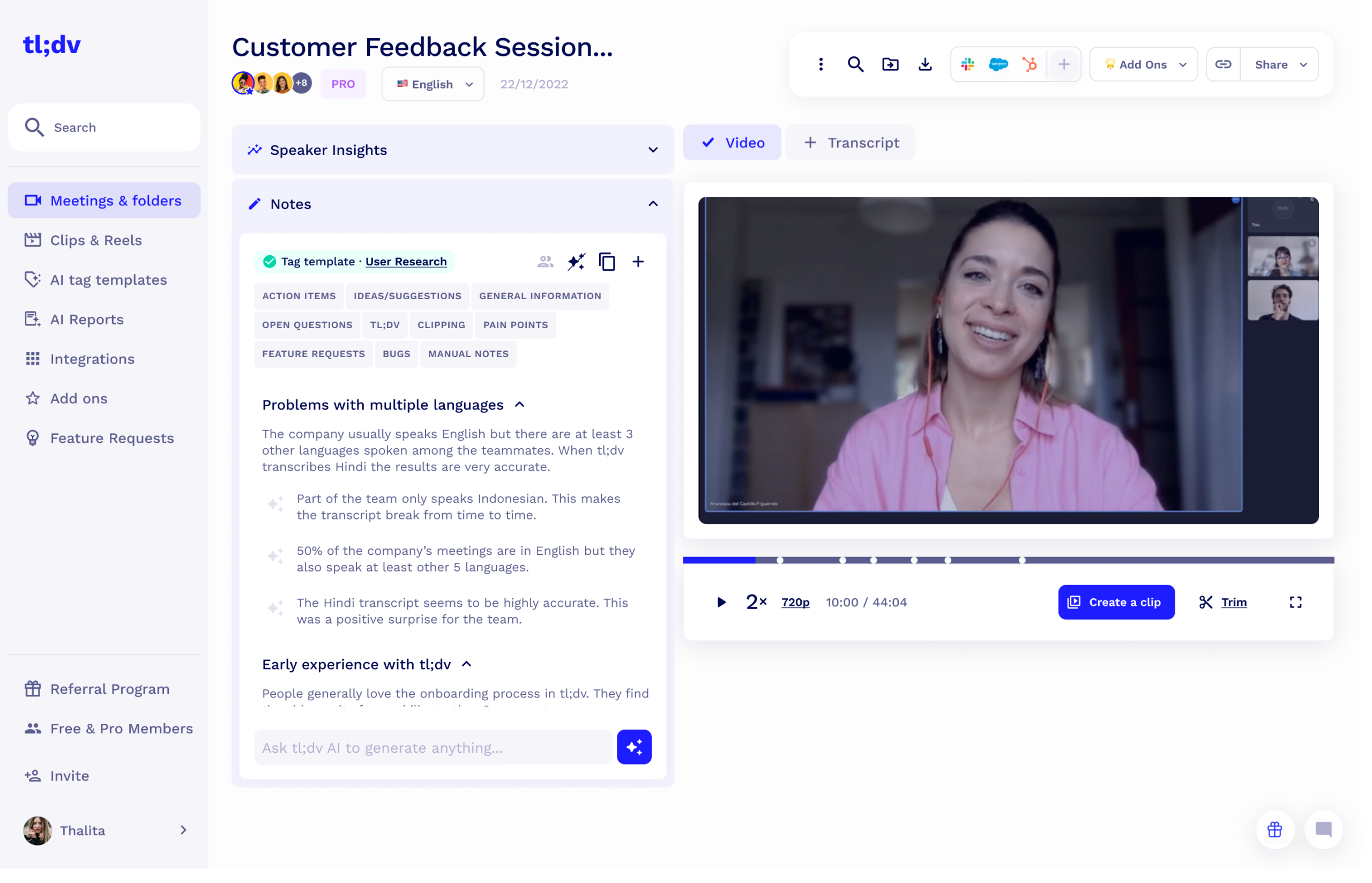
The core workflow is familiar to anyone who has used a meeting recorder before. tl;dv connects to your calendar, joins meetings automatically as a bot, and produces a recording, transcript, and summary in one place. What sets it apart is the depth of the post-meeting tooling: you can clip specific moments, search across all past meetings by topic or speaker, generate custom AI reports across multiple meetings at once, and share timestamped video clips with anyone, internally or externally.
The category is crowded. Fathom has captured a lot of the budget-conscious solo-user market with its generous free plan. Fireflies.ai dominates on sales-team integrations. Otter.ai has the broadest brand recognition. Krisp overlaps on transcription but is primarily a noise-cancellation tool. tl;dv’s distinguishing strength is transcription quality across languages and the depth of its async-video sharing features, which are genuinely better than most competitors.
Pricing
tl;dv uses a tiered subscription model with a free plan and three paid plans. Pricing is per user per month, billed annually unless you choose monthly billing, which is typically more expensive. Prices may have changed since publication, so confirm current rates on the tl;dv pricing page.
| Plan | Price (annual billing) | What you get |
|---|---|---|
| Free | $0 | Unlimited recordings and transcripts, basic AI summaries, 10 AI report credits per month |
| Pro | Around $18 per user per month | Unlimited AI summaries and reports, integrations, custom templates, AI coaching |
| Business | Around $59 per user per month | Everything in Pro plus CRM integrations, advanced analytics, admin controls, priority support |
| Enterprise | Custom | SSO, custom data retention, dedicated support, security review, custom contracts |
The pricing structure has a few things worth understanding. The free plan is unusually generous: unlimited recordings and transcripts with no monthly minute cap, which is rare in this category. Most competitors either cap free-tier minutes (Otter at 300, Fireflies at 800) or cap the number of meetings (Fathom is the other notable exception, also offering unlimited recording on its free plan).
The Pro plan at around $18 is in the middle of the market, but it’s worth noting it sits noticeably higher than Otter Pro and Fireflies Pro, both of which are closer to $10. tl;dv’s argument for the premium is the quality of the AI summaries and the multi-meeting AI reports, both of which are real differentiators. Whether that justifies the price difference depends on how heavily you use those features.
The Business plan at $59 per user per month is genuinely expensive and only makes sense for teams that need the CRM integrations and analytics. For most small teams, Pro is the right tier.
Where tl;dv Stands Out
Multilingual transcription is genuinely best-in-class
tl;dv supports transcription in more than 30 languages, including major European, Asian, and Latin American languages, with accuracy that holds up against any English-only competitor. For teams with members across multiple regions, this matters more than any other feature. Otter is primarily English-first with limited additional language support. Fathom’s multilingual support has improved but is still narrower. If your team runs meetings in Spanish, German, French, Portuguese, Japanese, or any other non-English language, tl;dv is typically the strongest pick on accuracy alone.
The transcription quality on English audio is also consistently strong, particularly with accented speech where Otter often struggles. Users with Indian English, British regional accents, or non-native English speakers in their meetings frequently report meaningfully better transcripts from tl;dv than from older incumbents.
AI summaries that read like a human wrote them
The AI summary quality is one of tl;dv’s strongest features. Rather than producing a generic bulleted list of topics, the summaries tend to be structured around decisions, action items, and unresolved questions, which is closer to what an actual meeting notetaker would produce. The platform also supports custom summary templates, so you can configure different summary formats for sales calls, customer interviews, internal standups, or any other recurring meeting type.
The multi-meeting AI reports are a genuinely differentiated feature. You can ask the AI to surface every mention of a specific topic, customer, or theme across dozens or hundreds of past meetings and get a synthesized report back. For research-heavy roles like customer success, user research, or product management, this kind of cross-meeting analysis is uniquely useful.
Unlimited free recording and transcripts
The free plan is one of the most generous in the category. Unlimited recordings, unlimited transcripts, and basic AI summaries are all included, which makes tl;dv a legitimate long-term option for individual users with light needs rather than just a trial. Combined with the multilingual support, the free plan is one of the easiest entry points into the category for international solo professionals.
Async-video sharing built into the workflow
tl;dv started as an async-video tool, and that DNA shows in the sharing features. You can clip any moment from a meeting, add a title, and share a timestamped video link with anyone, whether they were in the meeting or not, internally or externally. The recipient does not need a tl;dv account to view it. This is faster and more lightweight than the equivalent workflow in most competitors, which require either downloading the clip or sharing the entire meeting recording.
Strong calendar and conferencing integrations
tl;dv integrates cleanly with Google Calendar, Outlook, Zoom, Google Meet, and Microsoft Teams. The bot joins reliably, recordings start on time, and the calendar sync is dependable. This is table stakes in the category, and tl;dv meets the bar without surprises.
Where tl;dv Falls Short
Pro plan pricing is higher than direct competitors
At around $18 per user per month, the Pro plan sits roughly 80 percent higher than Otter Pro or Fireflies Pro. Fathom’s paid plan is also priced lower. tl;dv’s argument is that the AI quality and multi-meeting reports justify the premium, and for many users that is true, but it does mean the pricing comparison is real and worth thinking about. If your needs are mostly basic transcription and summaries, paying more for tl;dv may not be necessary.
CRM integrations are not the depth of Fireflies
tl;dv integrates with Salesforce, HubSpot, and Pipedrive on the Business plan, but the depth and configurability lag Fireflies.ai, which has built much of its product around CRM workflows. For sales teams specifically, where automatic call logging, deal-stage tracking, and structured field extraction matter, Fireflies is usually the better fit. tl;dv is solid for teams that need CRM integration as one of several use cases, but it is not the category leader for sales-team use cases.
Mobile experience is weaker than Otter
tl;dv is primarily a desktop and web product. There is a mobile app, but it is less polished than Otter’s and the in-person recording workflow is not as smooth. If most of your recording is from external meetings on a phone or in-person conversations, Otter or a dedicated voice recorder is generally a better fit.
Brand recognition is lower than incumbents
This is not a product weakness, but it is a practical consideration. When you share a tl;dv recording with a client, partner, or external stakeholder, they may not have heard of the platform. With Zoom, Otter, or Microsoft Teams, name recognition reduces friction. tl;dv has grown quickly, but it is still less universally recognized, which occasionally creates explanation overhead.
Free plan’s AI report credits are limited
The free plan includes only 10 AI report credits per month, which is enough to test the feature but not enough to use it as a regular part of your workflow. Anyone who wants to rely on multi-meeting AI reports will need the Pro plan, which is one of the strongest arguments for upgrading.
How tl;dv Compares
| Feature | tl;dv | Fathom | Fireflies.ai | Otter.ai |
|---|---|---|---|---|
| Free plan | Unlimited transcripts | Unlimited recording | 800 min/month | 300 min/month |
| Paid plan starting price | ~$18/user/mo | ~$15/user/mo | ~$10/user/mo | ~$10/user/mo |
| Language support | 30+ languages | ~25 languages | ~60 languages | English primary |
| CRM integration depth | Solid (Business plan) | Limited | Strongest | Limited |
| Best for | Multilingual teams, async sharing | Heavy users on a budget | Sales teams | Generalists, solo pros |
The honest summary: tl;dv wins on multilingual support, AI summary quality, and async-video sharing. Fathom wins on free-tier value and budget-friendly paid plans. Fireflies wins on sales workflows and CRM depth. Otter wins on brand familiarity and mobile polish. Fireflies technically supports more languages on paper, but tl;dv’s transcription quality across its supported languages is generally considered stronger in side-by-side testing.
Who Should Use tl;dv
tl;dv is the right choice if you fit one of these profiles:
International teams and multilingual workflows. If meetings happen in more than one language, or if you work with clients, partners, or colleagues whose first language isn’t English, tl;dv’s multilingual transcription is the strongest in the category. This is the single clearest reason to choose it.
Research-heavy roles. Customer success teams, user researchers, product managers, and consultants who need to synthesize insights across many meetings benefit from the multi-meeting AI reports. This feature is meaningfully better than what competitors offer.
Distributed teams that share async video. If your team relies on async video sharing rather than live meetings for some communication, the clipping and timestamp-sharing features are first-class rather than bolted on.
Anyone for whom AI summary quality is the top priority. If you’ve been disappointed by generic, list-style AI summaries from other tools, tl;dv’s summaries are generally a step up.
tl;dv is probably not the right fit if you primarily need basic English transcription on a budget (Fathom is cheaper), deep sales-tool integration (Fireflies is stronger), or a polished mobile-first experience (Otter is better). It is also not the right fit if you record almost everything in person on your phone rather than in virtual meetings.
Final Verdict
tl;dv is a genuinely strong product that deserves serious consideration in the meeting-assistant category, particularly for teams that have outgrown the basic English-only feature set of older incumbents. The combination of best-in-class multilingual transcription, AI summary quality that actually feels useful, generous free recording, and a real async-video sharing layer makes it differentiated rather than another lookalike.
The reasons to look elsewhere are specific and limited: Pro pricing is higher than Otter or Fireflies, CRM depth is behind Fireflies, the mobile experience is behind Otter, and brand recognition is still catching up. None of these are deal-breakers for the right user, but they are real considerations.
For multilingual teams, research-heavy roles, and anyone who cares most about transcription and summary quality, tl;dv is one of the top two or three picks in the category in 2026, and often the strongest. For everyone else, one of the alternatives in the comparison table is probably a better fit, but tl;dv is worth at least a free-plan trial before making a final decision.
Frequently Asked Questions
Is tl;dv free to use?
Yes, tl;dv offers a free plan with unlimited recordings, unlimited transcripts, basic AI summaries, and 10 AI report credits per month. It is one of the most generous free plans in the category and is genuinely usable for ongoing light use, not just a trial.
What languages does tl;dv support?
tl;dv supports transcription in more than 30 languages, including major European, Asian, and Latin American languages. The quality across these languages is consistently strong and is one of the platform’s clearest differentiators against English-first competitors.
How does tl;dv compare to Otter.ai?
tl;dv is generally stronger on transcription accuracy, multilingual support, and AI summary quality. Otter has a more polished mobile app, broader brand recognition, and a slightly lower Pro plan price. For multilingual teams or anyone prioritizing summary quality, tl;dv is usually the better pick.
How does tl;dv compare to Fathom?
Fathom is typically cheaper on paid plans and offers unlimited recording on its free tier. tl;dv has stronger multilingual support, more sophisticated multi-meeting AI reports, and better async-video sharing. Fathom is the value pick; tl;dv is the quality and breadth pick.
How does tl;dv compare to Fireflies.ai?
Fireflies has deeper CRM integrations and is generally preferred for sales-team workflows. tl;dv has better multilingual transcription quality, stronger AI summaries, and a more useful async-sharing layer. For sales teams, Fireflies usually wins; for everyone else, tl;dv is often the stronger pick.
Does tl;dv integrate with Zoom, Google Meet, and Microsoft Teams?
Yes, tl;dv integrates with all three major video conferencing platforms. The bot joins meetings automatically through calendar sync, and the integrations are reliable.
Can tl;dv generate AI reports across multiple meetings?
Yes, this is one of tl;dv’s strongest features. You can ask the AI to surface mentions of a topic, theme, or customer across many past meetings at once and get a synthesized report. The free plan includes 10 report credits per month; Pro and above are unlimited.
Can I share tl;dv recordings externally?
Yes, tl;dv was built around async-video sharing. You can clip specific moments, share timestamped links, and recipients do not need a tl;dv account to view the content. This is more lightweight than the equivalent workflow in most competitors.
Is tl;dv a good fit for sales teams?
tl;dv works for sales teams, particularly on the Business plan with its CRM integrations. However, Fireflies.ai is generally considered the stronger sales-specific tool, with deeper Salesforce, HubSpot, and Pipedrive workflows. Sales teams should evaluate both before deciding.
What is the difference between tl;dv Pro and Business?
Pro is around $18 per user per month and includes unlimited AI summaries, reports, integrations, and custom templates. Business is around $59 per user per month and adds deeper CRM integrations, advanced analytics, admin controls, and priority support. For most small teams, Pro is the right tier; Business makes sense mainly when CRM workflows are critical.
Is tl;dv worth paying for in 2026?
For multilingual teams, research-heavy roles, and anyone who values AI summary quality, yes, the Pro plan is reasonable value despite being priced above some competitors. For users with simpler needs, the free plan is unusually generous and may be enough on its own.
Last updated on May 12, 2026