ADVERTISING DISCLOSURE: THIS POST CONTAINS AFFILIATE LINKS. READ FULL DISCLAIMER
The Verdict: Krisp delivers industry-leading noise cancellation (40+ decibel reduction) plus bot-free meeting transcription, all processed locally on your device for maximum privacy. The Pro plan ($96/year or $16/month) unlocks unlimited noise cancellation, transcription, and AI summaries. Worth it if you work in noisy environments or handle sensitive calls where you cannot have a bot joining the meeting. Skip it if you prioritize polished AI summaries over audio quality. Otter and Fireflies produce more structured meeting notes. Krisp’s summaries are functional but basic. The noise cancellation is unmatched. The transcription is accurate. The privacy model (on-device processing, no cloud upload) matters for legal, healthcare, and enterprise teams. For pure note-taking without audio issues, competitors are cheaper and better.
Last updated May 1, 2026.
In This Review
What Krisp Is
Krisp is an AI-powered voice productivity platform that removes background noise in real time and transcribes meetings without bots.
Founded in 2017 in Yerevan, Armenia (now headquartered in Berkeley, California), Krisp started as a noise cancellation tool. It still does that better than anyone. The AI removes barking dogs, construction noise, keyboard typing, crying babies, and ambient chatter while preserving the speaker’s voice with over 40 decibels of noise reduction.
Since 2020 (when TIME Magazine named it one of the Best Inventions in the AI category), Krisp has expanded into a full meeting assistant. It now includes transcription, AI summaries, action item detection, and accent conversion. All audio processing happens locally on your device. No audio data is uploaded to Krisp’s servers for noise cancellation, which matters for privacy-sensitive industries like legal, healthcare, and finance.
How Krisp Works (System-Level Audio Device)
Krisp installs as a virtual audio device on your computer. You select Krisp Microphone as your input and Krisp Speaker as your output in any meeting app (Zoom, Teams, Meet, Slack, Discord, phone calls).
The app sits between your physical microphone and the meeting software, processing audio in real time with sub-20ms latency for basic noise cancellation (200ms for accent conversion). This works with any app that uses audio. No platform-specific plugins. No per-app configuration.
For meeting transcription, Krisp records audio from your system (not via a bot). When you end a meeting, the recording uploads to Krisp’s cloud for transcription and AI summary generation. English transcription can be processed on-device if you enable it. Other languages (16 supported) process server-side.
Bot-Free vs. Bot-Based Meeting Assistants
Krisp does not join your meetings as a participant. It records system audio silently in the background.
Otter, Fireflies, and Fathom send a bot that appears in the participant list with a name like “Otter.ai Notetaker” or “Fireflies.ai.” Everyone in the meeting sees it. Some clients find this intrusive. Some organizations ban bots from legal or healthcare calls for compliance reasons.
Krisp avoids this entirely. The tradeoff: you must manually start/stop recording. Bot-based assistants join automatically when a calendar event starts.
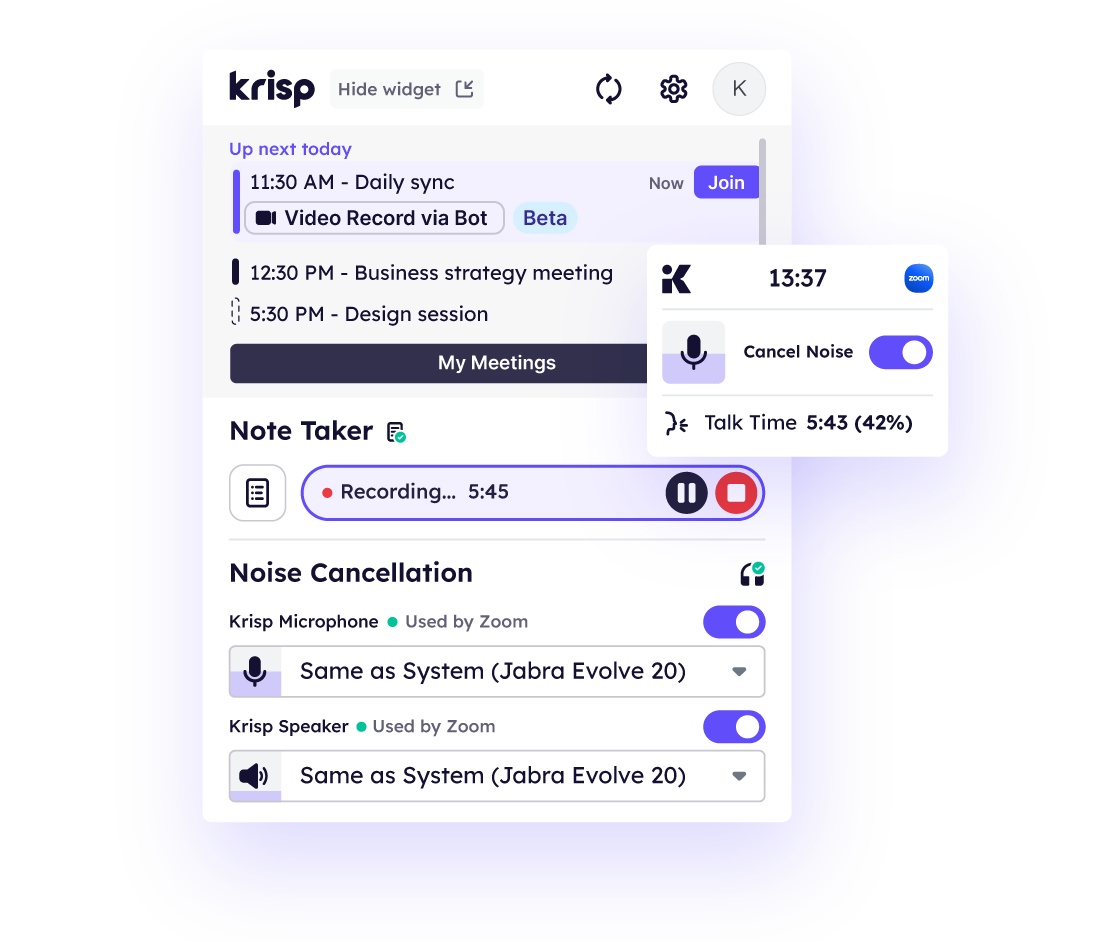
Source: Krisp.ai
Krisp Pricing
Krisp offers a free tier and three paid plans.
| Plan | Price | What’s Included |
|---|---|---|
| Free | $0 | 60 minutes/day noise cancellation, unlimited transcription and recording, 2 AI meeting notes per day, 7-day meeting history |
| Core (Pro) | $16/month (billed monthly) or $96/year (billed annually, effectively $8/month) | Unlimited noise cancellation, unlimited AI meeting notes, integrations (Slack, HubSpot, Notion), mobile app, 5 GB cloud storage |
| Advanced | $30/month (billed monthly) or $180/year (billed annually, effectively $15/month) | Everything in Core, plus accent conversion (4 hours/day speaker-side, unlimited listener-side), Salesforce and ConnectWise integrations, manager view, 30 GB storage |
| Enterprise | Custom pricing (contact sales) | SSO/SCIM, on-device transcription, HIPAA compliance, dedicated account manager, unlimited storage, priority support |
Free Trial
Krisp does not offer a traditional free trial. The Free plan is a permanent tier with daily usage caps (60 minutes noise cancellation, 2 AI notes).
You can test the full feature set by using the Free plan for a week, then upgrade if the daily limits become restrictive. No credit card required for Free.
Annual vs. Monthly Pricing
The annual plan saves 50% on Core ($96/year vs. $192/year for monthly billing). If you know you will use Krisp for more than two months, choose annual.
Advanced plan saves $180/year on annual billing ($180/year vs. $360/year for monthly).
Decision shortcut: If you only need noise cancellation and can live with 60 minutes per day, the Free plan covers most people. If you need unlimited noise cancellation or more than 2 AI meeting summaries per day, Core at $96/year is the breakeven point.
Try Krisp Free (No Credit Card Required)
Key Features
Krisp combines noise cancellation, transcription, AI summaries, and accent conversion. Each feature operates independently.
Bidirectional Noise Cancellation (40+ Decibel Reduction)
This is Krisp’s signature feature and it works exactly as advertised.
The AI removes background noise from both outgoing audio (your mic) and incoming audio (what you hear from others). You can enable one direction or both.
Noise types eliminated: keyboard typing, mouse clicks, barking dogs, crying babies, construction noise, traffic, lawnmowers, HVAC hum, ambient office chatter, and background voices. The system reduces noise by over 40 decibels in real-world tests, effectively silencing everything except human speech.
Latency is sub-20ms for basic noise cancellation, making it imperceptible during live conversations. Accent conversion adds 200ms latency, which is still fast enough for natural-sounding speech.
Hardware Requirements for Best Results
Krisp works best with USB wired headsets with external boom microphones. Bluetooth and 3.5mm connections underperform.
This is a documented limitation. If you use AirPods or a built-in laptop mic, the noise cancellation still functions but the quality drop is noticeable. For call centers or professional use, invest in a wired USB headset (Jabra, Plantronics, Logitech models under $100 work well).
Bot-Free Meeting Transcription (96% Accuracy)
Krisp transcribes meetings by recording system audio, not by joining as a bot participant.
English transcription is processed on-device if you enable it (Enterprise plan or manual toggle in settings). Other languages (Spanish, French, German, Portuguese, Italian, Dutch, Polish, Russian, Japanese, Chinese, Korean, Hindi, and 4 others) process server-side.
Transcription accuracy is rated at 96% for clear audio. Speaker diarization (identifying who said what) works but requires manual name assignment the first time a speaker appears. Once assigned, Krisp remembers participants across meetings.
Transcripts appear 30 to 60 seconds after the meeting ends. You can edit them inline and download as text, PDF, or integrate with Notion, Slack, or HubSpot.
AI Meeting Summaries and Action Items
After each meeting, Krisp auto-generates a summary with bullet points and detected action items.
The summaries are functional but basic. You get a paragraph overview, 3 to 5 bullet points covering key topics, and a list of action items if any were mentioned.
There are no custom templates, no meeting-type-specific formatting (standup vs. client call vs. strategy session), and no insight extraction beyond action items. Granola and Circleback produce more polished, structured summaries. Krisp gives you enough to remember what happened, but not enough to skip reading the transcript.
Accent Conversion (Real-Time Speech Adjustment)
Krisp’s most unusual feature adjusts accents in real time during calls.
Two modes:
- Speaker-side: Your voice is adjusted so listeners hear a more neutral accent. Currently supports Latin American English, Indian English, and Filipino English speakers converting to General American English.
- Listener-side: Incoming audio from other participants is adjusted for easier comprehension. This mode is unlimited on all paid plans.
The technology is impressive but the output can sound slightly robotic. It works better for call centers handling high-volume customer support than for intimate 1-on-1 executive calls. TTEC (a major BPO) reported a 54% reduction in language-barrier complaints after deploying Krisp’s accent conversion across their agents.
Ethical consideration: Accent conversion raises questions about workplace bias. A 2024 study in Applied Linguistics highlighted that accent-altering technology can implicitly signal that some accents are “less acceptable.” Use this feature thoughtfully.
Mobile App (Transcription Only)
Krisp’s iOS and Android apps support transcription and recording but do not support real-time noise cancellation during calls.
You can record in-person meetings or phone calls on mobile, then review transcripts and summaries later. The noise cancellation feature requires the desktop app (Windows, Mac, or Linux).
Where Krisp Stands Out
Noise Cancellation Is Unmatched
No other meeting assistant removes background noise this effectively. Otter, Fireflies, Fathom, and Granola do not offer noise cancellation at all. They assume your audio is clean.
If you take calls from coffee shops, airports, co-working spaces, or home offices with kids/pets/construction, Krisp solves a problem competitors ignore. The 40+ decibel reduction is not marketing. Independent tests confirm it.
The bidirectional feature (cleaning incoming audio from other participants) is particularly useful when your coworkers do not use Krisp. You hear them clearly even if they are calling from noisy environments.
Privacy Model Is Superior
All noise cancellation processing happens on-device. Your audio never leaves your computer for that feature. Transcription uploads to Krisp’s cloud, but you can enable on-device transcription (Enterprise plan or manual setting).
Krisp is SOC 2 Type 2, GDPR, HIPAA, and PCI-DSS compliant. Audio is deleted after processing unless you explicitly save it. For legal firms, healthcare providers, or enterprise teams handling sensitive client conversations, this privacy architecture matters.
Otter and Fireflies store all recordings in the cloud by default. Krisp gives you the option to keep everything local.
Works with Every App (System-Level Integration)
Because Krisp operates as a virtual audio device, it works with any application that uses audio. Zoom, Teams, Meet, Slack, Discord, WebEx, BlueJeans, phone calls, custom VoIP apps, and even in-person recording.
You do not need platform-specific integrations or Chrome extensions. Set it once in your system audio settings, and every app benefits. Competitors like Tactiq (Chrome extension only) or Fathom (Zoom-focused) cannot match this flexibility.
Linux Support
Krisp runs on Windows, Mac, and Linux. This is rare. Most meeting assistants are Windows/Mac only.
For developer-heavy teams or engineering departments running Linux workstations, Krisp is one of the few options that works natively.
Free Tier Is Genuinely Useful
60 minutes per day of noise cancellation covers most people’s daily meeting load. The Free plan is not a trial. It is a permanent tier with usage caps.
Unlimited transcription and recording (with 2 AI summaries per day) means you can test the full product for weeks without paying. If the daily limits work for you, you never upgrade. If they do not, you have enough data to decide whether Core is worth $96/year.
Where Krisp Falls Short
AI Summaries Are Basic
This is the most common complaint from users comparing Krisp to Granola, Circleback, or Otter.
Krisp generates a paragraph summary and a bullet list. That is it. No custom templates. No meeting-type-specific formatting. No insight extraction beyond action items. The structure is generic regardless of whether you just held a standup, a client pitch, or a strategy session.
Granola and Circleback produce summaries that feel like a human assistant wrote them. Krisp’s summaries feel like a bullet-point bot processed them. They are accurate but not polished.
No Workflow Automation
Krisp can push meeting notes to Slack, Notion, or HubSpot. That is the extent of its automation.
Circleback extracts custom insights, routes them to specific team members, and triggers workflows based on meeting content. Fireflies has AskFred (query transcripts across meetings) and custom topic tracking. Krisp has none of this. You get transcripts, summaries, and basic integrations. If you need deeper automation, look elsewhere.
Accent Conversion Sounds Unnatural
The technology works, but the output often sounds robotic. For call centers handling hundreds of calls per day, this is acceptable. For 1-on-1 executive calls or client-facing sales conversations, it can feel awkward.
Some users report that accent conversion creates an “uncanny valley” effect where the voice is understandable but noticeably artificial. Test this feature before relying on it for high-stakes calls.
Mobile App Lacks Noise Cancellation
The iOS and Android apps only support transcription. Real-time noise cancellation requires the desktop app.
If you take calls on your phone while traveling, Krisp cannot help you with audio quality. This is a surprising gap given that mobile calling is common for remote workers.
Requires USB Headset for Best Results
Bluetooth and 3.5mm headsets underperform. You need a wired USB headset with a boom microphone to get the advertised 40+ decibel noise reduction.
This is documented in Krisp’s own support materials, but many users discover it after buying a subscription and wondering why the noise cancellation is not as effective as advertised. The hardware requirement is a dealbreaker for people who prefer wireless headphones.
Customer Support Is Mixed
G2 reviews praise Krisp (4.6/5 from 1,100+ reviews). Trustpilot reviews are harsher, with complaints about slow response times and unresolved subscription issues.
Support is email-only (support@krisp.ai). No live chat. No phone support. Response times range from same-day to 72 hours based on user reports. For billing or technical issues that block work, this can be frustrating.
What Real Users Say
Krisp does not have a Capterra profile. User reviews are concentrated on G2, Gartner Peer Insights, Product Hunt, Trustpilot, and Reddit.
Common praise: The noise cancellation is consistently called “magic” or “life-changing” by users in noisy environments. People love the bot-free recording, especially in client-facing roles where bot notifications feel unprofessional. The free tier is cited as genuinely useful, not a gimmick. Privacy-conscious users (legal, healthcare, finance) appreciate the on-device processing model. The system-level integration works seamlessly across all apps without configuration.
Common complaints: AI summaries are too basic compared to Granola or Circleback. Accent conversion sounds robotic and unnatural in 1-on-1 calls. Mobile app lacks noise cancellation, which is frustrating for phone-based workers. USB headset requirement is not prominently disclosed upfront. Customer support is slow, especially for billing issues. Transcription occasionally fails to process, showing “being processed” indefinitely with no error message.
G2 and Gartner Ratings
G2: 4.6 out of 5 stars (1,100+ reviews as of early 2026). Users praise ease of use, noise cancellation effectiveness, and privacy features. Criticism focuses on basic AI summaries and occasional transcription processing failures.
Gartner Peer Insights: Highly rated by long-time users (5+ years), with consistent mentions of noise cancellation quality and stability. Some users note the UI feels dated and clunky.
Who Should Use Krisp
Krisp makes sense for:
- Remote workers in noisy environments (co-working spaces, coffee shops, homes with kids/pets/construction). The noise cancellation solves a real problem competitors ignore.
- Legal, healthcare, and finance professionals who cannot have bots joining client calls for compliance or privacy reasons. The bot-free recording + on-device processing model is critical.
- Call center teams and customer support agents who need accent conversion to reduce language-barrier complaints. TTEC’s 54% reduction in complaints is a real use case.
- Linux users who need a meeting assistant that runs natively on their OS. Krisp is one of the few options.
- Teams that use multiple meeting platforms (Zoom, Teams, Meet, Slack, custom VoIP). The system-level integration works everywhere without per-app setup.
- Privacy-conscious individuals who want transcription without uploading audio to the cloud (Enterprise plan with on-device transcription enabled).
Who Should Not Use Krisp
Skip Krisp if:
- You prioritize polished AI summaries over audio quality. Granola and Circleback produce better meeting notes. Krisp’s summaries are functional but basic.
- You need workflow automation or custom insight extraction. Fireflies and Circleback offer this. Krisp does not.
- You take most calls on mobile. The iOS/Android apps lack noise cancellation. Desktop-only limitation is a dealbreaker for phone-heavy workers.
- You refuse to use wired headsets. Bluetooth and 3.5mm connections underperform. If you are committed to AirPods, Krisp will not deliver the advertised noise reduction.
- You want automatic bot-based recording. Krisp requires manual start/stop for each meeting. Otter and Fireflies join automatically via calendar integration.
- You need multilingual transcription with high accuracy across 50+ languages. Krisp supports 16 languages. Fireflies supports 100+.
Krisp vs. Alternatives
| Platform | Best For | Starting Price | Key Difference |
|---|---|---|---|
| Krisp | Noisy environments, privacy-sensitive calls, bot-free recording | $96/year or $16/month (Free tier: 60 min/day noise cancellation) | 40+ dB noise cancellation, on-device processing, bot-free transcription, works with all apps at system level |
| Fireflies.ai | Teams needing deep CRM integrations and workflow automation | Free tier available, Pro at $10/month | Supports 100+ languages, AskFred AI chat to query transcripts, custom topic tracking, strong Salesforce/HubSpot integrations |
| Otter.ai | Real-time collaboration and live note-taking during meetings | Free tier available, Pro at $8.33/month (annual) | Live transcription with collaborative editing, OtterPilot for automated meeting summaries, strong Zoom/Teams integration |
| Granola | Professionals who want the most polished AI meeting notes | Free for 25 meetings, paid plans start at $10/month | Human-in-the-loop approach, highly polished summaries, custom templates, no noise cancellation |
| Fathom | Unlimited free recording for Zoom-centric teams | Free (unlimited), paid plans for advanced features | Unlimited free recording, Zoom-optimized, joins as a visible bot, no noise cancellation |
| tl;dv | Teams wanting timestamped video highlights and clip sharing | Free (unlimited), $25/user/month (Pro) | Stronger video clip sharing; better for async teams; no noise cancellation |
Quick Pick Guide
- If you work in noisy environments or need bot-free recording: Krisp. The noise cancellation and privacy model are unmatched.
- If you need polished AI summaries and custom templates: Granola or Circleback. Krisp’s summaries are too basic.
- If you need deep CRM integrations and workflow automation: Fireflies. The AskFred feature and custom topic tracking go far beyond Krisp’s capabilities.
- If you want real-time collaborative note-taking during meetings: Otter. The live transcription with shared editing is built for this.
- If you are budget-conscious and Zoom-only: Fathom. Unlimited free recording beats Krisp’s 60 min/day cap.
Popular Integrations
Krisp integrates with productivity tools to push meeting notes and summaries automatically.
- Slack: Auto-post meeting summaries to specific channels or DM yourself transcripts.
- Notion: Send transcripts and summaries to specific Notion pages or databases.
- HubSpot: Sync meeting notes to contact records or deals (Core plan and above).
- Salesforce: Push meeting data to Salesforce CRM records (Advanced plan only).
- ConnectWise: Sync notes to service tickets (Advanced plan only).
- Zapier: Connect Krisp to 5,000+ apps via custom Zaps (transcripts, summaries, action items can trigger workflows).
These are push-only integrations. Krisp sends data to these platforms but does not pull data back or enable two-way sync. For example, you cannot query Krisp from HubSpot. You can only push meeting notes into HubSpot.
Frequently Asked Questions
Does Krisp offer a free trial?
No traditional free trial, but the Free plan is permanent. You get 60 minutes per day of noise cancellation, unlimited transcription, and 2 AI meeting summaries per day. No credit card required.
Test the full product for weeks. If the daily limits work for you, stay on Free forever. If not, upgrade to Core ($96/year).
How much does Krisp cost for a 20-person team?
Krisp pricing is per-user. For 20 users on the Core plan:
- Annual: $96/user/year x 20 = $1,920/year ($160/month if paid annually)
- Monthly: $16/user/month x 20 = $320/month ($3,840/year)
No team discounts are publicly listed. Contact sales for Enterprise pricing if you need 50+ seats, SSO, or HIPAA compliance.
Is Krisp worth it, or should I use Fireflies?
Use Krisp if you need noise cancellation, bot-free recording, or on-device privacy. Use Fireflies if you need deep CRM integrations, 100+ language support, and workflow automation.
Fireflies has better AI summaries, more integrations, and stronger automation. Krisp has better audio quality, better privacy, and works with all apps at the system level (not just Zoom/Teams/Meet).
Most teams that need both features run Krisp for noise cancellation and Fireflies for transcription. You can layer them.
Can Krisp replace my noise-canceling headphones?
No. Krisp removes noise from your microphone input and speaker output in software. It does not replace physical noise isolation for your own ears.
Noise-canceling headphones (Sony, Bose) block environmental noise so you can focus. Krisp removes noise so other people on the call do not hear your background distractions. They solve different problems.
How long does Krisp take to implement?
Implementation is instant. Download the desktop app (Windows, Mac, or Linux), install it, and select Krisp Microphone/Speaker as your audio devices in system settings. Takes 2 minutes.
The first time you join a meeting, you manually start recording in the Krisp app. After that, it runs in the background and processes noise automatically.
Does Krisp integrate with Zoom, Teams, and Google Meet?
Yes, but not via platform-specific plugins. Krisp works at the system audio level, so it integrates with any app that uses audio. Zoom, Teams, Meet, Slack, Discord, WebEx, BlueJeans, phone calls, and custom VoIP apps all work identically.
You do not configure Krisp per-platform. You set it once in your OS audio settings, and every app benefits.
Is Krisp HIPAA compliant?
Yes, but only on the Enterprise plan. HIPAA compliance requires a Business Associate Agreement (BAA), which Krisp provides to Enterprise customers.
Free, Core, and Advanced plans do not include HIPAA compliance. If you handle protected health information (PHI), you need Enterprise. Contact sales for pricing.
Does Krisp offer discounts for nonprofits or education?
Not publicly. Krisp does not advertise nonprofit or education discounts on their pricing page.
The Free plan is the best option for budget-conscious users. 60 minutes per day of noise cancellation covers most classroom or nonprofit meeting scenarios.
What is Krisp’s cancellation policy?
Monthly plans cancel at the end of the billing cycle. Annual plans do not offer prorated refunds for early cancellation (standard SaaS practice).
You can downgrade from Core to Free at any time. Your paid features remain active until the subscription expires, then you revert to Free tier limits.
Can Krisp transcribe phone calls (not just video meetings)?
Yes. Krisp records system audio, not meeting platform audio. If you route a phone call through your computer (Zoom Phone, Google Voice, Skype, WhatsApp Desktop, any VoIP app), Krisp can transcribe it.
Traditional mobile phone calls (cellular network) require using the Krisp mobile app, which supports recording and transcription but not noise cancellation.
Does Krisp work offline?
Noise cancellation works offline because it processes audio on-device. Transcription and AI summaries require an internet connection to upload recordings to Krisp’s cloud (unless you enable on-device transcription on the Enterprise plan).
If your internet drops mid-meeting, noise cancellation continues. Transcription uploads when connectivity resumes.
Is Krisp right for call centers?
Yes. Krisp offers a dedicated Call Center plan (minimum 40 seats) with accent conversion, voice translation (80+ languages), AI Agent Assist, and call scoring. Pricing is custom.
TTEC and other major BPOs use Krisp for noise cancellation and accent conversion at scale. The 54% reduction in language-barrier complaints is a documented case study.
Final Verdict
Krisp solves two problems better than anyone: background noise and privacy-sensitive recording.
The 40+ decibel noise cancellation is not marketing. It works. If you take calls from noisy environments, this feature alone justifies the $96/year Core plan. The bot-free recording matters for legal, healthcare, and enterprise teams where compliance or client perception prohibits visible meeting bots.
The on-device processing model (noise cancellation never uploads audio, transcription can be kept local on Enterprise) gives Krisp a privacy advantage over Otter and Fireflies. For teams handling sensitive conversations, this architecture is critical.
The tradeoffs are real. AI summaries are basic. No workflow automation. Mobile app lacks noise cancellation. Accent conversion sounds robotic. If you prioritize polished meeting notes over audio quality, Granola or Circleback are better tools.
Krisp is the best meeting assistant for noisy environments and privacy-conscious teams. It is not the best all-around meeting assistant. Fireflies has deeper integrations. Otter has better collaboration. Fathom is cheaper for Zoom-only use. But if audio quality or bot-free recording are non-negotiable requirements, Krisp is the only option that delivers.
Last updated on May 12, 2026