ADVERTISING DISCLOSURE: THIS POST CONTAINS AFFILIATE LINKS. READ FULL DISCLAIMER
Last updated: May 2026
Quick verdict: My AI Front Desk is a solid fit for solo real estate agents and small teams who lose deals to missed calls. At $79 per month billed annually, it answers the phone 24/7, qualifies leads, books showings, and pushes data into your CRM through Zapier. It is not a CRM replacement, and it does not handle the nuanced negotiation calls. Use it as the gatekeeper that catches every after-hours sign call so your real conversations happen with warm, qualified leads.
What is My AI Front Desk?
My AI Front Desk is an AI-powered virtual receptionist that answers your business phone, handles inbound texts, and books appointments around the clock. The product launched as one of the earliest AI voice receptionists on the market, and the company has since expanded into a broader platform that bundles voice, SMS, web chatbot, a lightweight CRM, and outbound automations under a single subscription.
For real estate agents, the pitch is straightforward. Sign calls come in at all hours. Buyers drive past a listing on a Sunday evening and call the number on the rider. If you are showing a property, sitting at a closing, or simply off the clock, that lead either goes to voicemail or to the next agent who picks up. My AI Front Desk is designed to be the agent who always picks up.
Who My AI Front Desk is built for
This is not enterprise brokerage software. The pricing tiers and feature limits make it clear who the target customer is.
The Business-in-a-Box plan, which is the plan most solo agents and small teams will land on, is capped at roughly 10 interactions per day. That includes 200 voice minutes per month, 400 SMS messages, 100 chatbot conversations, and 300 form submissions. For a solo agent or a two-person team, that is generally enough headroom. For a brokerage handling hundreds of inbound calls per day, you would need to talk to sales about the Partner / Enterprise tier.
The product fits best for:
- Solo agents who lose evening and weekend sign calls because they cannot pick up while showing or driving.
- Small teams of two to five agents who share a single business line and need consistent call coverage without hiring a virtual receptionist service.
- Listing-heavy agents who get high call volume on individual properties and want to qualify leads before routing them to the listing agent.
It is a weaker fit for agents whose business is mostly referral-based and inbound calls are rare. If you take three calls a week and you know all of them, paying $79 per month for an AI receptionist is overkill.
How My AI Front Desk handles real estate calls
The setup is built around a knowledge base. You feed the AI information about your business, your listings, your service areas, and your typical call flow. The Business plan includes 20 knowledge base pages, which is enough to load in your bio, your active listings, your buyer intake questions, and your standard FAQ responses about commission structure, showing availability, and offer process.
When a call comes in, the AI:
- Answers in a natural-sounding voice, generally within the first ring.
- Identifies whether the caller is a buyer, seller, or general inquiry.
- Captures contact info, qualifying questions, and timeline.
- Books a showing or callback directly into your calendar through Zapier or the built-in AI Calendar.
- Sends you an SMS or email notification with the lead summary while the caller is still on the line.
- Transfers the call to you in real time if the caller meets criteria you have set, like a pre-approved buyer asking about a specific listing.
The transfer logic is the part that matters most for agents. You do not want every call going to the AI. You want the high-intent calls coming straight to your phone, and the after-hours sign calls captured cleanly so you can follow up the next morning. My AI Front Desk lets you set those rules in the dashboard rather than having to write code.
Pricing breakdown
My AI Front Desk runs on a three-tier structure. Pricing reflects what is published on the vendor site as of this update and may change.
| Plan | Price | Best for |
|---|---|---|
| Free | $0/mo | Testing the platform with limited usage. 20 voice minutes, 40 SMS, 10 chats per month. |
| Business-in-a-Box | $99/mo monthly, or $79/mo billed annually | Solo agents and small teams. 200 voice minutes, 400 SMS, 100 chats, full Zapier and CRM features. |
| Partner / Enterprise | Custom | Brokerages with 25+ daily interactions. Volume pricing, API access, dedicated account manager. |
The Business plan also includes 1,000 overage credits per month, which automatically cover usage above your included limits. If you blow through credits, the system auto-reloads at $10 per 1,000 credits. For context, voice minutes burn 25 credits each, so an extra 1,000 credits buys you roughly 40 additional minutes of call time. For most solo agents, the included usage will cover normal months and the overage pool absorbs busy weeks.
The annual billing requirement is the friction point. The $79 rate only applies if you commit to a full year upfront. Month-to-month billing is $99. If you are unsure whether AI call handling fits your workflow, the free tier gives you enough usage to test on a few real calls before committing.
What works well for real estate agents
Setup is genuinely fast. Most agents can get a basic configuration live in under an hour. You forward your business line to the AI number, paste in your bio and active listings, and set your call routing rules. The AI is functional from there, and you refine it based on the first batch of real calls.
Zapier integration is solid. You can route qualified leads directly into Follow Up Boss, kvCORE, Lofty, or whatever CRM you use. This is the difference between a useful AI receptionist and a glorified voicemail. Lead data lands in your pipeline automatically with the qualifying notes attached.
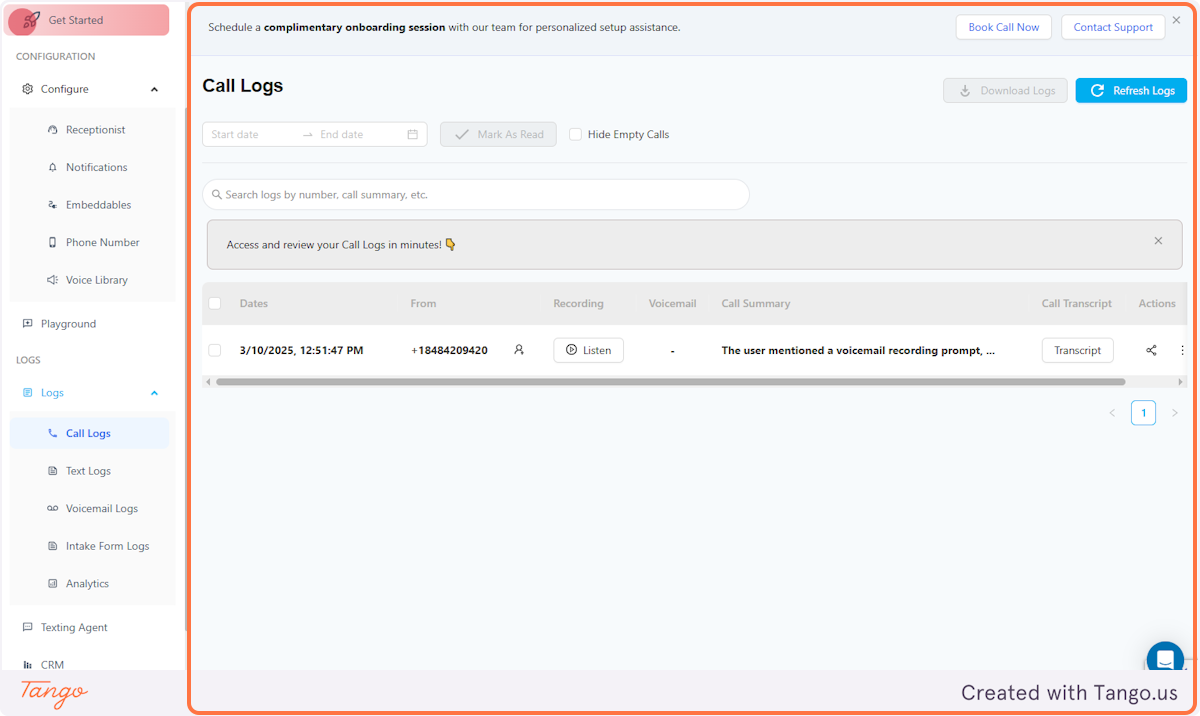
The unified inbox helps. Calls, SMS conversations, and chatbot interactions live in one dashboard. For an agent juggling multiple listings and clients, having one place to see every inbound interaction is more useful than it sounds on paper.
The pricing is honest for what it does. At $79 per month, this is one missed sign call away from paying for itself. A single buyer lead converted on a $400,000 home generates a commission that covers the subscription for years.
Where it falls short
Voice customization is limited. The AI sounds natural for routine flows, but you cannot fine-tune tone, pacing, or pronunciation in any meaningful way. For agents whose brand is built on a particular communication style, the generic voice may feel off-brand.
It is not built for complex conversations. The AI handles intake, qualification, and scheduling. It does not handle objection-heavy calls, contract questions, or anything requiring judgment. Your job is to set the routing rules so those calls reach you, not the AI.
No native MLS integration. The AI knows what you tell it about your listings. If you have ten active listings and they update frequently, you are responsible for keeping the knowledge base current, or you build a Zapier flow to pull from your CRM. There is no automatic feed from your local MLS.
Annual lock-in for the best rate. The 20% annual discount is meaningful, but committing to twelve months of any tool you have not used is a real ask. Test the free tier first.
Compliance is basic. Data is encrypted in transit and at rest, but the platform does not advertise SOC 2 or other formal certifications. For most residential agents this is a non-issue. Agents handling high-value commercial transactions or relocation work for regulated clients may want to ask sales about their compliance posture.
How My AI Front Desk compares to the alternatives
The two real comparisons for solo agents are a traditional virtual receptionist service and the do-nothing option, which is voicemail.
A live virtual receptionist service typically runs $95 to $300 per month for limited call volume, with per-minute overage charges and setup fees. The quality varies, and the receptionist generally does not have your CRM context or your listing details. My AI Front Desk costs less and has more context, but it is not a human and it cannot handle a call that goes off-script.
Voicemail is free. It also converts at roughly zero. Most callers do not leave messages, and the ones who do are often the least serious leads. If you are running a real business, voicemail is a leak you should plug.
Inside the AI receptionist category, alternatives like Synthflow and Dialzara compete on different angles. Synthflow leans technical and offers more customization for teams willing to build out workflows. Dialzara competes on price and month-to-month flexibility. My AI Front Desk sits in the middle, with the most complete out-of-the-box product for non-technical users who want to set it and forget it.
Should you use My AI Front Desk?
Use it if you are a solo agent or small team losing leads to missed calls. The math works out fast. One captured buyer lead per year covers the subscription many times over, and the time you save not chasing voicemail callbacks is real.
Skip it if your business is mostly referral, your inbound call volume is low, or you genuinely prefer to handle every call personally. The tool only earns its place when you have call volume it can absorb.
Test the free tier before committing to annual billing. Run it for two weeks against your real call volume, listen to the recordings, and judge whether the AI is catching enough of the right calls. If yes, the annual plan pays back quickly. If no, you have lost nothing.
Frequently asked questions
Does My AI Front Desk integrate with real estate CRMs like Follow Up Boss or kvCORE?
Yes, through Zapier. The platform does not have a native real estate CRM integration, but the Zapier connection covers most of the major real estate CRMs and lets you push lead data directly into your pipeline.
Can I keep my existing business phone number?
Yes. You forward your existing business line to the AI receptionist. Callers continue to call the number on your business cards and signage.
How long does setup take?
Most users have a working configuration live within an hour. Refining the knowledge base and call routing rules takes another few hours over the first week as you listen to real calls.
What happens if the AI cannot answer a question?
You configure fallback behavior. The AI can transfer the call to you, take a message and notify you by SMS, or schedule a callback at a time the caller selects.
Is there a free trial?
Yes. The free tier gives you 20 voice minutes, 40 SMS messages, and 10 chatbot conversations per month with no credit card required. It is enough to test the AI against a few real calls before paying.
Does the AI handle Spanish or other languages?
Multi-language support is available, though feature parity may vary by language. If you serve a bilingual market, confirm with sales that your specific language pair is fully supported.Last updated on May 8, 2026