ADVERTISING DISCLOSURE: THIS POST CONTAINS AFFILIATE LINKS. READ FULL DISCLAIMER
Last updated: May 2026
Quick verdict: ClickUp is one of the most feature-dense work management platforms on the market, bundling tasks, docs, chat, whiteboards, and AI into a single workspace. For solo professionals and small firms that want to consolidate tools, the value is real. For teams that want something simple and fast, the depth becomes the problem. ClickUp Brain, the AI layer, is sold as a paid add-on, which means the headline price is not the real price.
What ClickUp Is
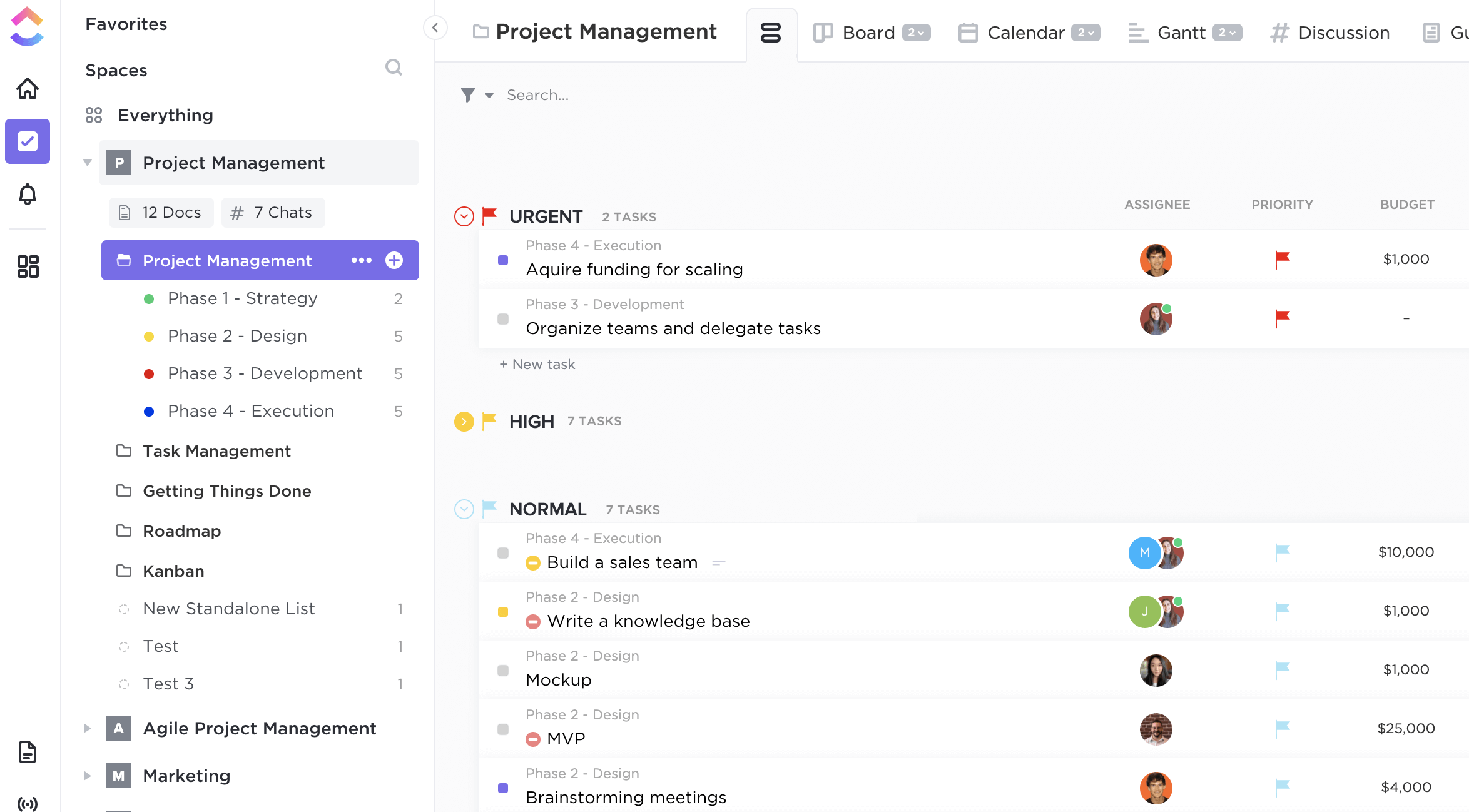
ClickUp is a cloud-based work management platform that combines project management, document collaboration, chat, whiteboards, time tracking, and AI into one workspace. The company positions it as an all-in-one alternative to running separate tools for tasks, docs, and team communication.
The platform is used across industries, but its strongest fit is small to mid-sized teams that are tired of paying for and switching between four or five different SaaS products. The core promise is consolidation: if you can replace Asana plus Notion plus Slack plus a time tracker with one subscription, the math often works in ClickUp’s favor.
The trade-off is complexity. ClickUp has more views, more custom fields, more automation paths, and more configuration than most teams will ever use. Out of the box it can feel overwhelming. Users who invest the setup time tend to like it. Users who do not tend to bounce after a few weeks.
ClickUp Pricing
ClickUp offers four published tiers, plus a separate AI add-on. Prices reflect annual billing and can change.
| Plan | Price | Best for |
|---|---|---|
| Free Forever | $0 | Solo users testing the platform |
| Unlimited | $7 per user/month | Small teams needing unlimited storage and integrations |
| Business | $12 per user/month | Mid-sized teams with advanced automation and reporting needs |
| Enterprise | Custom | Larger organizations needing SSO, advanced permissions, and dedicated support |
| ClickUp Brain (add-on) | ~$7-9 per user/month | Teams that want AI summaries, generation, and the AI Notetaker |
The pricing detail that catches buyers off guard: ClickUp Brain is not included in any of the base plans. A team on Unlimited that wants AI features is effectively paying roughly $14-16 per user per month, not $7. For a 10-person team, that is a meaningful jump in monthly cost that does not appear on the headline pricing page.
Monthly billing is significantly more expensive than annual. Unlimited jumps from $7 to $10 per user, and Business goes from $12 to $19. Most firms commit annually to get the published price.
Where ClickUp Stands Out
The free plan is genuinely usable
Most “free” project management plans cap users at 3-5 or strip out features so aggressively that they only work as demos. ClickUp’s free plan has no user limit and includes unlimited tasks, custom views, basic automations, and document collaboration. Storage is capped at 100MB, which is the main constraint. For a solo professional or a two-person partnership testing whether ClickUp fits their workflow, the free plan is enough to make a real decision without committing budget.
Customization depth is best-in-class
ClickUp supports custom fields, custom statuses, custom task types, and custom automations at granularity that competing tools either restrict to higher tiers or do not offer at all. A real estate team can build pipelines that mirror their listing process. A legal team using Clio for matter management can build adjacent ClickUp spaces for internal project tracking, marketing campaigns, or operations work that Clio is not designed to handle. The flexibility is the reason teams that stick with ClickUp tend to stay.
AI Notetaker is a credible meeting tool
The ClickUp Brain AI Notetaker joins Zoom, Google Meet, and Microsoft Teams calls, transcribes them, and automatically turns action items into tasks inside the workspace. For teams already using ClickUp for project management, this is a meaningful workflow advantage over standalone tools like Fathom, Fireflies.ai, or Otter.ai, where action items still need to be manually moved into a separate task system. The AI Notetaker requires the ClickUp Brain add-on, which is the real cost to weigh.
One subscription, many tools
The consolidation argument is strongest for small firms that are juggling separate paid subscriptions for tasks, docs, time tracking, and chat. ClickUp covers all of these natively. Whether the consolidation actually saves money depends on which tools get retired and whether the team adopts the replacements fully, but the potential is real and quantifiable on a spreadsheet.
Where ClickUp Falls Short
The learning curve is steep
The same flexibility that makes ClickUp powerful makes it intimidating. New users routinely report feeling lost in the first week. Spaces, folders, lists, tasks, subtasks, views, and statuses all need to be configured before the platform feels productive. Teams without someone willing to own the setup often abandon ClickUp before they see the payoff. Competing tools like Trello or Asana feel more usable on day one, even if they offer less long-term ceiling.
Performance can lag on large workspaces
Users with hundreds of tasks, complex dashboards, or heavy whiteboard use report slowness and occasional dashboard load failures. ClickUp has improved performance significantly over the past two years, but it is still not as snappy as lighter tools. Teams that prioritize speed over feature depth may find this frustrating.
The AI is a paid add-on, not a base feature
This is the single biggest pricing gotcha. Buyers who compare ClickUp’s $7 Unlimited tier to competitors that bundle AI in their base price are not comparing equivalent products. The real cost of ClickUp with AI is closer to $14-16 per user per month. The marketing materials emphasize AI heavily, which can mislead buyers into assuming it is included.
The mobile app trails the web experience
The desktop and browser versions of ClickUp are far more capable than the mobile app. Mobile is fine for quick check-ins, status updates, and reading notifications, but heavy work, view configuration, and dashboard analysis still need a real screen. For professionals who genuinely need to work from their phone, this is a meaningful limitation.
Customer support is uneven by plan
Free and Unlimited users rely largely on chat and a help center. Faster, more responsive support is gated behind Business and Enterprise tiers. Smaller firms running on Unlimited can find this frustrating when something breaks and the response cycle stretches to a day or more.
How ClickUp Compares
The work management category is crowded. ClickUp’s main rivals are Asana, Monday.com, Notion, Trello, and Wrike, each with a different center of gravity.
Against Asana: ClickUp wins on flexibility and price. Asana wins on polish and onboarding ease. Asana is the safer pick for a team that wants something to “just work” without configuration. ClickUp is the better pick for a team willing to invest in setup to get exactly what they want.
Against Monday.com: Monday is visually cleaner and arguably easier for non-technical users, but it costs more per seat and offers less depth at every tier. ClickUp’s Unlimited plan ($7) materially undercuts Monday’s equivalent tier ($9+).
Against Notion: Notion is a docs-first tool that grew into project management. ClickUp is a project-management-first tool that grew into docs. For teams that primarily need a knowledge base with light project tracking, Notion fits better. For teams that need real task management with secondary docs, ClickUp fits better.
Against Trello: Trello is a Kanban board. ClickUp is a platform that includes Kanban among many other views. Trello wins on simplicity and time-to-first-use. ClickUp wins on everything else, assuming the team needs more than a board.
Who Should Use ClickUp
ClickUp is the right call for small to mid-sized teams that want to consolidate multiple tools, are willing to invest setup time upfront, and have someone on the team who enjoys configuring software. Solo professionals can also benefit, particularly on the free plan, if they have a workflow that involves real task management rather than simple to-do lists.
Real estate professionals managing listings, marketing campaigns, and client follow-up across multiple deals at once can use ClickUp to build pipelines that genuinely reduce admin overhead. Small law firms that use a practice management system like Clio, MyCase, or PracticePanther for matters can use ClickUp for the operations work those tools do not handle, such as marketing, internal training, hiring, and content production. Accounting firms running on QuickBooks or Xero can use ClickUp for client onboarding workflows and internal projects that sit outside the books.
It is less ideal for teams that want a simple, fast tool with minimal configuration, teams that do most of their work on mobile, or teams without a clear person to own the setup. For those scenarios, a simpler tool tends to produce better adoption even if it offers less raw capability.
Final Verdict
ClickUp earns its place as one of the most flexible work management platforms available. The free plan is unusually generous, the customization is genuinely best-in-class, and the consolidation argument can save real money for teams running too many tools. The catch is that ClickUp Brain, the AI layer everyone talks about, is a separate paid add-on that effectively doubles the per-seat cost. Buyers should price the version they actually want, not the version on the homepage.
For a small firm willing to invest in setup, ClickUp is one of the strongest options in the category. For a team that wants something they can use on day one without thinking, a simpler tool will produce better outcomes regardless of feature parity on paper.
Frequently Asked Questions
Is ClickUp really free forever?
Yes. The Free Forever plan does not expire and supports unlimited users and unlimited tasks. Storage is capped at 100MB and some advanced features are gated behind paid tiers, but the core platform is genuinely free for as long as needed.
How much does ClickUp Brain cost?
ClickUp Brain is sold as a per-user add-on on top of any paid plan, generally in the range of $7-9 per user per month. Pricing can change, so verify on the ClickUp site before budgeting.
Can ClickUp replace Slack or Microsoft Teams?
ClickUp Chat is built in and can handle internal communication, but most teams that try to replace a dedicated chat tool find the experience uneven. For low-volume internal chat tied closely to projects, it works. For high-volume real-time team communication, dedicated tools generally feel more reliable.
Does ClickUp integrate with QuickBooks or Xero?
ClickUp connects to over 8,000 apps through Zapier, which covers both QuickBooks and Xero. There is no native direct integration for either accounting platform, so the connection runs through Zapier with the cost and complexity that adds.
How does ClickUp compare to Asana?
ClickUp offers more flexibility and customization at a lower price point. Asana offers a cleaner, simpler interface that is easier for non-technical teams to adopt without setup overhead. The right answer depends on whether the team prioritizes capability or ease of use.
Is the ClickUp mobile app good?
The mobile app handles quick task updates, notifications, and basic check-ins well, but it is meaningfully less capable than the desktop or browser versions. Heavy configuration and dashboard work need a real screen.
Can ClickUp’s AI Notetaker replace Fathom or Fireflies?
For teams already using ClickUp as their primary work hub, yes. The AI Notetaker joins calls on Zoom, Google Meet, and Teams, transcribes them, and converts action items into ClickUp tasks automatically. For teams not using ClickUp for project management, a dedicated tool like Fathom or Fireflies.ai is generally a better fit.
How long does ClickUp take to set up?
A basic working setup can be in place in a few hours. A fully configured workspace with custom fields, automations, and views that reflect a team’s actual workflow typically takes one to two weeks of iterative setup. The teams that invest the time tend to get the most value from the platform.
Does ClickUp have a transaction fee structure?
No. ClickUp charges per user per month with no transaction fees or usage caps on the core platform. AI features through ClickUp Brain are billed separately as a flat per-user add-on.
What happens to data if a firm cancels?
ClickUp allows data export through CSV and other formats. After cancellation, data is typically retained for a limited recovery window before deletion, but specifics depend on the plan and current terms. Firms should export critical data before downgrading or canceling.
Is ClickUp HIPAA compliant?
HIPAA compliance is available on the Enterprise plan with a signed Business Associate Agreement. Lower tiers are not HIPAA compliant and should not be used to handle protected health information.
This article is for informational purposes only. Software features, pricing, and terms change frequently and may differ from what is described here. Verify current details directly with ClickUp before purchasing.Last updated on May 13, 2026