ADVERTISING DISCLOSURE: THIS POST CONTAINS AFFILIATE LINKS. READ FULL DISCLAIMER
The Verdict: Everlaw is the cloud-native ediscovery platform that mid-market law firms, government agencies, and plaintiffs’ firms reach for when Relativity feels too heavy and Logikcull feels too thin. Pricing is per-gigabyte hosted with unlimited users, unlimited processing, and unlimited support included, but the published rate is custom-quoted and large datasets get expensive fast. The right choice if you want a modern interface, fast onboarding, and predictable monthly billing without per-seat creep. The wrong choice if your matters are small, infrequent, or self-service in nature.
Last updated May 7, 2026.
In This Review
What Everlaw Is
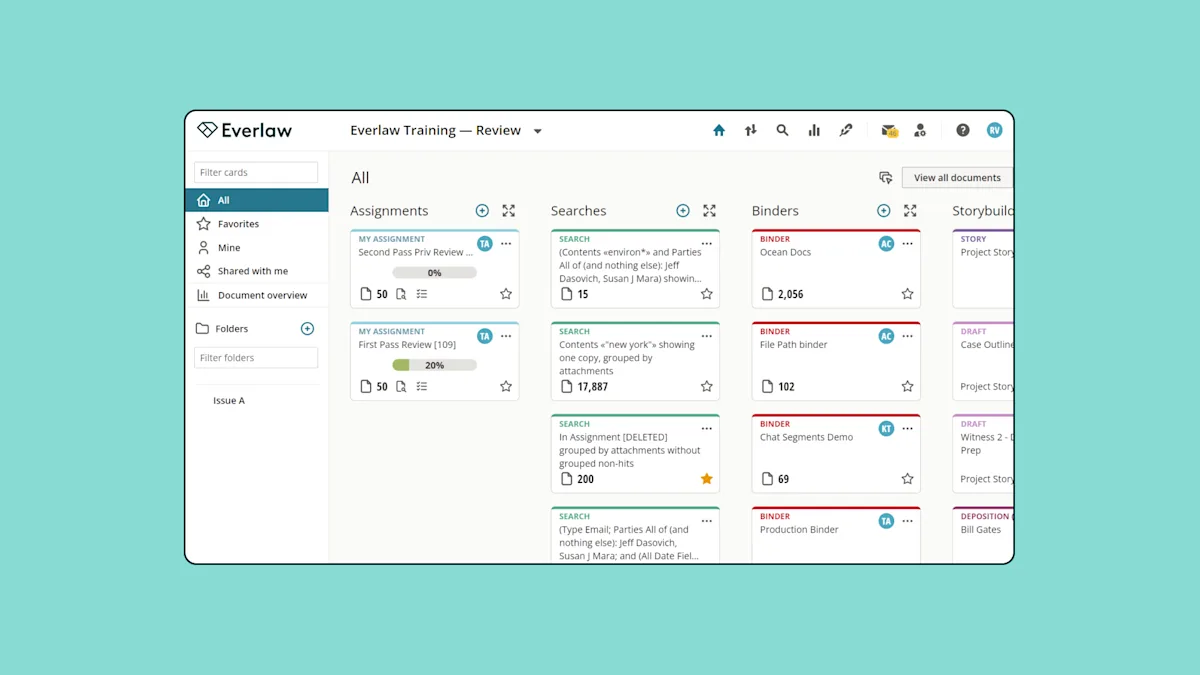
Everlaw is a cloud-native ediscovery and litigation platform built for legal teams handling document review, internal investigations, and trial preparation. The platform covers the full Electronic Discovery Reference Model (EDRM) workflow: data ingestion, processing, early case assessment, review, production, and trial-ready storytelling. It is most often compared to Relativity, DISCO, and Reveal, and it positions itself as the modern alternative to legacy ediscovery tools.
The platform is browser-based with no on-premise option. Teams upload data directly through a self-service interface that handles common formats including email threads, attachments, audio, video, Slack messages, and Microsoft Teams exports. Automated processing handles deduplication, deNISTing, OCR, and multi-lingual translation without requiring a separate vendor or processing fee.
Everlaw Pricing
Everlaw does not publish per-gigabyte rates. Pricing is custom-quoted based on data volume, contract length, and whether the buyer chooses pay-as-you-go or an annual data subscription. The platform’s only public pricing claim is that cost is based on data hosted, with unlimited users, unlimited processing, unlimited productions, and unlimited support included.
That is the structural difference from most competitors. Per-seat ediscovery platforms typically charge $150 to $250 per user per month plus separate processing, ingestion, and production fees. Everlaw bundles those line items into the per-gigabyte rate, which makes budgeting more predictable but also makes large datasets expensive in absolute terms.
| Cost Component | Estimated Range | What’s Included |
|---|---|---|
| Per-GB hosting (monthly) | Custom quote | Hosting, unlimited users, unlimited processing, unlimited productions, unlimited support and training |
| Annual subscription discount | Lower per-GB rate vs. pay-as-you-go | Locked-in volume commitment for an agreed annual data subscription |
| Implementation | $5,000 to $20,000 (per ITQlick estimates) | Onboarding, configuration, data migration setup |
| Data migration | $10,000 to $50,000 for large enterprise migrations | Migrating existing review databases from Relativity or other platforms |
| EverlawAI single-doc features | Free with subscription (as of 2026) | Writing Assistant, Deposition Analyzer, Single Document Review Assistant |
| EverlawAI batch features | Usage-based credits | AI Deep Dive, Batch Processing, batch coding suggestions across multiple documents |
Important: The “unlimited users” claim is real and unusual in the ediscovery market, but the per-GB hosting rate is the variable that controls your total spend. On a 100 GB matter with 10 users, Everlaw can be cheaper than per-seat alternatives. On a 10 TB matter, the per-GB math gets uncomfortable. Always model your specific data profile against a custom quote before signing.
The 2026 pricing landscape shifted in early 2026 when Relativity and Everlaw both made significant generative AI features free with subscription. Everlaw’s single-document AI features (Writing Assistant, Deposition Analyzer, Single Document Review Assistant) are now included at no extra cost. Batch AI actions, including AI Deep Dive across large document sets, still consume usage-based credits.
Get a Custom Quote from Everlaw
Key Features
Document Review and Coding
The review interface is the part of Everlaw that drives most of its G2 ratings. Coding layouts are customizable, keyboard shortcuts are responsive, and the platform applies AI-assisted coding suggestions with clear Yes / Soft Yes / No options that reviewers can accept or override. Reviewers consistently report faster batch turnaround compared to Relativity, with less document-to-document lag.
The platform handles the standard review workflow without configuration overhead. Tagging, redactions, privilege review, quality control sampling, and review assignments are all built-in rather than bolted on through plugins.
StoryBuilder
StoryBuilder is Everlaw’s signature feature and the one that differentiates it from most competitors. It is a fact and chronology management tool that lets teams build case narratives, deposition outlines, and trial timelines directly from review work product. Documents flagged during review can be promoted into the case story without re-tagging or exporting, which collapses the gap between document review and trial preparation.
Capterra reviewers cite StoryBuilder as a primary reason for choosing Everlaw, particularly attorneys preparing for depositions. The feature does not have a true equivalent in DISCO or Logikcull, and it is more accessible than Relativity’s Fact Manager.
EverlawAI Assistant
EverlawAI covers a range of generative AI tasks across document review and case strategy. The single-document features run inside the review interface to summarize a document, suggest coding, draft writing, or analyze a deposition transcript. These are now free with subscription as of 2026.
AI Deep Dive is the heavier-weight batch feature designed for large investigations. It searches and analyzes terabytes of data with no query limits and is engineered for matters exceeding 10 million documents. Deep Dive runs on usage-based credits and is billed separately from the core subscription.
Predictive Coding and TAR 2.0
Everlaw’s prediction engine uses Continuous Active Learning, which improves coding suggestions in real time as reviewers work rather than requiring a static seed set. Independent benchmarking has placed Everlaw’s TAR recall rate at the high end of the market, which matters in matters where missing relevant documents creates defensibility risk.
Self-Service Data Ingestion
Everlaw’s upload tool accepts data in native formats, including modern messaging exports from Slack and Microsoft Teams. Processing, OCR, deduplication, and deNISTing run automatically without sending data to a separate processing vendor. For teams used to traditional vendor-driven ingestion workflows, this is a meaningful workflow change.
Productions and Exports
Production builds support standard formats with bates numbering, redactions, privilege logs, and slip sheets. The production interface is one of the consistently praised features in user reviews, with reviewers citing checks and validations that reduce production errors. There are no per-page or per-document production fees, which is a notable difference from per-seat platforms that charge separately for productions.
Where Everlaw Stands Out
The Modern Interface Actually Reduces Onboarding Time
Most “modern interface” claims in legal software are marketing. Everlaw’s is real. Reviewers consistently report that paralegals and junior associates can be productive on the platform within a couple of training sessions, compared to weeks of ramp-up on Relativity. For firms that rotate contract attorneys onto matters or that hire new associates frequently, this saves real money.
The G2 review pattern is unusually consistent on this point. Ease of use is the most-cited praise category, with 96 mentions in the public review set, ahead of customer support and user interface. That is rare for an ediscovery platform.
Pricing Predictability Without Per-Seat Creep
The unlimited-users pricing structure removes a real problem in multi-party litigation. On per-seat platforms, adding co-counsel, opposing counsel for shared review databases, or a wave of contract reviewers triggers additional licensing costs that can reach $1,500 or more per month before any data processing. Everlaw’s per-GB model does not penalize team expansion, which makes it easier to scale review teams up and down without renegotiating the contract.
Customer Support Is Genuinely Responsive
“Customer support” is the second most-cited praise theme across G2 and Capterra. Reviewers report that support responds within an hour, even on weekends and outside standard business hours, with detailed instructions rather than generic ticket replies. Training, technical support, and user onboarding are all included in the per-GB price, which removes the incentive for the vendor to gate help behind professional services fees.
Self-Service Productions Cut Vendor Dependency
Firms that previously relied on a litigation support vendor to run productions can do that work in-house on Everlaw without requesting custom search terms or tagging schemes from a project manager. For firms trying to bring discovery work back in-house and reduce outside vendor spend, this is the single most measurable cost saving.
Where Everlaw Falls Short
Per-GB Pricing Gets Expensive on Large Matters
The same pricing model that makes Everlaw cheap for small matters makes it expensive for large ones. Software Advice reviewers cite per-GB cost as the most common complaint, particularly on bigger ediscovery cases where data volumes run into terabytes. If your typical matter exceeds 1 TB of hosted data, the per-GB model can produce monthly bills that rival or exceed per-seat alternatives, and DISCO’s all-inclusive pricing may produce a lower total cost of ownership.
The Learning Curve Is Real, Despite the Easy-Onboarding Reputation
Everlaw’s interface is genuinely more accessible than Relativity’s, but “easy to learn” is not the same as “no learning curve.” G2 reviewers cite difficult learning curve as a notable drawback (33 mentions), particularly for older attorneys or staff who have only used competitors. The platform has more depth than its interface initially suggests, and getting full value out of features like StoryBuilder and Deep Dive requires deliberate training.
Search and Tagging Have Rough Edges
Inefficient search functionality is the third most-cited drawback in user reviews. Reviewers report that tags do not always respond as expected, that search term configuration is harder than it should be, and that highlights do not always behave consistently. Power users coming from Relativity sometimes describe Everlaw’s search as less precise, which matters on complex matters where defensible search workflows are required.
Deduplication and Versioning Have Known Limitations
Capterra reviewers cite deduplication as a recurring frustration. Identifying and culling duplicates is not always straightforward, and near-duplicate search is a documented gap. Versioning has its own issue: when a document is produced, the platform creates a new document rather than a new version of the existing record, which creates clutter in large matters and complicates cost management.
Batch AI Features Are Gated Behind Separate Credits
The 2026 free single-document AI features were a genuine improvement, but the most useful AI capabilities for large investigations, including AI Deep Dive and batch coding, still consume usage-based credits that are billed separately. G2 reviewers explicitly call out the credit-based AI billing as a frustration, with the consensus that batch AI should be included in the contract package rather than treated as a usage upcharge.
What Real Users Say
Everlaw holds high ratings across major review platforms, with G2 ranking it #1 in ediscovery for four consecutive quarters. Capterra ratings are similarly strong, and the platform’s reputation for customer service shows up consistently across both sources.
Common praise: Intuitive interface that new users can learn in a couple of training sessions, fast and responsive document-to-document navigation compared to Relativity, exceptional customer support that responds quickly even on weekends, transparent per-GB billing without surprise fees, StoryBuilder as a genuine differentiator for trial preparation, and useful generative AI features that integrate naturally into the review workflow.
Common complaints: Per-GB pricing gets expensive on large matters with terabyte-scale data, search and tagging functionality has rough edges that frustrate power users, deduplication and near-duplicate handling have documented gaps, batch AI features (AI Deep Dive, Batch Processing) consume separate credits rather than being included in the subscription, the learning curve is real for staff coming from other platforms, and migration from existing review databases requires technical support and document management coordination.
Who Should Use Everlaw
- Mid-market law firms (50 to 500 attorneys) handling regular litigation and investigation work that want enterprise ediscovery capabilities without Relativity’s complexity or implementation overhead.
- Plaintiffs’ firms and contingency practices that need predictable monthly billing and unlimited user licenses to scale review teams up and down without per-seat penalties.
- Government agencies requiring FedRAMP-compliant ediscovery with modern AI capabilities and a defensible TAR workflow.
- In-house corporate legal departments bringing discovery work back from outside counsel and needing self-service ingestion, processing, and production capabilities.
- Litigation support teams running productions in-house that want to eliminate per-page and per-document production fees from outside vendors.
- Trial-focused practices that will use StoryBuilder for case chronologies, deposition prep, and trial outlines rather than treating ediscovery as a discrete pre-trial phase.
Who Should Not Use Everlaw
- Solo practitioners and small firms with infrequent matters that would be better served by self-service tools like Logikcull or Reveal’s drag-and-drop matters tier.
- AmLaw 100 firms with established Relativity workflows and large in-house litigation support teams who already extract full value from Relativity’s customization depth and ecosystem of marketplace apps.
- Organizations with strict on-premise or air-gapped requirements, since Everlaw is cloud-only with no on-premise deployment option.
- Teams whose typical matters consistently exceed 5 TB of hosted data, where DISCO’s all-inclusive pricing or a negotiated Relativity contract may produce lower total cost of ownership.
- Buyers prioritizing the lowest possible upfront cost, since Everlaw is positioned as a premium cloud-native platform and is not the budget option in the category.
Everlaw vs. Alternatives
The ediscovery market is consolidating around three positioning lanes: enterprise-dominant (Relativity), modern cloud-native (Everlaw, DISCO), and self-service (Reveal/Logikcull). Picking between them depends on matter size, team size, and how much configuration overhead the firm can absorb.
| Platform | Best For | Starting Price | Key Difference |
|---|---|---|---|
| Everlaw | Mid-market firms, plaintiffs’ firms, government agencies | Custom per-GB | Unlimited users included, modern UI, StoryBuilder for trial prep |
| Relativity | AmLaw 200 firms, complex multi-jurisdictional litigation | Custom per-GB and consumption | Largest ecosystem of marketplace apps and integrations, deepest customization |
| DISCO | Firms wanting all-inclusive flat-fee pricing on predictable workloads | Custom all-inclusive per-GB | Single per-GB fee covers everything including AI; lower TCO at high data volumes |
| Logikcull | Solo practitioners and small firms with infrequent self-service matters | Per-matter or per-GB | Drag-and-drop simplicity, fastest setup, narrower feature depth |
| Casetext CoCounsel | Teams needing legal AI for research and drafting, not document review at scale | $225 to $500 per user per month | Different tool category; complements ediscovery rather than replacing it |
Quick Pick Guide
- Pick Everlaw if you are a mid-market firm or plaintiffs’ practice that wants modern UI, predictable per-GB billing, and unlimited user licenses.
- Pick Relativity if you are an AmLaw 200 firm with established workflows, dedicated litigation support staff, and matters that justify the platform’s depth.
- Pick DISCO if your typical matters exceed 1 TB and you want all-inclusive flat-fee pricing without per-credit AI billing.
- Pick Logikcull if you are a solo or small firm with infrequent matters and want drag-and-drop self-service without contract overhead.
- Stay on your current platform if you have a stable workflow, your team is productive, and migration costs (data migration alone can run $10,000 to $50,000) outweigh the benefit of switching.
Popular Integrations
Everlaw connects with the data sources and productivity tools that legal teams use day to day. The platform’s ingestion engine accepts native exports from major business communication platforms, and integrations cover identity management, cloud storage, and case management.
Communication and collaboration: Microsoft Teams, Slack, Microsoft 365 (Exchange, SharePoint, OneDrive), Google Workspace.
Identity and access: Okta, Azure Active Directory, single sign-on (SAML).
Cloud storage: Microsoft OneDrive, Google Drive, Box, Dropbox.
Case and practice management: Integration with major legal case management tools through API, including Clio for matter management workflows.
Data sources: Direct ingestion from email systems, mobile device backups, audio and video files, and traditional litigation hold platforms.
Frequently Asked Questions
Does Everlaw offer a free trial?
Everlaw does not offer a public free trial. Evaluations are handled through a custom demo with a sales representative, who will scope a pilot or trial environment based on your firm’s data profile. There is no free version of the platform. Buyers evaluating ediscovery without committing to a paid platform sometimes start with RelativityOne’s free trial or a self-service tool like Logikcull before evaluating Everlaw.
How much does Everlaw cost for a 50-attorney firm?
Everlaw’s per-GB pricing is custom-quoted, and the firm size matters less than the data volume. A 50-attorney firm with three active matters totaling 200 GB of hosted data will pay significantly less than a 50-attorney firm with one matter of 5 TB. The unlimited-users pricing structure means that adding the 50th attorney to the platform costs nothing extra. Implementation costs typically run $5,000 to $20,000 according to ITQlick estimates, with data migration costs depending on the size and source of existing review databases.
Is Everlaw worth it, or should I use Relativity?
The answer depends on your firm’s size and workflow maturity. Everlaw is the better fit for mid-market firms (50 to 500 attorneys), plaintiffs’ firms, government agencies, and teams that prioritize ease of use and predictable billing. Relativity is the better fit for AmLaw 200 firms with established workflows, dedicated litigation support staff, and matters that justify the platform’s customization depth and ecosystem of marketplace apps. If you are currently on Relativity and your team is productive, migration costs (data migration alone runs $10,000 to $50,000) often outweigh the benefit of switching.
Can Everlaw handle modern messaging data like Slack and Microsoft Teams?
Yes. Everlaw’s ingestion engine handles native Slack exports and Microsoft Teams data along with traditional email, attachments, audio, and video. The platform processes these formats automatically without requiring a separate processing vendor or per-file fee. Modern messaging data ingestion has become a baseline requirement in 2026 ediscovery, and Everlaw is on par with DISCO and Relativity on this capability.
How long does Everlaw take to implement?
Implementation timelines vary based on data migration scope and firm size. A small firm starting with no existing review databases can be operational within days because the platform is browser-based, uses self-service ingestion, and includes onboarding and training in the per-GB price. Larger firms migrating existing matters from Relativity or other platforms typically need a structured migration project that runs four to twelve weeks, with $10,000 to $50,000 in migration costs depending on data volume and complexity.
Does Everlaw integrate with Microsoft 365 and Google Workspace?
Yes. Everlaw integrates with Microsoft 365 (Exchange, SharePoint, OneDrive, Teams) and Google Workspace (Gmail, Drive) for direct data ingestion. Single sign-on through Okta, Azure AD, and SAML is supported for identity management. These integrations matter for in-house corporate legal departments running internal investigations, where pulling data directly from collaboration platforms reduces collection time and cost.
Is Everlaw FedRAMP and SOC 2 compliant?
Yes. Everlaw maintains FedRAMP authorization, which is the federal government standard for cloud security and a hard requirement for working with federal agencies. The platform also holds SOC 2 Type II certification and runs a proactive security program with intrusion detection testing, vulnerability scanning, and continuous codebase monitoring. For firms handling government, healthcare, or financial services matters, the compliance posture is competitive with Relativity and stronger than most self-service alternatives.
Does Everlaw offer discounts for nonprofits, plaintiffs’ firms, or government agencies?
Everlaw has a strong customer base in plaintiffs’ firms and government agencies, and pricing is structured to be competitive in those segments. The platform does not publish a formal discount program for nonprofits or government, but custom pricing is negotiated through the sales process and annual data subscriptions reduce the per-GB rate compared to pay-as-you-go. Plaintiffs’ firms and contingency practices benefit from the unlimited-users structure because review team scaling does not trigger licensing penalties.
What is Everlaw’s cancellation policy?
Everlaw has historically positioned itself as not requiring long-term contracts, with month-to-month flexibility on pay-as-you-go and the ability to suspend or delete projects to reduce billing. Annual data subscriptions lock in volume commitments at lower per-GB rates and have their own cancellation terms specified in the contract. If a project is suspended, billing impact starts the first full month of suspension. Final cancellation, suspension, archival, and export terms should be confirmed in your specific contract before signing.
Is Everlaw right for solo practitioners or small firms?
Generally no, unless the solo practitioner handles regular litigation matters that justify a per-GB hosting commitment. Everlaw is built for ongoing ediscovery work, and solo practitioners with one or two matters per year are usually better served by per-matter self-service tools like Logikcull. The unlimited-users structure does not produce meaningful savings for a one-person practice, and the per-GB hosting cost on irregular matters can be hard to justify. Solo practitioners running a high-volume plaintiffs’ practice are an exception and may find Everlaw competitive.
Final Verdict
Everlaw earned its #1 G2 ranking by getting the basics right: a modern interface that reduces onboarding time, transparent per-GB billing without per-seat penalties, and customer support that responds within an hour even on weekends. For mid-market law firms, plaintiffs’ firms, government agencies, and in-house corporate legal departments, it is the strongest cloud-native ediscovery option in the market.
The platform has real limitations. Per-GB pricing gets expensive on terabyte-scale matters, search and deduplication have rough edges, and the most useful batch AI features still consume separate credits. None of these are deal-breakers for the firms Everlaw is built for, but they matter when comparing total cost of ownership against DISCO’s all-inclusive pricing or a negotiated Relativity contract on large matters.
The 2026 decision is less about Everlaw vs. Relativity and more about which platform fits your firm’s data profile, team size, and matter mix. If you are running mid-market caseloads with regular review work and want predictable billing, Everlaw is the default choice. If you are running 5 TB+ matters consistently, run the math against DISCO. If you are an AmLaw 200 firm with a Relativity-trained litigation support team, the migration cost rarely pencils out.
Last updated on May 7, 2026