ADVERTISING DISCLOSURE: THIS POST CONTAINS AFFILIATE LINKS. READ FULL DISCLAIMER
The Verdict: Lawmatics is the strongest legal CRM and intake automation platform on the market for law firms that take marketing seriously. It is built for firms doing active client acquisition, not for firms that just want a contact database. Pricing is custom-quoted across three tiers (Essential, Premium, Enterprise) with a 3-user minimum; real costs typically run $249 to $499 per month plus add-ons. Solos with low lead volume should look elsewhere.
Last updated November 2026.
In This Review
What Lawmatics Is
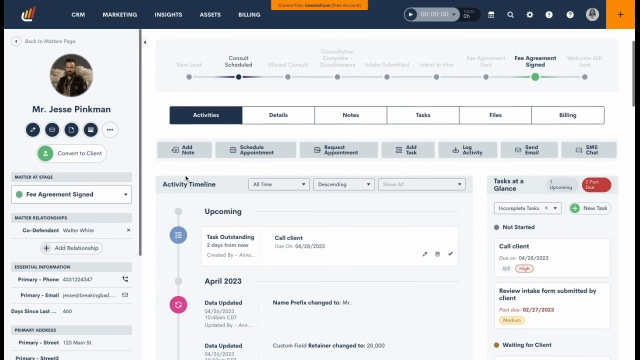
Lawmatics is a legal-specific CRM, client intake, and marketing automation platform built for law firms that actively market for new clients. It was founded in 2017 by Matt Spiegel, the former founding CEO of MyCase, and is headquartered in San Diego.
The platform sits at the front end of the client journey, handling lead capture, intake forms, automated follow-up, e-signatures on retainer agreements, and pipeline tracking. It is not a full practice management system. There is no matter management, no built-in document storage in the depth competitors offer, and time and billing are available only as add-ons. Lawmatics is designed to live alongside a practice management tool like Clio Manage, MyCase, Smokeball, or PracticePanther, not replace it.
That positioning matters. Most legal practice management platforms bolt CRM features onto an existing case management product, and the result is usually a weak CRM with limited automation. Lawmatics inverts the model: marketing automation and intake are the core, and case management lives somewhere else. For firms whose biggest growth lever is converting more inbound leads, this design is the entire point.
Lawmatics Pricing
Lawmatics does not publish per-user pricing publicly. The pricing page lists three tiers (Essential, Premium, Enterprise) with feature breakdowns but routes every plan to a “Contact Sales” call. All plans require a 3-user minimum, and pricing scales with both seat count and contact volume.
Based on third-party pricing reports and customer-disclosed numbers, real-world Lawmatics costs land in the following ranges. These are not list prices; they are typical quoted prices for small to mid-size firms.
| Plan | Typical Reported Price | What’s Included |
|---|---|---|
| Essential | ~$249/month and up | 2,500 contacts, intake automation, custom forms, e-signatures, SMS, scheduling, basic CRM, 20 automations |
| Premium | ~$349/month and up | 10,000 contacts, unlimited automations, marketing automation, email campaigns, round-robin scheduling, advanced conflict checking, custom reporting, ROI tracking |
| Enterprise | ~$499/month and up | Everything in Premium, custom contact volumes, dedicated account manager, full feature access, custom integrations |
| Time & Billing add-on | Add-on pricing | Time tracking, invoicing, LMPay payment processing |
| QualifyAI credits | Tiered packs (50 to 500+ credits/month) | AI-powered lead qualification, sold separately as credit bundles with overage pricing |
| SMS/MMS | Tiered usage | Tier 1 included free; volume tiers with overage charges starting at $0.02 to $0.03 per message |
Important: Lawmatics charges per firm with a 3-user minimum, not strictly per user. This helps growing teams (you can add users without proportional cost increases) but stings solo practitioners who pay for three seats they cannot fill. Implementation fees of $1,500 to $7,500 have been reported for complex setups, and the Premium tier is often the realistic starting point because Essential’s 20-automation cap fills up quickly.
What teams actually pay
For a 3-attorney firm on the Premium plan, expect total first-year cost in the $5,000 to $7,000 range, including subscription, basic SMS usage, and onboarding. Firms with active marketing programs that use QualifyAI credits and higher SMS volumes report annual spend closer to $8,000 to $12,000. Plan upgrades happen often as firms outgrow contact limits.
The pricing is genuinely premium for a CRM, but the comparison point is not other legal CRMs. It is general-purpose marketing platforms like HubSpot, where law firms would pay $890+ per month for the Marketing Hub Professional tier without legal-specific features. From that angle, Lawmatics is competitive.
Get a Custom Quote from Lawmatics
Key Features
Client intake automation
Custom intake forms embed directly on a firm’s website with branded styling and feed into automated workflows. A new lead at 2 AM can immediately receive a branded intake questionnaire, get added to an automated email sequence, and appear on the pipeline dashboard before anyone at the firm wakes up. Conditional logic in the workflows is the standout feature: a personal injury lead indicating surgery follows a different nurture path than a soft-tissue lead, automatically.
CRM and pipeline management
The CRM organizes contacts, communication history, tasks, and pipeline stages in a searchable database. Round-robin scheduling distributes new leads across attorneys and intake staff based on availability and workload. Custom data fields, pipeline stages, and views let firms model their actual sales process rather than fitting into a generic template.
Marketing automation and email campaigns
This is where Lawmatics genuinely competes with general-purpose marketing platforms. Drag-and-drop email builders, audience segmentation by dozens of criteria, drip campaigns, A/B testing, and ROI attribution by referral source are all included on the Premium tier. The platform tracks which marketing channels actually generate paying clients, not just clicks. For firms running paid advertising or referral programs, this attribution data is meaningful.
QualifyAI
QualifyAI is the AI-powered lead qualification feature, sold as a credit-based add-on. It scores leads based on intake responses, engagement signals, and conversion likelihood, helping firms prioritize follow-up. Reviewers report meaningful conversion improvements when QualifyAI is configured well, but the credit pricing model means high-volume firms need to budget separately for AI usage.
E-signatures and document automation
Unlimited e-signatures are included on all plans, which is unusual in the legal tech space (many competitors charge per envelope). Document automation generates retainer agreements, engagement letters, and intake packets from templates with merged client data. The depth is good but not as deep as dedicated document automation platforms like Lawyaw or Documate.
Conflict checking
Advanced conflict checking comes standard on Premium and Enterprise tiers. The system flags potential conflicts during intake before a firm engages with a prospective client. This is a meaningful ethics protection for firms handling high lead volume where manual conflict checks slip through.
Where Lawmatics Stands Out
Best-in-class intake automation for law firms
If marketing automation is the buying criterion, no other legal CRM matches Lawmatics. The conditional workflow logic, ROI attribution, drip campaigns, and integration depth are built specifically for law firm growth, not retrofitted from a generic CRM. Firms that invest in workflow configuration regularly report 25 to 35 percent conversion rate improvements over manual intake processes.
Per-firm pricing scales well for growing teams
Because pricing is keyed to contact volume rather than strict per-user counts, adding paralegals, intake staff, or junior attorneys does not multiply cost the way it would on Clio Manage or MyCase. For a growing 8-person firm, this often makes Lawmatics cheaper than per-user CRM alternatives at full deployment.
Integrations with practice management tools
Native integrations with Clio, MyCase, PracticePanther, Smokeball, and QuickBooks let Lawmatics push converted clients into existing case management without duplicate data entry. This is the engine that makes the “CRM separate from practice management” model work.
Customer support is strong
Reviewers consistently praise the support team’s responsiveness, with twice-daily open onboarding calls, live chat, and a knowledge base. Long-time customers tend to be loyal and active in the user community.
Founded by a legal tech veteran
Matt Spiegel’s prior experience building MyCase shows in the product roadmap and community engagement. The platform feels designed by someone who understands law firm operations rather than a general SaaS team adding legal features.
Where Lawmatics Falls Short
Steep learning curve and long implementation
Reviewers across G2, Capterra, and GetApp consistently describe a steep learning curve. Average time to full implementation is reported at 3 to 6 months, with one reviewer noting their setup took six months to fully customize. Firms that deploy Lawmatics with minimal customization see only modest conversion gains (8 to 12 percent), while firms that fully build out workflows see 25 to 35 percent gains. Translation: the value scales with effort, not with subscription price.
Pricing is opaque and minimum-driven
The 3-user minimum and custom-quoted pricing make budgeting hard. Solo practitioners cannot get a single seat, and firms cannot self-serve evaluate price-to-value without sitting through a sales call. The Essential tier’s 20-automation cap is also tighter than buyers expect, pushing most firms to Premium during the first year.
No mobile app
For a 2026 platform built around real-time lead capture and follow-up, the absence of a true mobile app is a real limitation. The web app works on mobile browsers but is not optimized for in-the-field use. Attorneys who want to check on intake or respond to leads from court or while traveling will feel this gap.
Not a full practice management system
This is by design, but it bears repeating: Lawmatics handles the front end of the client lifecycle and stops. Firms still need a separate platform for matters, documents, calendars, and detailed billing. The ongoing cost of running two systems (CRM plus practice management) is real, both in dollars and in workflow friction.
Reporting and integration friction
Some reviewers report friction with custom reports requiring training and occasional bugs in third-party integrations beyond the core list. About 60 percent of reviewers who mention integrations report some kind of integration limit, particularly with non-legal tools or accounting platforms outside of QuickBooks.
What Real Users Say
Lawmatics averages 4.5 to 4.6 stars across G2, Capterra, and GetApp, based on ~50 to 100 verified reviews. The user base is smaller than Clio’s, but sentiment is consistently positive among firms that fully implement the platform.
Common praise: Reviewers highlight the depth of automation capabilities, the responsive support team, the clear ROI tracking from marketing campaigns, the ease of moving leads through pipeline stages, and the flexibility of custom forms and workflows. Long-term users describe Lawmatics as the backbone of their firm’s growth.
Common complaints: Steep learning curve, lengthy initial implementation (3 to 6 months), high cost relative to simpler CRMs, occasional integration bugs, no mobile app, and the per-firm pricing model penalizing solos. A few reviewers report that complex customizations require extra patience or guidance to resolve.
Who Should Use Lawmatics
- Growing small to mid-sized law firms (3 to 30 attorneys) with active marketing programs and meaningful inbound lead volume
- Firms with dedicated marketing or intake staff who can invest in workflow configuration
- Personal injury, immigration, family law, and estate planning practices that handle volume and need conditional intake logic
- Firms that already run a practice management platform (Clio, MyCase, PracticePanther) and need a stronger CRM layer
- Firms tracking marketing ROI by referral source and willing to act on the data
- Buyers comparing Lawmatics to general-purpose marketing tools like HubSpot or ActiveCampaign
Who Should Not Use Lawmatics
- Solo practitioners with low lead volume who cannot justify a 3-user minimum or $249+ monthly cost
- Firms wanting all-in-one practice management with matters, documents, billing, and intake in one platform
- Firms unwilling or unable to invest 3 to 6 months in workflow setup to extract real value
- Firms that need a robust mobile app for field-based intake or follow-up
- Practices not actively marketing for new clients (referral-only firms get less ROI from automation)
- Tight-budget solos for whom Clio Grow at $59/user/month or MyCase‘s built-in CRM may be enough
Lawmatics vs. Alternatives
Lawmatics competes most directly with Clio Grow, Captorra, and Lead Docket on the CRM-only side, and with all-in-one platforms like MyCase and PracticePanther when buyers want CRM and case management in one tool.
| Platform | Best For | Starting Price | Key Difference |
|---|---|---|---|
| Lawmatics | Marketing-focused growth firms | ~$249/mo (3-user min) | Best automation depth, requires 3 to 6 months to configure fully |
| Clio Grow | Firms already on Clio Manage | $59/user/mo | Tight Clio integration, simpler automation, lighter marketing features |
| MyCase | Solos and small firms wanting all-in-one | $39/user/mo | Built-in CRM with case management, weaker on advanced automation |
| PracticePanther | Small firms wanting simple all-in-one | $49/user/mo | Lightweight CRM bundled with practice management |
Quick Pick Guide
- Pick Lawmatics if client acquisition is your firm’s main growth challenge and you have 3+ users plus the bandwidth to configure it
- Pick Clio Grow if you already use Clio Manage and want CRM that integrates without leaving the Clio ecosystem
- Pick MyCase if you want CRM and full practice management in one tool at a lower entry price
- Pick PracticePanther if you want a simple, all-in-one platform with bundled (not best-in-class) CRM
Popular Integrations
Lawmatics integrates with the major legal practice management platforms and a focused list of supporting tools.
- Practice management: Clio Manage, MyCase, PracticePanther, Smokeball
- Accounting: QuickBooks Online, QuickBooks Desktop
- Communication: Microsoft 365, Outlook, Gmail, Google Calendar
- Telephony: Twilio (built-in via SMS/MMS), RingCentral
- Payments: LMPay (built-in), LawPay/Affinipay
- Other: Zapier (for connecting to thousands of additional tools), open API for custom integrations
The Clio Manage integration is the most-cited in user reviews, with firms commonly running Lawmatics for intake and Clio for matter management as a paired stack.
Frequently Asked Questions
Does Lawmatics offer a free trial?
Lawmatics does not offer a public free trial. The standard sales process is a guided demo with a sales rep, followed by a custom quote. Some firms have negotiated short pilot periods, but this is handled deal-by-deal rather than as a standard offering.
How much does Lawmatics cost for a 5-person firm?
For a 5-person firm on the Premium tier, expect roughly $4,200 to $5,400 per year for the subscription, before SMS overages, QualifyAI credits, or the Time and Billing add-on. Implementation fees of $1,500 to $7,500 may apply for complex setups. Annual contracts may include modest discounts compared to monthly billing.
Is Lawmatics worth it, or should I use Clio Grow?
It depends on whether marketing automation is a primary need or a nice-to-have. Lawmatics has materially deeper automation, conditional workflow logic, and ROI attribution than Clio Grow. Clio Grow is significantly cheaper and integrates seamlessly with Clio Manage for firms already in that ecosystem. Marketing-driven firms typically pick Lawmatics; firms that want simple intake plus existing Clio integration pick Clio Grow.
Can Lawmatics replace my practice management software?
No. Lawmatics is intentionally focused on the front end of the client lifecycle (intake, CRM, marketing automation). Matter management, document storage, calendars, and detailed billing live in a separate practice management tool. Most Lawmatics customers run it alongside Clio, MyCase, PracticePanther, or Smokeball.
How long does Lawmatics take to implement?
Basic setup takes 2 to 4 weeks. Full workflow configuration, marketing automation buildout, and integration with practice management software typically takes 3 to 6 months. Firms that deploy with minimal customization see modest conversion gains; firms that fully invest in setup see materially better results.
Does Lawmatics integrate with QuickBooks?
Yes. Lawmatics integrates with both QuickBooks Online and QuickBooks Desktop, particularly when the Time and Billing add-on is enabled. Sync depth depends on which practice management platform is in the stack and whether billing data flows through Lawmatics or directly through the case management tool.
Is Lawmatics SOC 2 compliant?
Yes. Lawmatics is SOC 2 Type II compliant and supports the data security and privacy controls expected for legal industry use, including encryption in transit and at rest. For specific compliance requirements like HIPAA or industry-specific certifications, request the latest documentation directly from Lawmatics.
Does Lawmatics offer discounts for nonprofits or new firms?
Lawmatics does not advertise standard nonprofit or new-firm discount programs. Custom pricing for unusual situations may be negotiable directly with sales, particularly for multi-year commitments. Annual billing typically saves a modest percentage compared to monthly.
What is Lawmatics’ cancellation policy?
Standard contracts are annual, billed upfront or monthly. Mid-contract cancellation typically requires paying out the remaining term. Confirm cancellation terms directly with your account rep before signing, particularly if multi-year discounts are being offered. Calendar a renewal review 90 days before contract end to give negotiation room.
Is Lawmatics right for a solo practitioner?
Generally, no. The 3-user minimum and $249+ monthly entry price are hard to justify for solos with low to moderate lead volume. Solos who do significant marketing and have intake or paralegal support may make it work, but the more common fit is Clio Grow, MyCase, or a simpler CRM. This is informational only; consult a tool that fits your firm’s actual scale and budget.
Final Verdict
Lawmatics is the clear leader in legal-specific CRM and marketing automation, with a feature set built for firms that take client acquisition seriously. The automation depth, conditional logic, and ROI attribution are genuinely best-in-class for the legal vertical, and the founder’s MyCase background shows in the product’s understanding of how law firms actually operate.
The honest catch is that Lawmatics rewards effort, not just spend. Firms that drop Lawmatics in with minimal configuration get modest gains. Firms that invest 3 to 6 months in workflow setup see real conversion improvements. The $249+ monthly entry price and 3-user minimum mean this is the wrong tool for solos with low lead volume; for growing firms with active marketing programs, it is often worth the cost.
Buyers should walk into the sales call with a clear sense of their lead volume, their marketing program, and which practice management platform Lawmatics will pair with. Get the demo, ask for the Premium tier quote, and confirm what implementation support is included before signing.
Last updated on May 10, 2026