ADVERTISING DISCLOSURE: THIS POST CONTAINS AFFILIATE LINKS. READ FULL DISCLAIMER
The Verdict: FreshBooks is the best-fit accounting software for freelancers and service-based small businesses that bill by the hour, send a lot of invoices, and do not carry inventory. It is not built for product-based businesses, teams that need multi-user access without paying extra per seat, or anyone who needs advanced reporting. Plans start at $23/month (monthly billing), and pricing has increased in 2026.
Last updated May 1, 2026.
In This Review
What FreshBooks Is
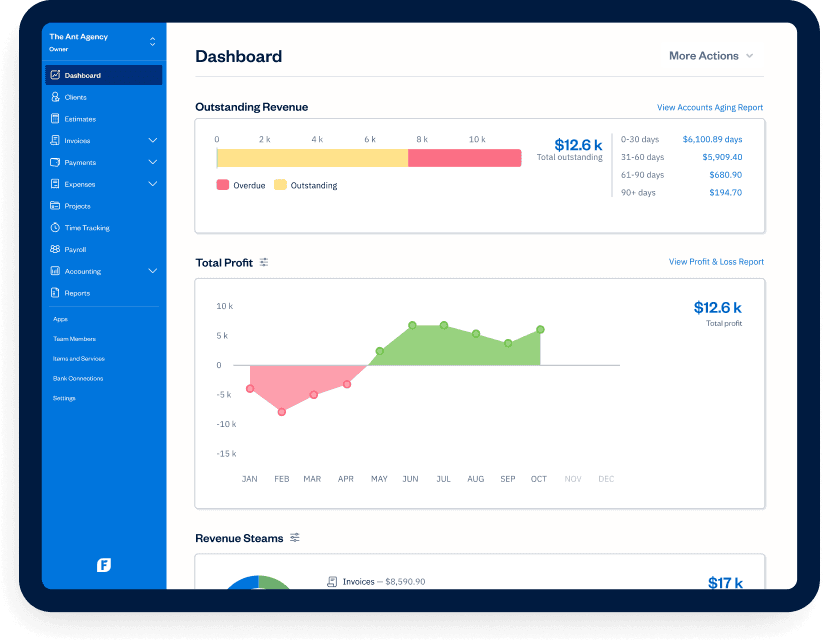
FreshBooks is cloud-based accounting software built specifically for freelancers, independent contractors, and service-based small businesses. Launched in 2003 and now serving more than 35 million users, its entire design is oriented around one use case: businesses that sell time and services rather than physical products, and need to invoice clients, track billable hours, and manage expenses without learning accounting from scratch. That narrow focus is both its greatest strength and its hard ceiling.
FreshBooks fits a specific kind of business well: consultants, designers, photographers, agencies, trades businesses, virtual assistants, and professionals billing by the hour. The interface is clean, the learning curve is shallow, and the mobile app is one of the better ones in this category. If your business carries inventory, processes retail transactions, or has more than a few employees who all need software access, you will hit the walls fairly quickly.
Source Freshbooks.com
FreshBooks Pricing
FreshBooks updated its pricing in 2026, and the increase is meaningful. The table below reflects full monthly billing rates (not promotional discounts, which FreshBooks rotates frequently). Annual billing reduces costs by roughly 10%. Note that each plan includes only one user; additional team members cost $11/month per person regardless of plan tier.
| Plan | Monthly Price | Billable Clients | What’s Included |
|---|---|---|---|
| Lite | $23/mo | 5 clients | Unlimited invoices, expense tracking, estimates, tax summaries, mileage tracking. No recurring invoices or double-entry accounting. |
| Plus | $43/mo | 50 clients | Everything in Lite, plus recurring invoices, proposals, client retainers, receipt scanning, double-entry accounting reports, accountant access. |
| Premium | $70/mo | Unlimited | Everything in Plus, plus project profitability tracking, custom email templates, and automated client emails with dynamic fields. |
| Select | Custom (talk to sales) | Unlimited | Everything in Premium, plus lower transaction fees, removed FreshBooks branding, dedicated support, onboarding, 2 free team member seats, Easy Switch data import. |
Add-ons to factor into your budget: Advanced Payments (virtual terminal and stored credit cards) adds $20/month. Payroll via FreshBooks starts at $40/month plus $6 per employee. Team members beyond the base seat are $11/month each. A solo freelancer on Plus with one contractor added is paying $54/month before payment processing fees.
Free trial: FreshBooks offers a 30-day free trial with no credit card required. Promotional discounts (currently 70% off for 4 months as of this writing) are available but should be budgeted at full price; they expire.
One important flag: FreshBooks loses access to all historical invoices and client data when a subscription is cancelled. This is a real risk for anyone who might pause their business or switch platforms. Several user reviews specifically call this out as a serious inconvenience.
See Current FreshBooks Pricing
Key Features
Invoicing
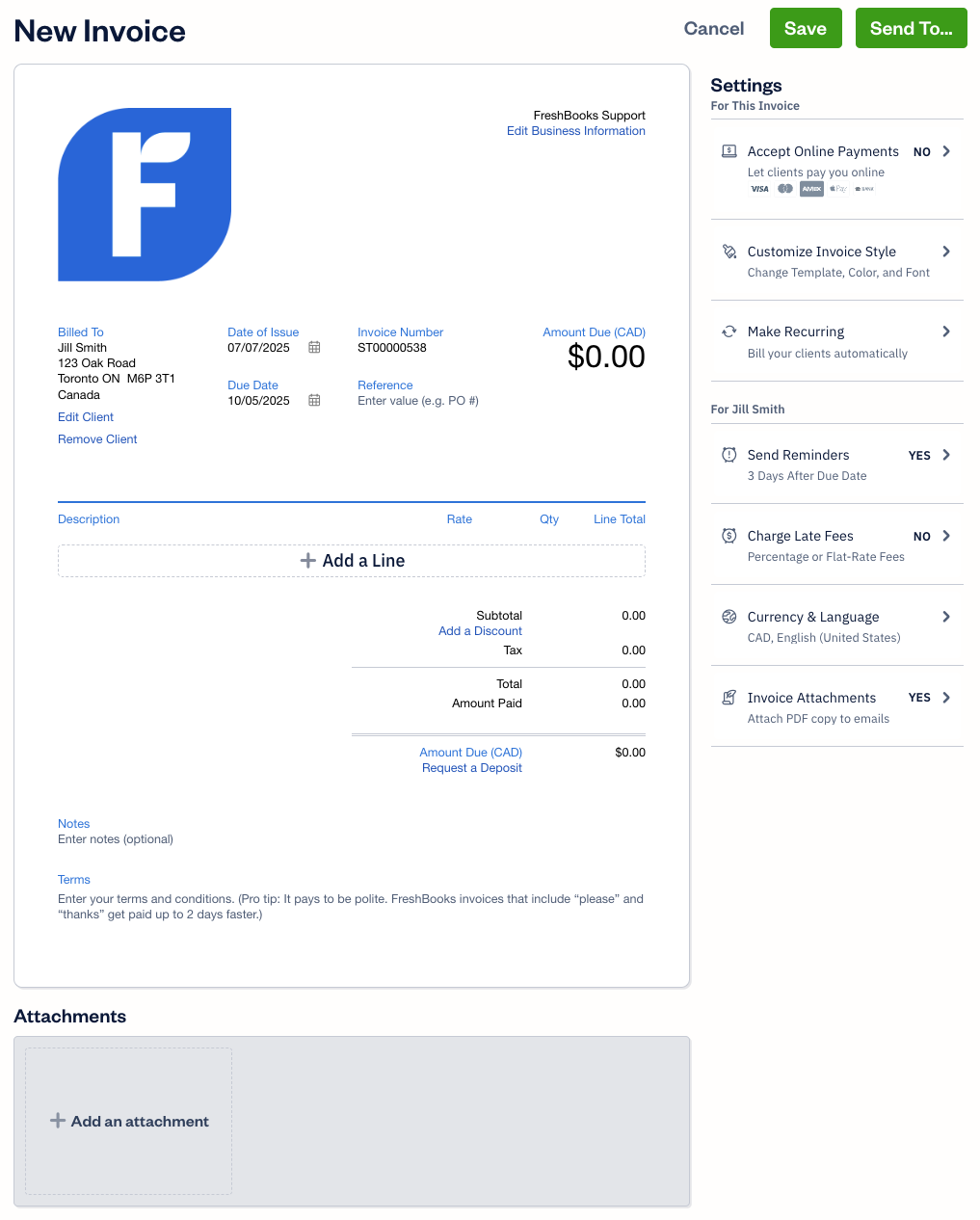
FreshBooks built its reputation on invoicing, and it still leads here. Creating a professional invoice takes under two minutes: select a client, add line items (or pull from tracked time), set payment terms, and send. Clients pay via credit card, ACH, Apple Pay, Google Pay, or Buy Now, Pay Later directly from the invoice, no FreshBooks account needed. Recurring invoices automate repeat billing. Late payment reminders fire on a schedule. The system tracks whether invoices have been opened, useful evidence when a client claims they never received it.
Source: FreshBooks.com
Time Tracking and Project Profitability
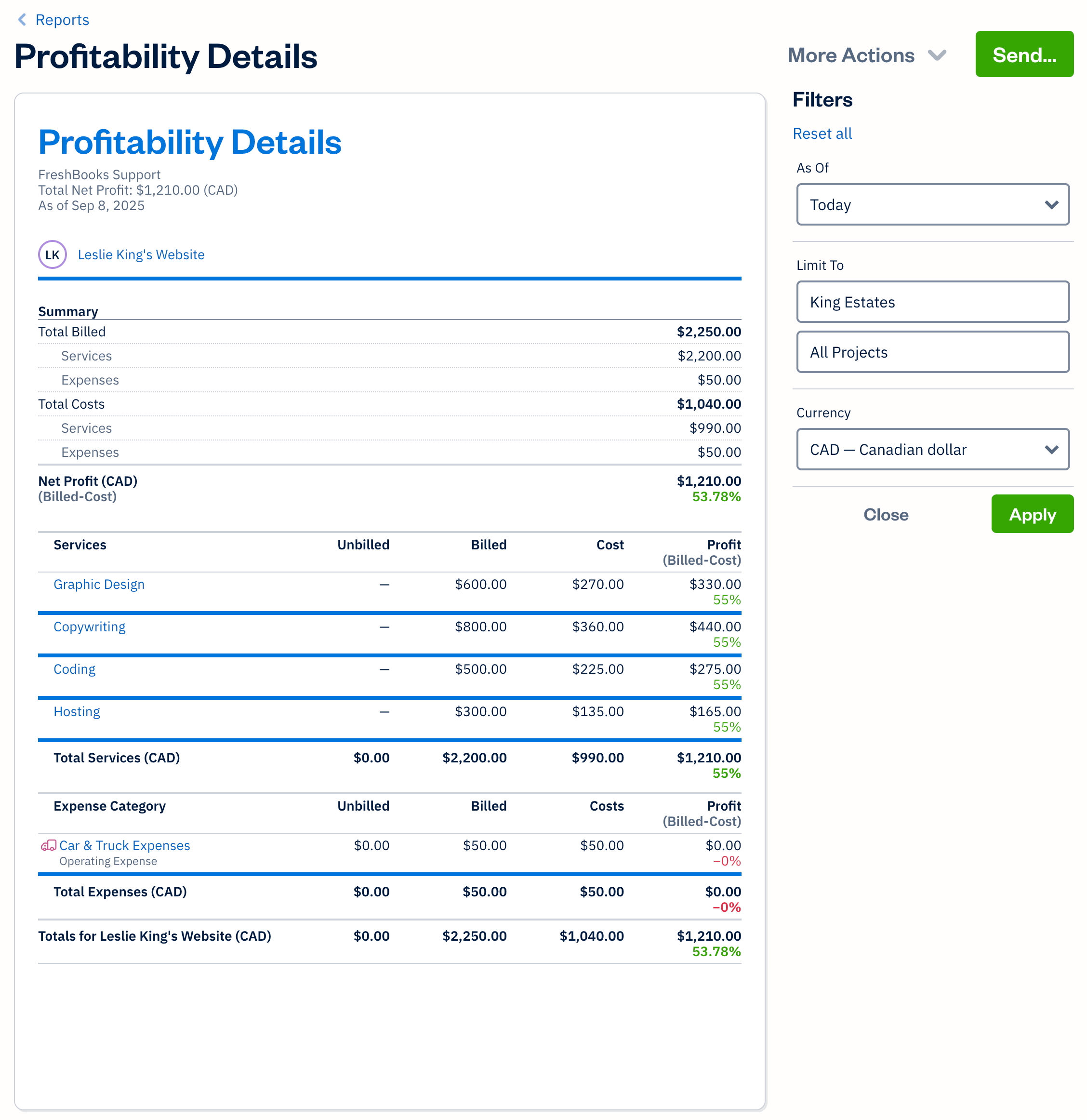
Built-in time tracking separates FreshBooks from Wave and basic alternatives. Run a timer from web or mobile, assign time to a client and project, then convert all tracked hours to invoice line items in one click. On Premium, FreshBooks also shows project profitability: billable hours versus costs, so you can see whether a project actually made money. The one real complaint here is that the iOS app’s time tracking view is limited compared to the browser version, which frustrates anyone who reviews hours from their phone.
 Source: freshbooks.com features page or blog
On the Premium plan, FreshBooks shows whether each project is actually profitable after time and expenses are factored in.
Expense Tracking and Receipt Scanning
Connect a bank account or business credit card and FreshBooks pulls in transactions automatically, categorizing by expense type. On Plus and above, the mobile app scans paper receipts and logs them as expenses. Mileage tracking runs automatically on all plans. Bank reconciliation lines up bank transactions against FreshBooks entries and suggests matches. Covers the expense workflow well for a solo service provider; not robust enough for businesses with complex transaction volumes or multiple revenue streams.
Reporting
Plus and above include full double-entry accounting: P&L, balance sheet, and cash flow statements. Lite excludes these entirely. Reports are clearly labeled but customization is minimal. No custom dashboards, no multi-dimensional filters. Sufficient for a freelancer sharing a year-end summary with a tax preparer; limited for anyone who wants meaningful financial insight beyond the basics.
Where FreshBooks Stands Out
The Easiest Invoicing Workflow in the Category
No other small business accounting platform matches FreshBooks for invoice speed and polish at this price range. The combination of a clean interface, built-in payment processing, automated reminders, and open-receipt confirmation adds up to a workflow that consistently reduces time-to-payment. For a solo operator whose biggest cash flow problem is late invoices, this feature alone can justify the cost.
Time Tracking That Connects to Billing
FreshBooks is one of the only platforms in its price tier where time tracking is a first-class feature. The timer, project breakdown, and one-click conversion to billable line items work together as a complete workflow. Wave and Zoho Books exclude time tracking or treat it as a separate module. QuickBooks Time does this well but requires a separate subscription.
Built for Non-Accountants
No journal entries to configure, no chart of accounts to set up, no double-entry concepts exposed during normal use. A freelancer with no financial background can send professional invoices and reconcile expenses within an hour of signing up. This is harder to achieve than it sounds, and it is where FreshBooks consistently outperforms QuickBooks for the self-employed segment.
Mobile App Quality
The FreshBooks mobile app covers the full workflow: send invoices, log expenses, snap receipts, run the time tracker, and check who has paid. For trades businesses and field service providers, it functions as a daily tool rather than a simplified companion app. Mileage tracking runs automatically in the background on all plan tiers.
Where FreshBooks Falls Short
Client Caps Are a Real Constraint
The Lite plan’s 5-client limit is not a minor footnote. A growing freelancer who regularly picks up new clients hits that ceiling quickly, forcing an upgrade to Plus at $43/month. That is an 87% price increase for what amounts to expanding a client roster. The per-client restriction is the most common pricing complaint in user reviews and the one thing that most often catches new users off guard.
Per-Seat Pricing Gets Expensive Fast
Every plan except Select is built for a single user. Adding a second person costs $11/month on top of the base plan. A small agency on Premium with three team members pays $103/month before add-ons. At that level, QuickBooks Online Plus includes five users and substantially more accounting depth. FreshBooks does not make economic sense for multi-user teams once you run the comparison.
Reporting Lacks Depth for Growing Businesses
No custom report filters, no multi-dimensional views, no drill-down that lets you understand performance at a granular level. Fine for a freelancer. Not enough for a business trying to understand which clients or service lines are most profitable. Xero and QuickBooks both offer more reporting flexibility at comparable price points.
Not Built for Inventory or Product Businesses
No inventory management, no COGS tracking tied to physical stock, no POS integration. If any part of your revenue comes from selling products, FreshBooks is the wrong tool. Hard boundary, no workaround.
Payment Processing Complaints Persist
The most consistent technical complaint across review platforms: ACH transfers take longer to settle than expected, and bank feed syncing occasionally loses or misclassifies transactions. FreshBooks has made improvements, but this appears in recent 2025-2026 reviews often enough to be a known risk.
Data Access Ends When You Cancel
Historical invoices, client records, and reports become inaccessible when a subscription lapses. There is no read-only archive tier. Export everything before cancelling. Several user reviews specifically call this out, including people who used FreshBooks for years before switching platforms.
What Real Users Say
FreshBooks holds a 4.5/5 rating on G2 (based on thousands of reviews) and a comparable score on Capterra. The pattern in user feedback is consistent across both platforms and largely matches what the feature set would lead you to expect.
Common praise: Users with no accounting background consistently call out how quickly they were able to get set up and start invoicing. Time tracking connected directly to billing is highlighted repeatedly as a genuine time-saver. Customer support responsiveness gets mentioned positively more often than for comparable platforms. The mobile app is praised specifically by field-based service businesses.
Common complaints: The 5-client cap on Lite is the most frequently mentioned frustration, followed by the per-user pricing that makes team use expensive. Payment processing delays (particularly ACH) come up regularly in 2025 and 2026 reviews. Several longtime users note that prices have increased without proportional feature improvements, and a meaningful number call out the loss of data access on cancellation as a serious concern.
NerdWallet, which tested FreshBooks extensively, flags that Trustpilot reviews skew heavily positive in part because FreshBooks invites users to leave reviews, a common practice that inflates aggregate scores. The G2 and Capterra datasets, which include more organic feedback, are a better signal for balanced assessment.
Who Should Use FreshBooks
- Freelancers and self-employed professionals who bill clients by the hour and need invoicing, time tracking, and basic expense management without accounting complexity.
- Service-based small businesses with 1 to 5 employees in fields like consulting, design, marketing, photography, video production, or professional services.
- Trades and field service businesses (contractors, electricians, landscapers) that need to invoice from a phone and track expenses on the go.
- Anyone switching away from manual invoicing in Word or Excel who wants a quick path to professional, automated billing without a steep learning curve.
- Businesses where the owner does their own books and needs something simple enough to manage without dedicated accounting training.
Who Should Not Use FreshBooks
- Product-based or inventory-driven businesses. FreshBooks has no inventory management or COGS tracking tied to physical stock.
- Teams of 3 or more who all need software access. Per-seat pricing at $11/user/month makes this significantly more expensive than multi-user alternatives at the same tier.
- Businesses that need detailed financial reporting. Custom report filters, multi-dimensional analysis, and deep financial visibility require QuickBooks Online or Xero.
- High-volume billing businesses. Large agencies or firms sending hundreds of invoices monthly with complex billing structures will outgrow FreshBooks.
- Anyone who needs payroll at a reasonable price. FreshBooks Payroll starts at $40/month plus $6 per employee, which is expensive relative to dedicated payroll tools like Gusto or ADP.
FreshBooks vs. Alternatives
| Platform | Best For | Starting Price | Key Difference |
|---|---|---|---|
| FreshBooks | Solo freelancers and service businesses | $23/mo | Best invoicing UX; built-in time tracking; 1 user per plan |
| QuickBooks Online | Growing small businesses with complex books | $35/mo | Deeper accounting, better reporting, more integrations; steeper learning curve |
| Xero | Multi-user teams and international businesses | $20/mo | Unlimited users on all plans; stronger reporting; less intuitive for invoicing |
| Wave | Micro-businesses on a tight budget | Free (accounting); $16/mo (Pro) | Free core accounting; no time tracking; limited support |
| Zoho Books | Businesses already using the Zoho ecosystem | $20/mo | Strong reporting, client portal, and automation; better value for small teams |
Quick pick guide:
- You’re a solo freelancer who needs to invoice fast and track time: choose FreshBooks Plus
- Your business is growing and you need better reporting: choose QuickBooks Online
- You have a small team and do not want to pay per seat: choose Xero
- You are just starting out and want free accounting software: choose Wave
- You are on Zoho CRM or Zoho Projects already: choose Zoho Books
Popular Integrations
Source: zapier.com
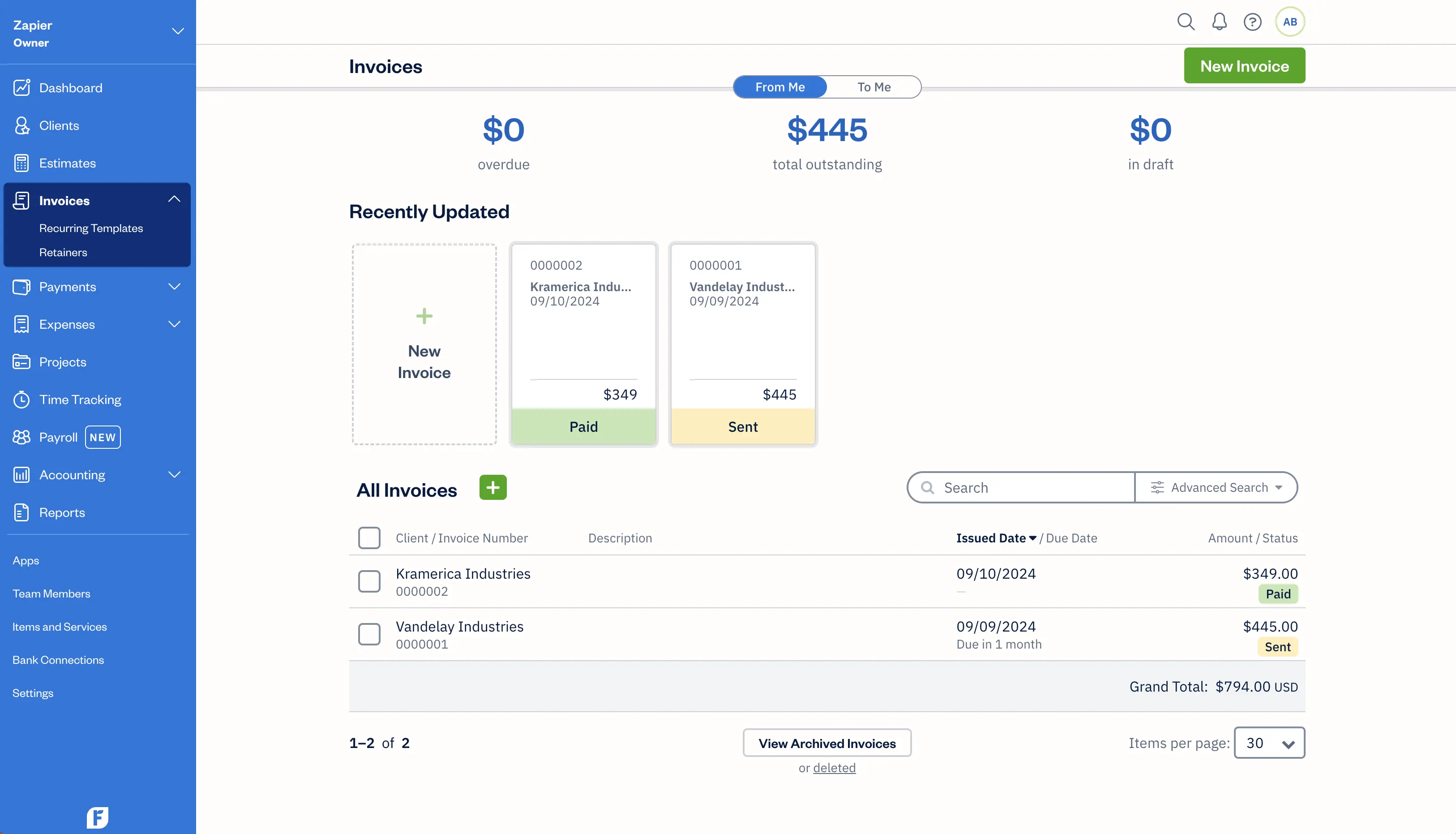
FreshBooks connects to 100+ apps natively and thousands more via Zapier, covering payments, payroll, CRM, and project management.
FreshBooks supports 100+ native integrations and connects to thousands more via Zapier.
Payments: Stripe, PayPal, Square, WePay (built-in). Apple Pay, Google Pay, and Buy Now, Pay Later available natively on all plans.
Payroll: Gusto (two-way sync, auto-categorizes payroll as expenses), PaymentEvolution (Canada), ADP. Gusto is generally better value than FreshBooks’ own payroll add-on.
CRM and Project Management: HubSpot, Capsule CRM (CRM); Asana, Trello, Basecamp, ClickUp (project management, most via Zapier).
Email and Productivity: Mailchimp, Gmail (create clients and invoice from inbox), Slack, Dropbox, Google Sheets. Zapier connects FreshBooks to 8,000+ additional apps.
Frequently Asked Questions
Does FreshBooks offer a free trial?
Yes. FreshBooks offers a 30-day free trial with full feature access and no credit card required. Promotional discounts (currently 70% off for the first 4 months) are also available, but expire. Budget at full plan cost when evaluating long-term value.
How much does FreshBooks cost for a 5-person company?
On Premium ($70/month), adding 4 team members at $11/month each totals $114/month, or roughly $1,368/year. At that price, QuickBooks Online Plus (5 users included, deeper accounting) at around $90/month is a stronger value for a team that size.
Is FreshBooks worth it compared to QuickBooks?
For a solo freelancer or 1-2 person service business billing hourly: yes. FreshBooks’ invoicing and time tracking are better for that use case. For a business with a team or complex books: QuickBooks Online wins on capability, and the price gap narrows fast once FreshBooks’ per-user fees are factored in. See our QuickBooks Online review.
Can FreshBooks handle payroll?
FreshBooks offers a payroll add-on at $40/month plus $6/employee. It also integrates with Gusto and ADP. For most small businesses, the Gusto integration is the better path: stronger payroll features at comparable pricing. FreshBooks payroll is a convenience option, not a reason to choose the platform.
How long does FreshBooks take to set up?
Most users send their first invoice within an hour. Connecting a bank account for automatic expense import takes another 15-30 minutes. No complex chart of accounts or opening balance journal entries required for basic operation. The 30-day trial covers a full billing cycle.
Is FreshBooks good enough to replace a dedicated time-tracking tool?
For most service businesses billing hourly to under 50 clients, yes. Built-in timer, project breakdowns, and one-click invoice conversion cover what tools like Harvest handle. For complex needs (multiple rate tiers, team approval workflows), a dedicated tool via Zapier may work better.
Does FreshBooks integrate with QuickBooks?
Not directly. The typical workflow is exporting FreshBooks reports and sharing them with an accountant, or giving accountant access directly (available on Plus and above). Some accountants prefer one platform; worth asking before committing.
Is FreshBooks HIPAA compliant?
No. FreshBooks is not designed or marketed as HIPAA-compliant and does not offer a BAA. Healthcare providers handling protected health information should use a platform with explicit HIPAA compliance built in.
Does FreshBooks offer discounts for nonprofits or students?
No standing nonprofit or education discount program. Promotional introductory pricing (percentage-off for new subscribers) is the main way to reduce entry cost. Nonprofits looking for free core accounting should consider Wave instead.
What is FreshBooks’ cancellation policy?
Month-to-month (or annual with 10% off), cancellable anytime with no fee. The key issue: access to historical invoices, client records, and reports is removed when a subscription lapses. Export all data before cancelling. No free read-only tier exists for past records.
Can FreshBooks replace a dedicated invoicing tool like HoneyBook?
For most use cases, yes, and then some. FreshBooks adds full accounting on top of invoicing. HoneyBook is stronger for client onboarding, contracts, and project workflows. If you need accounting records for a bookkeeper or tax preparer, FreshBooks is the better fit.
Is FreshBooks right for a solo consultant just starting out?
The Lite plan at $23/month works for a new freelancer with under 5 clients. Honest advice: if you expect to grow past 5 clients within 6-12 months, budget for Plus ($43/month) from the start. Hitting the Lite ceiling and being forced mid-stride is the most common new-user frustration.
Final Verdict
FreshBooks earns its reputation for a specific type of business: the solo or small-team service provider who needs professional invoicing, hourly billing, and clean expense tracking without learning accounting software. In that lane, it is genuinely one of the best tools available. The invoicing workflow is the fastest and most polished in its price range. The time-to-invoice connection is a real differentiator. And the interface stays out of your way in a way that QuickBooks does not.
The limits are real, though, and they scale with business size. The per-user fees make FreshBooks expensive for teams. The reporting is shallow for businesses that need financial insight beyond the basics. And the 2026 price increases mean the math no longer works as cleanly as it once did, especially for businesses that need multiple users or payroll.
The right use of FreshBooks is as a solo freelancer’s primary accounting tool, or as the billing and invoicing layer for a small service business with 1 to 3 people. Scale beyond that, and it is worth pressure-testing QuickBooks Online or Xero before committing to FreshBooks’ growing add-on costs.
Visit FreshBooks Official Site
Related Reads
Last updated on May 2, 2026