ADVERTISING DISCLOSURE: THIS POST CONTAINS AFFILIATE LINKS. READ FULL DISCLAIMER
The Verdict: Smokeball is the legal practice management platform built around automatic time capture, with a 20,000+ legal forms library and tight Microsoft Office integration. Pricing is not public and typically lands around $100 per user per month. The platform is hybrid (cloud plus Windows desktop) which limits it to Windows-based firms, but for hourly-billing firms losing time to manual entry, the automatic capture pays for itself.
Last updated May 6, 2026.
In This Review
What Smokeball Is
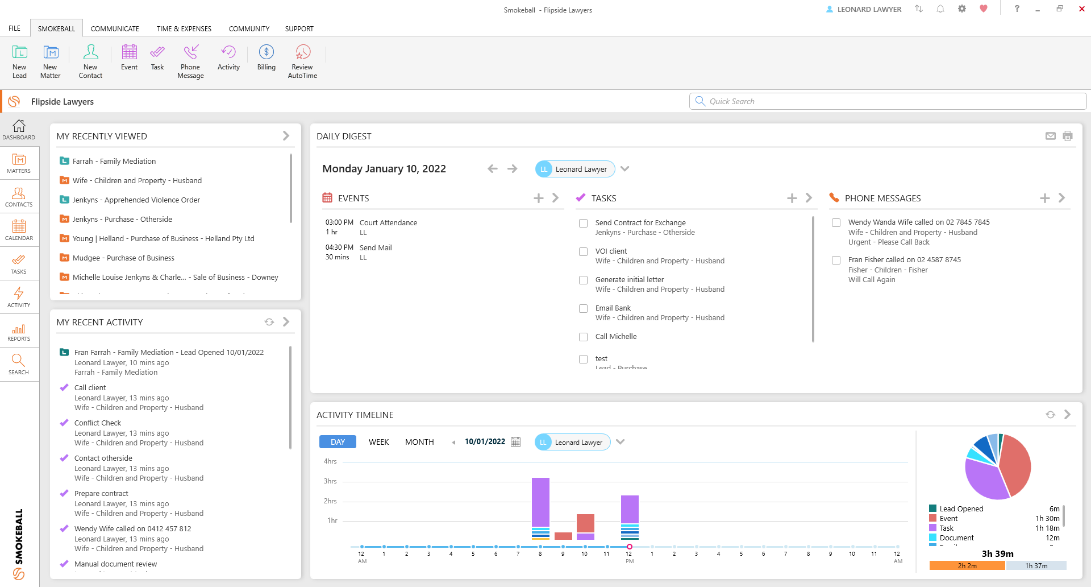
Smokeball is a legal practice management platform built around one core feature: AutoTime, the automatic time capture engine. The platform tracks every billable minute spent working in Microsoft Word, Outlook, and the Smokeball application itself. For hourly-billing firms that lose time to manual entry, this is the strongest argument for the platform.
Smokeball is a hybrid cloud and desktop platform. Core data lives in the cloud for secure access from anywhere, but locally installed Windows components handle the Microsoft Office integration and provide offline capability. This makes Smokeball Windows-only by default. Mac users and Google Workspace firms will hit immediate compatibility limits.
The platform serves solo, small, and mid-sized law firms primarily in the US, UK, and Australia. Smokeball serves over 200 matter types out of the box and includes a library of more than 20,000 federal and local court forms.
Source: Smokeball.com
Smokeball Pricing
Smokeball does not publish pricing publicly. You must request a demo and get a custom quote based on firm size, plan tier, and feature mix. Capterra estimates that most small and mid-sized firms budget around $100 per user per month for legal practice management software, and Smokeball typically lands in that range.
Smokeball offers four plan tiers:
| Plan | Price | What’s Included |
|---|---|---|
| Bill | Contact sales | Time and billing focus, basic case management, trust accounting, invoicing |
| Boost | Contact sales | Browser-based simplified version, case management, document management, billing |
| Grow | Contact sales | Full Smokeball platform, AutoTime tracking, document automation, Microsoft Office integration, 20,000+ forms |
| Prosper+ | Contact sales | Everything in Grow plus lead management, email marketing, advanced workflows, profitability management, custom reporting, OCR document search |
Important: Smokeball typically requires a multi-year contract to lock in initial pricing. Several long-term users on G2 report that renewal fees have nearly doubled at the end of their first 36-month contract. Negotiate renewal terms upfront, not at the end of the contract when leverage is gone.
The Real Pricing Question
Smokeball’s pitch is that AutoTime captures billable hours that would otherwise be lost. The company claims firms using AutoTime increase annual billable time by an average of $135,000 per fee earner. If those numbers hold for your firm, the price is irrelevant. If your firm bills mostly flat fee or contingency and AutoTime adds little value, the price becomes harder to justify.
For hourly-billing firms losing 5 to 10 percent of billable time to forgotten entries, Smokeball pays for itself quickly. For other practice models, the value math changes.
Key Features
AutoTime Automatic Time Capture
This is the platform’s defining feature. AutoTime tracks every billable minute spent in Microsoft Word, Outlook, and Smokeball without any manual timer starting. If your fingers are on the keyboard, Smokeball is capturing time. Daily billing review takes minutes rather than hours, and the platform consistently catches time that would otherwise slip past.
One real-world testimonial cited reclaiming 2 to 3 days per month previously spent on billing administration after switching to AutoTime.
Document Automation and Forms Library
Smokeball includes 20,000+ pre-built legal forms covering 250+ matter types across multiple jurisdictions. This is one of the largest legal forms libraries in the practice management market. Forms auto-populate with matter details, reducing drafting time significantly. Document automation includes conditional logic for more complex template logic.
For practice areas like family law, real estate, estate planning, and personal injury where standardized forms repeat constantly, this saves real time.
Microsoft Office Integration
Smokeball’s tightest integration is with Word and Outlook. Emails can be filed to matters directly from Outlook with one click. Documents save to and from Smokeball matters without leaving Word. This level of integration is significantly deeper than what Clio, MyCase, or PracticePanther offer, but it requires Windows.
Case and Matter Management
Smokeball organizes everything around matters with linked documents, emails, contacts, calendar events, tasks, and time entries. The interface is functional and feels familiar to anyone used to Microsoft Office. Custom matter templates and intake checklists are available on Grow and Prosper+.
Billing and Trust Accounting
Smokeball supports hourly, flat fee, contingency, and split billing. Trust accounting and IOLTA compliance tools are included on every plan. Recent updates added split billing and matter-level permission controls. The billing module integrates tightly with LawPay for payment processing.
AI Tools and Archie
Smokeball has rolled out native AI tools and an assistant called Archie. The AI features leverage centralized matter data to help firms get more done in less time. Specifics depend on plan tier and continue to expand.
Lead Management and Marketing (Prosper+)
The Prosper+ plan adds lead management, email marketing, and intake-to-engagement workflows. This makes Prosper+ a near-complete intake CRM, similar in scope to PracticePanther’s Business plan or Clio Grow.
Where Smokeball Stands Out
Best-in-Class Automatic Time Capture
This is the clearest differentiator in the legal practice management category. No competitor offers automatic time capture as deep, accurate, or unobtrusive as Smokeball’s AutoTime. For hourly-billing firms, this alone justifies the platform.
Massive Legal Forms Library
20,000+ forms covering 250+ matter types is significantly larger than any competitor’s native library. For practice areas with heavy form use, this saves hours per week and reduces dependence on third-party forms tools like LegalZoom or Practical Law.
Deep Microsoft Office Integration
The tight Word and Outlook integration is genuinely best-in-class. For firms whose attorneys live in Outlook and Word all day, the friction reduction is substantial. Email-to-matter filing, document save-to-matter, and inline calendar sync feel native rather than bolted on.
High Customer Satisfaction
Smokeball maintains very strong satisfaction scores across review platforms (4.7 to 4.8 on G2 and Capterra). Customer support is consistently praised. Onboarding is described as thorough, and ongoing training is included at no additional cost.
Hybrid Architecture for Performance
The hybrid cloud-plus-desktop architecture means Smokeball feels faster than purely web-based alternatives. Document operations, time tracking, and search work even with weak internet. For firms in areas with unreliable connectivity, this matters.
Where Smokeball Falls Short
Windows-Only Architecture
Smokeball requires Windows for the desktop component, period. Mac users hit a hard wall. Firms using Google Workspace will not get the deep integration value Smokeball offers Microsoft Office users. The Boost browser-based tier reduces this limit somewhat, but it strips out the AutoTime and document automation features that make Smokeball valuable in the first place.
Pricing Is Opaque
Not publishing pricing is a real friction in the buying process. Comparing Smokeball to Clio, MyCase, or PracticePanther requires a sales call before you know what you would pay. For firms doing fast comparison shopping, this is a barrier. The opacity also makes negotiating harder since there is no public anchor point.
Renewal Pricing Surprises
Multiple long-term users report that renewal pricing has spiked dramatically (some saying nearly doubled) at the end of their initial 36-month contracts. The pricing competitiveness that drove the original purchase decision often does not survive renewal. Negotiate renewal caps upfront before signing.
Performance Issues on Older Hardware
Reviewers consistently mention slow loading times, freezing, and high RAM usage, especially on older Windows computers. Smokeball is hardware-hungry. Plan to upgrade machines if your current Windows hardware is more than 3 to 4 years old.
Limited Custom Reporting
Custom reporting is restricted to the Prosper+ tier, and even there, reporting depth lags behind Clio Advanced. Firms wanting to build custom dashboards or do detailed financial analysis often export to Excel.
Smaller Integration Ecosystem
Smokeball integrates with Microsoft Office, LawPay, QuickBooks, RingCentral, DocuSign, and a handful of others. The native list is a fraction of Clio’s 250+. Firms with specialized tool stacks will hit limits quickly.
Billing Friction and Bug Reports
Reviews note ongoing billing edge cases, glitches, and compatibility issues. Most are minor friction, but the frequency suggests QA could be tighter. Splitting billing flexibility has been an issue for some users.
What Real Users Say
Smokeball holds excellent ratings on G2 (around 4.7) and Capterra (around 4.8) across hundreds of reviews. The patterns are highly consistent.
Common praise: AutoTime automatic time capture as a transformative feature, deep Microsoft Office and Outlook integration, massive legal forms library, high customer support quality, comprehensive onboarding and training, document automation capabilities, and significant time savings on billing administration.
Common complaints: Windows-only requirement, opaque pricing, dramatic renewal price increases at contract end, performance issues on older hardware, limited custom reporting depth, smaller integration ecosystem, occasional bugs especially in billing, and lack of Google Workspace integration.
Who Should Use Smokeball
- Hourly-billing firms losing time to manual entry where AutoTime delivers immediate revenue recovery
- Firms running on Windows and Microsoft Office that benefit from the deepest Word and Outlook integration in the category
- Practice areas with heavy form use like family law, real estate, estate planning, immigration, or personal injury where the 20,000+ forms library saves real time
- Solo and small firms wanting comprehensive onboarding and ongoing training included rather than self-serve
- Firms with reliable but not always fast internet who benefit from the hybrid architecture’s offline capability
- Firms ready to commit to a multi-year contract in exchange for initial pricing concessions
Who Should Not Use Smokeball
- Mac-based firms or Google Workspace firms who will not get the integration depth that justifies the platform
- Cost-sensitive solos who do not need automatic time capture, where MyCase or Clio EasyStart cost considerably less
- Flat-fee or contingency-only practices where AutoTime delivers minimal value
- Firms wanting transparent published pricing for fast comparison shopping
- Firms unable to commit to multi-year contracts or with concerns about renewal pricing
- Firms with older Windows hardware not budgeted for upgrades to handle Smokeball’s resource requirements
- Firms wanting the largest integration ecosystem, where Clio’s 250+ integrations meaningfully exceed Smokeball’s native list
Smokeball vs. Alternatives
| Platform | Best For | Starting Price | Key Difference |
|---|---|---|---|
| Smokeball | Hourly-billing Windows-based firms | Contact sales (~$100/user/mo) | Best-in-class AutoTime, 20,000+ forms, Windows-only |
| Clio | Firms wanting the safe industry default | $49/user/mo | 250+ integrations, Mac and Windows, no auto time capture |
| MyCase | Cost-conscious solos and small firms | $39/user/mo | Cheapest, simpler, native LawPay |
| PracticePanther | Firms wanting workflow automation depth | $49/user/mo | Stronger automation, no auto time capture |
| CosmoLex | Firms wanting built-in accounting | $109/user/mo | Native accounting, no QuickBooks needed |
Quick Pick Guide
- If you bill hourly and want passive time capture: Smokeball
- If you want the safest industry default: Clio
- If you want the cheapest option: MyCase
- If you need automation depth: PracticePanther
- If you want accounting built in: CosmoLex
Popular Integrations
Smokeball has a smaller native integration list than Clio but covers the essentials for Windows-based firms. The most common:
Microsoft Office: Microsoft Word (deep native integration), Microsoft Outlook (deep native integration), Microsoft Office 365.
Payments: LawPay (native).
Accounting: QuickBooks Online, QuickBooks Desktop.
E-signature: DocuSign.
Communication: RingCentral, phone and video conferencing on Prosper+.
Calendar: Microsoft Outlook calendar (native), Google Calendar sync.
Court forms: 20,000+ federal and local forms native to Smokeball.
Frequently Asked Questions
Does Smokeball offer a free trial?
Smokeball offers a free trial through a demo and consultation process rather than a self-serve trial. You request a demo, work with a sales representative to identify the right plan, and then trial the platform with onboarding support. This is more involved than Clio’s or MyCase’s instant free trials.
How much does Smokeball cost?
Smokeball does not publish pricing. Most small and mid-sized firms budget around $100 per user per month for legal practice management, and Smokeball typically lands in that range. Exact pricing depends on plan tier (Bill, Boost, Grow, or Prosper+), firm size, and contract length.
Is Smokeball worth it, or should I use Clio?
Smokeball is worth it if your firm bills hourly and you lose time to manual entry, where AutoTime delivers immediate revenue recovery. Clio is the better pick for Mac users, Google Workspace firms, firms wanting transparent pricing, or firms valuing a larger integration ecosystem.
Does Smokeball work on Mac?
No. Smokeball requires a Windows desktop component for full functionality. Mac users can access the cloud version on Boost, but lose the AutoTime tracking, document automation, and Microsoft Office integration that make Smokeball valuable. Clio or MyCase are better fits for Mac firms.
How long does Smokeball take to implement?
Most small firms are operational within 2 to 4 weeks. Smokeball includes comprehensive onboarding, live training, and ongoing support at no additional cost. Plan for additional time if migrating from another platform or if hardware upgrades are needed.
Is Smokeball’s automatic time capture really worth it?
For hourly-billing firms, often yes. Smokeball’s internal data claims firms increase annual billable time by an average of $135,000 per fee earner using AutoTime. For flat-fee or contingency practices, the value is much lower since the captured time does not directly drive billing.
Does Smokeball integrate with QuickBooks?
Yes. Smokeball integrates with both QuickBooks Online and QuickBooks Desktop. The integration handles invoice sync, payment tracking, and accounting reconciliation. Firms wanting truly integrated accounting without QuickBooks should look at CosmoLex instead.
Is Smokeball HIPAA compliant?
Smokeball uses bank-grade encryption, secure cloud hosting, and role-based access controls. HIPAA business associate agreements are available for firms representing covered entities. Verify current compliance status directly with Smokeball.
What is Smokeball’s contract structure?
Smokeball typically requires a multi-year contract, often 36 months, to lock in initial pricing. Renewal terms can include significant price increases. Negotiate renewal caps upfront, before signing the original contract, to avoid surprises later.
Does Smokeball have a mobile app?
Yes. Smokeball offers iOS and Android mobile apps for case access, time review, and basic billing. The full feature set including AutoTime requires the Windows desktop component, so mobile is supplementary rather than primary.
Is Smokeball good for personal injury firms?
Smokeball serves personal injury practices well, particularly for case management and the legal forms library. For firms needing dedicated personal injury workflow tools (settlement calculators, medical record management, lien tracking), specialized platforms like Filevine or CASEpeer offer deeper PI-specific features.
Is Smokeball right for solo practitioners?
Solos who bill hourly and run on Windows benefit most. Solo flat-fee or contingency practitioners may find the price hard to justify versus MyCase or Clio EasyStart. The Boost browser-based tier is a lower-priced entry point for solos but strips out AutoTime, which is the platform’s main reason to exist.
Final Verdict
Smokeball is the right answer for one specific buyer: the hourly-billing Windows-based firm that loses real money to manual time entry. AutoTime is genuinely best-in-class, the forms library is unmatched, and the Microsoft Office integration is deeper than anything else in the category. For that buyer, Smokeball pays for itself.
The trade-offs are significant. The Windows-only architecture eliminates Mac and Google Workspace firms entirely. Pricing opacity makes comparison shopping harder. Multi-year contracts with steep renewal increases catch some firms by surprise. Performance issues on older hardware add real cost. And the smaller integration ecosystem means firms with unusual tech stacks will hit walls.
For hourly-billing firms running Microsoft Office on Windows hardware, Smokeball deserves serious consideration. For everyone else, the alternatives in this category will likely serve them better at lower total cost.
Last updated on May 7, 2026