ADVERTISING DISCLOSURE: THIS POST CONTAINS AFFILIATE LINKS. READ FULL DISCLAIMER
Last updated: May 2026
Quick verdict: Otter.ai is one of the most established AI meeting assistants on the market, and it remains a reasonable pick for solo professionals and small teams who mostly live in Zoom, Google Meet, or Microsoft Teams and want searchable transcripts plus AI summaries. It does the basics well, the free tier is genuinely usable, and the platform is mature. The trade-offs are real, though: transcription accuracy can lag dedicated competitors on accented speech and noisy audio, the AI summary quality is generally considered behind newer entrants, and the pricing for unlimited features sits higher than several alternatives offering comparable functionality. If you record a handful of meetings a week and want a stable, recognizable name with broad calendar and conferencing integrations, Otter is a safe choice. If you want best-in-class summaries or specialized use cases like sales call analysis, look elsewhere.
What Otter.ai Is
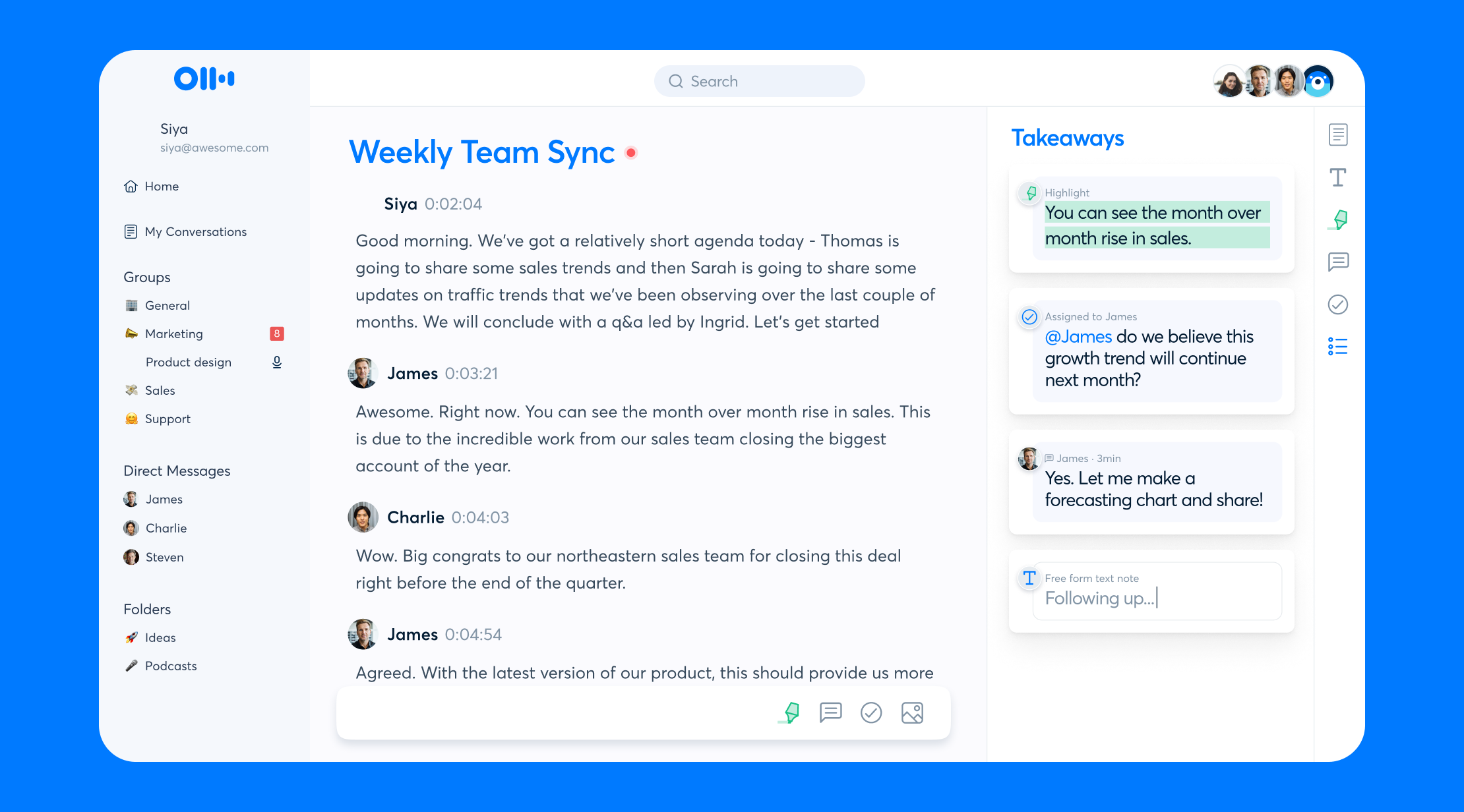
Otter.ai is an AI-powered meeting assistant that joins virtual meetings, records the audio, generates a live transcript, and produces an AI-written summary with action items afterward. The platform launched in 2016 and was one of the first consumer-facing speech-to-text products to gain traction outside of niche transcription services. Over the past few years it has shifted toward positioning itself as a full meeting workspace, layering AI chat, automated summaries, and lightweight collaboration features on top of the original transcription engine.
The core workflow is straightforward. Otter connects to your calendar, automatically joins meetings on Zoom, Google Meet, or Microsoft Teams as a bot participant, and produces a transcript in real time. After the meeting, the platform generates a summary, pulls out action items, and lets you search across all past transcripts. There is also a mobile app for in-person recording and a Chrome extension for desktop capture.
Otter sits in a crowded category. Direct competitors include Fireflies.ai, Fathom, and tl;dv, each of which has carved out a slightly different niche. Krisp overlaps on the meeting-notes side but is primarily a noise-cancellation tool with a transcription layer added on. Otter’s distinguishing feature is mostly its age and brand recognition; it is the tool many users have already heard of, and the free plan is generous enough that it remains a common entry point into the category.
Pricing
Otter.ai uses a tiered subscription model with a free plan and three paid plans. Pricing is per user per month and bills annually unless you choose monthly billing, which is typically more expensive. Prices may have changed since publication, so confirm current rates on the Otter.ai pricing page.
| Plan | Price (annual billing) | What you get |
|---|---|---|
| Basic (Free) | $0 | 300 monthly transcription minutes, 30 minutes per conversation, limited AI features |
| Pro | Around $10 per user per month | 1,200 monthly minutes, 90 minutes per conversation, advanced search, exports, custom vocabulary |
| Business | Around $20 per user per month | 6,000 monthly minutes, 4-hour conversations, admin controls, usage analytics, shared workspace |
| Enterprise | Custom | SSO, custom data retention, video replay, advanced security, dedicated support |
The pricing structure is fairly typical for the category, but a few details are worth flagging. The Pro plan’s 1,200-minute monthly cap works out to roughly 20 hours of meetings, which is enough for most solo users but can get tight if you record long workshops or back-to-back calls. The Business plan’s per-meeting cap of four hours is a real constraint for anyone running training sessions, all-day workshops, or extended interviews. Several competitors, including Fathom on its free plan, offer unlimited recording length, which makes Otter look comparatively restrictive at every tier.
One pricing wrinkle worth knowing: Otter has historically offered an in-product referral program that pays in non-cash rewards (additional Pro Lite minutes) rather than commission, so there is no widespread affiliate ecosystem driving inflated coverage. The pricing you see is generally the pricing you pay.
Where Otter.ai Stands Out
Mature, recognizable, and broadly compatible
Otter has been in the market longer than most direct competitors, which has tangible benefits. The Zoom, Google Meet, and Microsoft Teams integrations are deeply tested and generally reliable. The bot joins meetings consistently, the transcript appears in real time without dropouts on most calls, and the calendar sync rarely misfires. For a tool that needs to work without intervention every single day, this kind of operational maturity matters more than a flashy feature set.
The mobile apps for iOS and Android are also among the more polished in the category. In-person recording works well, the transcript syncs cleanly to the web app, and the offline mode handles spotty connectivity better than several newer entrants.
Generous free plan for getting started
The 300-minute free tier is enough to actually use the product for a month before deciding whether to pay. That is unusual in this category, where free plans often cap at a handful of meetings or strip out the AI features entirely. Otter’s free plan still includes basic AI summaries, which makes it a legitimate option for occasional users rather than a five-minute demo.
Solid search across historical transcripts
If you have been using Otter for a year or two, the search function is one of the more useful features in the platform. Full-text search across all past transcripts is fast, and the AI chat layer can answer questions about specific meetings or surface mentions of a topic across months of conversations. For knowledge workers who routinely need to recall what was said in a meeting six weeks ago, this is genuinely useful.
Speaker identification that improves over time
Otter’s speaker diarization works reasonably well out of the box and gets noticeably better as you label speakers in your account. For recurring meetings with the same participants, the system eventually learns voices and labels them automatically. This is not unique to Otter, but the implementation is mature and reliable.
Where Otter.ai Falls Short
Transcription accuracy is no longer best-in-class
Otter’s transcription engine is competent for clear English audio with familiar accents, but it has not kept pace with the broader leap in speech-to-text quality driven by foundation models. Users with non-North American accents, multilingual meetings, or noisy recording environments often report meaningfully better results from competitors like tl;dv or Fireflies, both of which lean on newer model architectures. If transcription accuracy is the single most important factor in your decision, Otter is no longer the obvious answer.
AI summary quality lags newer entrants
The AI summary feature works, but the output tends to be generic compared to competitors. Otter summaries often read as a rephrased list of topics rather than a useful synthesis of what was decided, who is doing what, and why. Tools like Fathom and tl;dv have invested heavily in summary quality and frequently produce notes that are closer to what a human notetaker would write. For some users this difference is small. For others, particularly anyone using meeting notes as the primary record of decisions, it is a real gap.
Per-meeting time limits create friction
The 30-minute, 90-minute, and four-hour caps on individual conversations across the free, Pro, and Business plans are a real constraint. Anyone running long workshops, training sessions, multi-hour interviews, or extended planning meetings will run into these limits. Several competitors offer unlimited recording length even on lower tiers, so this restriction feels increasingly out of step with the market.
Limited integrations beyond the basics
Otter integrates well with the major video conferencing platforms and offers calendar sync, but integrations beyond that are thinner than competitors. Native connections to CRMs, project management tools, and knowledge bases are limited, and most automation workflows require routing through Zapier or a similar middleware. For teams that want their meeting notes to flow automatically into Salesforce, HubSpot, Notion, or a similar system of record, the integration depth is a frequent source of frustration.
Privacy and data handling concerns have surfaced periodically
Otter has faced periodic scrutiny over its data handling practices, including past reports about how recordings and transcripts are stored and used. The company has updated its policies in response, but anyone handling confidential client information, legal matters, or regulated industry conversations should review the current data retention and processing terms carefully before adopting Otter at scale. This is not unique to Otter; most AI meeting tools have similar considerations, but the topic has come up enough that it is worth flagging.
How Otter.ai Compares
| Feature | Otter.ai | Fathom | Fireflies.ai | tl;dv |
|---|---|---|---|---|
| Free plan | 300 min/month | Unlimited recording | 800 min/month | Unlimited transcripts |
| Paid plan starting price | ~$10/user/mo | ~$15/user/mo | ~$10/user/mo | ~$18/user/mo |
| AI summary quality | Solid, generic | Strong | Strong | Strong, multilingual |
| Best for | Generalists, solo pros | Heavy users on a budget | Sales and CRM integration | Multilingual teams |
The honest summary is that Otter is rarely the best-in-class choice on any single dimension anymore. Fathom typically wins on free-tier generosity and value, Fireflies wins on integration depth and sales workflows, and tl;dv tends to win on transcription quality and multilingual support. Otter wins on familiarity, mobile app polish, and the depth of its historical transcript search if you have been using it for a while.
Who Should Use Otter.ai
Otter is a reasonable choice if you fit one of these profiles:
Solo professionals and consultants who record a moderate number of client calls and want a recognizable, reliable tool without much setup. The Pro plan at around $10 per month covers most independent professionals comfortably.
Small teams already in the Otter ecosystem who have built up months or years of searchable transcripts. The switching cost of moving that history elsewhere is real, and Otter remains good enough that staying put is usually fine.
Users who primarily need in-person recording via the mobile app. Otter’s mobile experience is one of the better implementations in the category, and the offline handling is dependable.
People who want a generous free tier to evaluate the meeting-assistant category without committing to a paid plan immediately.
Otter is probably not the right pick if you need best-in-class transcription accuracy, run frequent meetings over 90 minutes, work in multilingual environments, or rely heavily on integrations beyond Zoom and the major calendar systems. In those cases, one of the alternatives in the comparison table is generally a better fit.
Final Verdict
Otter.ai is a competent, mature meeting assistant that earned its market position by being early, reliable, and accessible. In 2026, it is no longer the standout option it was a few years ago, but it remains a defensible choice for solo professionals and small teams with mainstream needs. The free plan is generous enough to try without commitment, the paid plans are priced in line with the category, and the core workflow of automated transcription and AI summaries works as advertised.
The reasons not to choose Otter are mostly about ceiling rather than floor. Competitors have caught up and in some areas pulled ahead on transcription accuracy, summary quality, and integration depth. If any of those dimensions is critical to your workflow, take a serious look at Fathom, Fireflies.ai, or tl;dv before defaulting to Otter out of brand recognition. If none of them is critical and you mostly want a tool that quietly does its job, Otter still earns its place on the shortlist.
Frequently Asked Questions
Is Otter.ai free to use?
Yes, Otter offers a free Basic plan with 300 transcription minutes per month and a 30-minute cap per individual conversation. It includes basic AI summaries and is genuinely usable for occasional meetings, though heavier users will hit the limits quickly.
How accurate is Otter.ai transcription?
Otter’s transcription is generally competent for clear English audio with familiar accents, often landing in the 85 to 95 percent accuracy range depending on conditions. Accuracy drops on accented speech, multilingual meetings, and noisy environments, where newer competitors tend to perform better.
Does Otter.ai work with Zoom, Google Meet, and Microsoft Teams?
Yes, Otter integrates with all three major video conferencing platforms. The bot joins meetings automatically through calendar sync, and the integrations are among the most mature in the category.
Can Otter.ai transcribe in languages other than English?
Otter’s primary language is English. It supports a limited number of additional languages for some features, but multilingual support is weaker than competitors like tl;dv. Anyone running meetings in non-English languages should evaluate alternatives.
How does Otter.ai handle data privacy?
Otter publishes its data retention and processing policies on its website and offers Enterprise-level controls for custom retention and security requirements. Anyone handling confidential or regulated information should review the current terms carefully before adopting Otter at scale.
What is the difference between Otter Pro and Otter Business?
Pro is priced around $10 per user per month and offers 1,200 monthly minutes with 90-minute conversation caps. Business is roughly $20 per user per month with 6,000 monthly minutes, four-hour caps, admin controls, usage analytics, and a shared workspace for teams.
Can I export Otter.ai transcripts?
Yes, exports to TXT, DOCX, PDF, and SRT formats are available on the Pro plan and above. The free plan has limited export options.
Does Otter.ai have a mobile app?
Yes, Otter has well-regarded mobile apps for iOS and Android with in-person recording, offline support, and sync to the web app. The mobile experience is one of Otter’s stronger areas.
How does Otter.ai compare to Fathom?
Fathom offers unlimited recording on its free plan, generally produces stronger AI summaries, and is often the better value pick for heavy users. Otter has a more mature ecosystem, better historical search, and a more polished mobile app.
How does Otter.ai compare to Fireflies.ai?
Fireflies has deeper CRM and sales-tool integrations and is often preferred for revenue teams. Otter has a more generous free tier and a longer track record. For pure transcription and basic AI summaries, the two are close; for sales workflows, Fireflies pulls ahead.
Is Otter.ai worth paying for in 2026?
For solo professionals and small teams with mainstream needs, yes, the Pro plan at around $10 per month is reasonable value. For users with specific needs around accuracy, summary quality, or integration depth, the answer depends on whether a competitor is a meaningfully better fit for the use case.
Last updated on May 12, 2026