ADVERTISING DISCLOSURE: THIS POST CONTAINS AFFILIATE LINKS. READ FULL DISCLAIMER
The Verdict: Fireflies.ai is one of the most capable AI meeting assistants available, with strong transcription accuracy, a genuinely useful AI summary engine, and integrations that connect to nearly every tool in a modern business stack. The Pro plan at $10 per user per month (billed annually) is solid value for individuals and small teams. The main things to understand before buying: the AI credits system adds costs for heavy users, the visible meeting bot raises consent issues in some client-facing contexts, and billing practices have generated complaints worth knowing about.
Last updated May 3, 2026.
In This Review
What Fireflies.ai Is
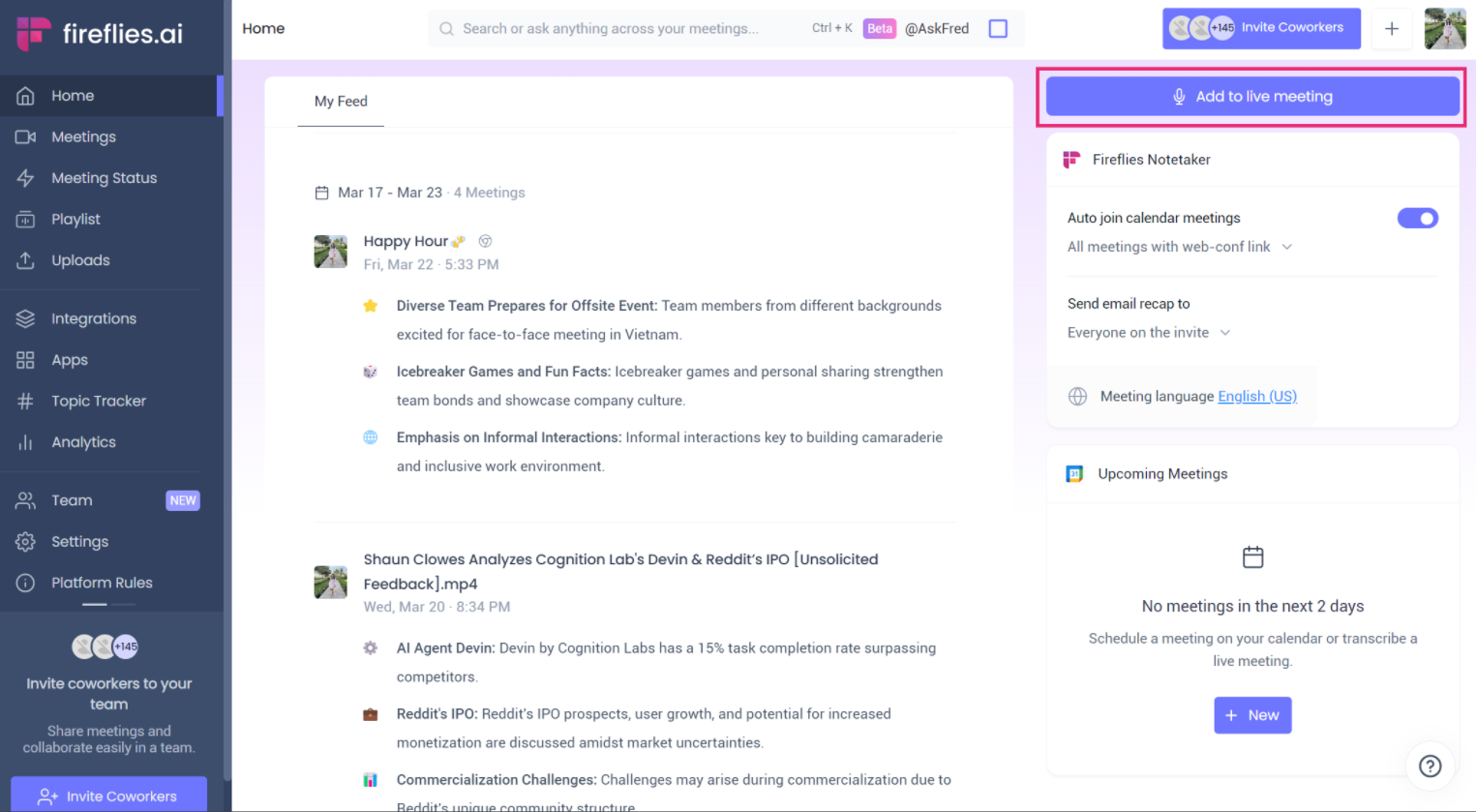
Fireflies.ai is an AI-powered meeting assistant that automatically records, transcribes, and summarizes your video calls. Its AI notetaker, “Fred,” joins your meetings as a participant, captures the full conversation, and delivers a structured summary with action items, key topics, and a searchable transcript to your inbox within minutes of the call ending. No manual note-taking, no re-listening to recordings, no writing up follow-ups from memory.
The platform is used across more than one million companies worldwide and has become one of the more widely adopted tools in the AI meeting assistant category. It works across all major video conferencing platforms including Zoom, Google Meet, Microsoft Teams, and Webex, and connects to over 200 business tools for CRM syncing, task management, and workflow automation.
What Fireflies.ai Is Built For
Fireflies is a strong fit for administrative professionals, operations teams, sales teams, and anyone who runs a high volume of meetings and needs a reliable record of what was said and what was decided. It is especially useful in contexts where meeting notes need to be shared, stored, and searchable over time, rather than just captured once and discarded.
It is not a project management tool, a scheduling tool, or a full CRM. Think of it as the documentation layer that sits on top of your meeting workflow and feeds clean, structured data into the tools you are already using.
Fireflies.ai Pricing
Fireflies offers four tiers. The pricing below reflects annual billing, which is 40 to 45 percent cheaper than month-to-month.
| Plan | Annual Price | Monthly Price | What’s Included |
|---|---|---|---|
| Free | $0 | $0 | Unlimited transcription, limited AI summaries, 800 minutes storage per seat. AskFred AI assistant, meeting search, 100+ language support, mobile app. |
| Pro | $10/user/month | $18/user/month | Unlimited transcription and AI summaries, 8,000 min storage per seat, transcript downloads, CRM and Zapier integrations, talk-time analytics, action items and task manager. 20 AI credits/month. |
| Business | $19/user/month | $29/user/month | Everything in Pro, plus unlimited storage, video recording (not just audio), conversation intelligence, team analytics, multi-language mode, user groups. 30 AI credits/month. |
| Enterprise | $39/user/month | Custom | Everything in Business, plus HIPAA compliance, SSO, SCIM, private storage, custom data retention, rules engine, dedicated account manager. 50 AI credits/month. |
The AI credits system deserves attention before you buy. AI-powered features (AskFred questions, advanced summaries, smart highlights) consume credits. Pro gets 20 credits per month. Business gets 30. Heavy users of AskFred and AI-generated content regularly run through their monthly allowance and face a prompt to buy more at roughly $0.10 per credit ($5 for 50). For occasional users this is not an issue. For teams relying on AI features daily, budget for credit top-ups or you will hit a wall mid-month.
The annual discount is significant. A team of five on Pro pays $600 per year billed annually versus $1,080 billed monthly, a difference worth noting before choosing a billing cycle.
Key Features
Automatic Recording and Transcription
Fireflies connects to your calendar and automatically sends Fred to join every scheduled meeting, or you can invite Fred manually to individual calls. Transcription happens in real time across 100+ languages, with speaker labels identifying who said what throughout the conversation. Once the meeting ends, the full transcript lands in your Fireflies dashboard and inbox within minutes.
Transcription accuracy is strong under good conditions. Fireflies claims approximately 95% accuracy on clean audio, and user reviews largely support that for standard meetings with clear audio, minimal background noise, and standard English. Accuracy drops on technical jargon, strong accents, heavily overlapping speech, and noisy environments. Manual corrections to the transcript, worth noting, do not update the AI summary automatically.
AI Summaries and Action Items
The AI Super Summary is the feature most users buy Fireflies for. After every meeting you receive a structured summary covering key topics, decisions, action items, next steps, and a high-level overview, without having to write a single word yourself. For administrative professionals managing follow-ups across a high volume of meetings, this alone saves significant time daily.
Action items are extracted automatically and assigned to the relevant speaker based on context. They can be pushed directly to task management tools like Asana, Trello, ClickUp, or Notion through the integrations layer.
AskFred AI Assistant
AskFred is Fireflies’ built-in AI assistant that lets you query your meeting library in plain language. Ask what was decided about a specific topic, get a follow-up email drafted from a call, or pull action items from last week’s client meetings, all without hunting through transcripts manually. Each AskFred query consumes one AI credit from your monthly allowance.
The 2026 Live Assist update extends AskFred into meetings themselves, providing real-time suggestions, background information, and coaching during the call rather than only after it ends.
Searchable Meeting Archive
Every meeting Fireflies captures becomes part of a searchable knowledge base. You can find a specific phrase, decision, or name mentioned in a call from six months ago and jump directly to that timestamp. For organizations that rely on institutional memory across a high volume of client or internal calls, this builds genuine long-term value over time.
Topic Trackers let you define keywords and phrases you want flagged across all calls, so you can monitor how often specific topics, competitors, or objections come up without reviewing every transcript manually.
Conversation Intelligence
On Business and Enterprise plans, Fireflies adds analytics across meetings: speaker talk-time ratios, sentiment analysis, topic frequency trends, and team-level reporting for administrators. This is most useful for sales managers and team leads who want coaching data without buying a dedicated conversation intelligence platform like Gong. It is not as deep as Gong or Chorus, but it is a meaningful addition at the Business plan price point.
CRM and Workflow Integrations
The integrations layer is one of Fireflies’ genuine strengths. Meeting notes and action items can be pushed automatically to Salesforce, HubSpot, Pipedrive, and other CRM platforms, eliminating manual data entry after sales calls. Slack notifications, Notion pages, Asana tasks, and Zapier automations are all available on the Pro plan and above. The Business and Enterprise plans unlock the full integrations suite including API access for custom workflows.
Where Fireflies.ai Stands Out
Platform Coverage Is Comprehensive
Unlike some competitors that work well on one or two platforms, Fireflies supports Zoom, Google Meet, Microsoft Teams, Webex, Dialpad, RingCentral, and more without requiring different setups for each. For admin professionals supporting teams that use different conferencing tools across different clients or departments, this breadth matters.
Setup Is Genuinely Fast
Connecting Fireflies to a calendar and having Fred auto-join meetings takes under ten minutes. There is no complex IT deployment, no training period, and no configuration overhead for basic use. Users consistently cite ease of setup as one of the platform’s strongest attributes in G2 and Capterra reviews.
The Searchable Archive Compounds Over Time
Most note-taking tools produce notes that get filed and forgotten. Fireflies’ searchable archive gets more valuable the longer you use it. An organization that has been using Fireflies for two years has a searchable record of every meeting, every decision, and every commitment made on those calls. That is a meaningful organizational asset, particularly for client-facing teams where institutional memory matters.
Integration Depth With CRMs
The HubSpot and Salesforce integrations are among the most cited reasons users stay on the platform. Pushing structured meeting notes directly to contact and deal records removes 10 to 15 minutes of manual CRM data entry per call, which adds up quickly for sales and customer success teams running five to ten client calls per day.
Where Fireflies.ai Falls Short
The Visible Bot Creates Consent Friction
Fred joins your meetings as a visible participant named “Fireflies.ai Notetaker.” Every person on the call can see it, and not every participant is comfortable with an AI recording their conversation. Some enterprise clients have policies against external recording tools. Some universities and regulated organizations block meeting bots entirely. And in sensitive client conversations, a visible AI participant can change the dynamic of the discussion. If bot-free recording is a hard requirement, Krisp records system audio without joining the meeting as a participant.
Consent is a real consideration. In March 2026, a class action was filed in the Northern District of Illinois (Case No. 1:26-cv-02675) alleging that Fireflies collects voiceprints without the notice and written consent required under Illinois’ Biometric Information Privacy Act, including from meeting participants who never created a Fireflies account. The case is ongoing. If you operate in Illinois or handle meetings with participants in regulated jurisdictions, review your legal obligations around recording consent before deploying Fireflies organization-wide.
AI Credits Run Out for Heavy Users
The AI credits system is the feature most likely to frustrate users who did not read the fine print. Pro users get 20 credits per month, Business users get 30. Each AskFred query or advanced AI feature consumes a credit. Teams that use AskFred daily, generate extensive smart highlights, or rely heavily on AI-generated content will exhaust their monthly allowance and need to purchase top-ups. At $5 for 50 additional credits, the cost is manageable, but the friction of hitting a wall mid-month and seeing an upsell prompt is genuinely annoying.
Transcription Accuracy Has Real Limits
The 95% accuracy claim holds up under good conditions. Technical terminology, heavy accents, multiple overlapping speakers, and poor audio quality all push accuracy down meaningfully. Life sciences terminology, legal jargon, and industry-specific language in particular generate errors that require manual correction. And since manual transcript corrections do not propagate to the AI summary, a corrected transcript can sit alongside an incorrect summary.
Billing and Cancellation Complaints
Trustpilot reviews raise recurring concerns about Fireflies’ billing practices, including reports of unexpected seat charges on Business plans after trial periods, difficulty canceling subscriptions, and automated support responses that do not resolve billing disputes. These complaints are more prevalent on Trustpilot than on G2 or Capterra, but they are consistent enough to warrant attention.
Before signing up: Note that the annual plan has no refund after the first 7 days or after 20 meetings are processed, whichever comes first. Confirm your seat count, billing cycle, and plan tier carefully at signup, and review your billing settings after any team changes.
Free Plan Storage Fills Up Fast
The free plan’s 800-minute storage limit fills in roughly six weeks of regular use for an active professional. The free plan is useful for testing Fireflies, not for long-term use. Anyone relying on Fireflies as a core workflow tool will need the Pro plan relatively quickly.
What Real Users Say
Fireflies.ai holds a 4.8/5 rating on G2 across roughly 735 verified reviews, and a 4.8/5 ease-of-use rating on Capterra. Trustpilot scores are lower at 4.3/5, with billing and cancellation issues more prominently represented there.
Common praise: Users consistently highlight transcription accuracy on clear audio, the quality of AI-generated summaries, ease of setup, and time saved on post-meeting follow-ups. The meeting search archive and CRM integrations receive specific praise from sales and customer success teams. Long-term users frequently describe Fireflies as something they cannot imagine working without.
Common complaints: Transcription errors on technical language, jargon, and noisy environments. AI summary inaccuracies that do not update when transcripts are manually corrected. The AI credits system creating unexpected upgrade pressure for heavy users. The visible bot making some clients or meeting participants uncomfortable. Billing disputes and cancellation friction appearing in Trustpilot reviews.
Who Should Use Fireflies.ai
- Administrative professionals who manage meeting notes, follow-ups, and action items across a high volume of internal or client-facing calls and want to stop spending time on manual documentation.
- Sales and customer success teams who want meeting notes pushed directly to Salesforce or HubSpot without manual data entry after every call.
- Small business owners and consultants running frequent client meetings who need a searchable record of decisions and commitments without a dedicated note-taker on staff.
- Operations and project managers who need action items from meetings captured and routed to task management tools automatically.
- Teams with multilingual meetings, given Fireflies’ 100+ language transcription support, which is stronger than most competitors in this space.
Who Should Not Use Fireflies.ai
- Professionals in highly regulated industries (legal, healthcare, financial services) where meeting recording consent requirements are strict and a visible AI bot participant creates compliance risk. Enterprise plan includes HIPAA compliance, but consent obligations go beyond that.
- Teams whose clients or participants regularly object to AI recording tools. If your meeting counterparts routinely remove notetaker bots, Fireflies will miss those calls.
- Users who rely heavily on AI features daily and are not prepared to budget for AI credit top-ups beyond the monthly plan allowance.
- Teams in Illinois or other BIPA jurisdictions who need to resolve consent obligations before deploying an AI meeting recorder organization-wide, given the ongoing litigation.
Fireflies.ai vs. Alternatives
| Platform | Best For | Starting Price | Key Difference |
|---|---|---|---|
| Fireflies.ai | Teams wanting strong CRM integration and a searchable meeting archive | Free / $10/user/month (annual) | Best integration depth; most platform coverage; AI credits system adds cost for heavy users |
| Fathom | Individuals who want free, no-credit-limit AI meeting notes | Free (generous) / $19/user/month | No AI credits system; unlimited AI summaries on free tier; less CRM integration depth than Fireflies |
| Otter.ai | Teams wanting real-time collaborative note editing | Free / $16.99/user/month | Stronger real-time collaboration; weaker CRM integrations than Fireflies; primarily English-focused |
| tl;dv | Teams who want timestamped video highlights shared quickly | Free / $20/user/month | Better video clip sharing; good for async teams; fewer integrations than Fireflies |
| Krisp | Teams that need bot-free recording or work in noisy environments | Free / $8/user/month (annual) | Records system audio without joining as a bot; 40+ dB noise cancellation; weaker AI summaries than Fireflies |
Quick Pick Guide
- You want AI meeting notes and your primary need is CRM sync to HubSpot or Salesforce: Fireflies Pro at $10/user/month is the strongest option in this category.
- You want unlimited AI summaries with no credits system and a generous free plan: Fathom is worth comparing before committing to Fireflies.
- Your team has clients or participants who regularly object to visible meeting bots: Krisp records system audio without joining as a participant, which avoids that friction entirely.
- You run meetings in multiple languages: Fireflies’ 100+ language support is one of the broadest in the category.
- You are evaluating for a regulated environment (healthcare, legal, financial services): Enterprise plan is required for HIPAA compliance, and you should review consent obligations independently of the software tier.
Popular Integrations
Fireflies connects to over 200 tools. The most commonly used integrations for administrative and operations teams include:
- CRM: Salesforce, HubSpot, Pipedrive, Zoho CRM, Copper
- Task management: Asana, Trello, ClickUp, Monday.com, Notion, Jira
- Communication: Slack (meeting summaries delivered to channels), Microsoft Teams
- Video conferencing: Zoom, Google Meet, Microsoft Teams, Webex, Dialpad, RingCentral, BlueJeans
- Automation: Zapier (connects to 5,000+ apps), Make (formerly Integromat)
- Storage and docs: Google Drive, Dropbox, Notion
- Recruiting: Greenhouse, Lever
- Calendar: Google Calendar, Outlook Calendar (for automatic meeting join)
Frequently Asked Questions
Does Fireflies.ai offer a free plan?
Yes. The free plan includes unlimited transcription, limited AI summaries, 800 minutes of storage per seat, meeting search, AskFred, and mobile app access. The 800-minute cap fills in roughly six weeks of regular business use, at which point you need to upgrade to Pro or delete old recordings to free up space.
Is Fireflies.ai worth it, or should I use Fathom instead?
It depends on your primary use case. Fathom’s free plan is more generous with no AI credits system and no storage limits on paid tiers. Fireflies is stronger on CRM integrations, platform breadth, multilingual support, and the long-term searchable archive. If you are a solo user who just wants clean AI meeting notes, Fathom is worth trying first. If you need HubSpot or Salesforce sync and you cover meetings across Zoom, Teams, and Google Meet, Fireflies earns its price.
What is the AI credits system and how does it work?
AI credits power the features that go beyond basic transcription: AskFred queries, advanced summaries, smart highlights, and AI-generated content. Pro gets 20 credits per month, Business gets 30, Enterprise gets 50. Each AskFred question or AI feature use consumes one credit. Additional credits can be purchased at approximately $0.10 each ($5 for 50). Light users will not notice the limit. Heavy daily users of AskFred should budget for top-ups.
Can Fireflies.ai transcribe meetings in languages other than English?
Yes. Fireflies supports transcription in 100+ languages, which is one of the broader multilingual offerings in the AI meeting assistant category. Multi-language mode on Business and Enterprise plans handles meetings where participants switch between languages mid-call.
Does Fireflies.ai integrate with HubSpot and Salesforce?
Yes. CRM integrations with HubSpot, Salesforce, Pipedrive, and others are available on the Pro plan and above. Meeting notes, action items, and summaries can be pushed automatically to contact and deal records, eliminating manual CRM data entry after calls.
Is Fireflies.ai HIPAA compliant?
HIPAA compliance is available on the Enterprise plan only, at $39 per user per month. Pro and Business plans do not include HIPAA compliance. If you are in a healthcare-adjacent role where HIPAA applies to meeting recordings, you will need Enterprise tier or a different tool.
What happens if a meeting participant removes the Fireflies bot?
If a participant removes Fred from a meeting, that meeting will not be captured. Fireflies has no way to record a call once the bot has been removed. For client-facing roles where participants may object to AI recording, this is a real workflow risk worth planning for.
Does Fireflies.ai record in-person meetings?
Yes. The 2026 desktop app allows Fireflies to capture audio from in-person meetings and offline conversations, not just video calls. The mobile app also supports audio uploads for transcription of recorded in-person content.
What is Fireflies.ai’s refund policy?
The annual plan has no refund after the first 7 days or after 20 meetings have been processed within those 7 days, whichever comes first. Monthly plans can be canceled at any time. Review cancellation terms before committing to an annual plan.
Can Fireflies.ai replace a human note-taker or executive assistant?
For capturing what was said and turning it into structured notes, yes, Fireflies handles the mechanical note-taking function very well. It does not replace the judgment layer of a skilled executive assistant: knowing which details matter politically, reading the room, deciding what to record versus what to leave out. It is a powerful tool alongside human support, not a full replacement for it.
Does Fireflies.ai work with Zoom and Microsoft Teams?
Yes. Fireflies supports both Zoom and Microsoft Teams natively, along with Google Meet, Webex, and a range of other conferencing platforms. The bot joins via calendar invitation, so no plug-in is required on the participants’ side.
Is Fireflies.ai right for a legal or financial services firm?
With caution. Client confidentiality obligations in legal and financial services add a layer of complexity around deploying AI recording tools. The Enterprise plan includes private storage and custom data retention, which addresses some security concerns. However, you should review your jurisdiction’s recording consent laws and your firm’s client confidentiality policies before deploying Fireflies for any client-facing meetings.
Final Verdict
Fireflies.ai is a strong, well-built AI meeting assistant that delivers on its core promise. The transcription is accurate, the AI summaries are genuinely useful, the integrations are deep, and the platform coverage is broader than almost any competitor in the category. For administrative professionals, operations teams, and sales teams running a high volume of meetings, the Pro plan at $10 per user per month (billed annually) is one of the better productivity investments available at that price point.
Go in with clear eyes on the limitations. The AI credits system will surprise you if you use AskFred heavily. The visible bot is a real friction point in some client-facing contexts. The billing and cancellation experience has generated enough complaints to be worth noting before you sign an annual plan. And the ongoing BIPA litigation is something regulated industries should track.
None of those are dealbreakers for most users. But they are the difference between a smooth experience and an annoying one. Know what you are buying, use the free plan to validate the transcription quality on your specific meeting types, and choose your billing cycle deliberately.
Visit Fireflies.ai Official Site
Last updated on May 12, 2026