ADVERTISING DISCLOSURE: THIS POST CONTAINS AFFILIATE LINKS. READ FULL DISCLAIMER
Last updated: May 2026
Quick verdict: Motion is an AI-powered calendar and task manager that automatically schedules your work day around your meetings, deadlines, and priorities. The pitch is simple: you stop deciding what to do next and Motion decides for you. For solo professionals and small firms billing by the hour (consultants, lawyers, accountants, agency owners), the value is real if you trust automated scheduling and have 2 to 4 weeks to set it up properly. Pricing starts at $19/seat/month on Pro AI ($12.73 annual) and $29/seat/month on Business AI ($19.43 annual). No free plan, only a 7-day trial. Skip Motion if your bottleneck is email triage rather than time-blocking, or if you prefer manual control of your calendar.
What Motion Is
Motion (at usemotion.com) is an AI scheduling and task management platform that sits between your task list and your calendar. You add tasks with a deadline, priority level, and rough duration estimate, and Motion’s AI automatically places them in available calendar slots. When a meeting gets added, runs long, or a task slips, Motion reshuffles your entire day in real time so the schedule stays current.
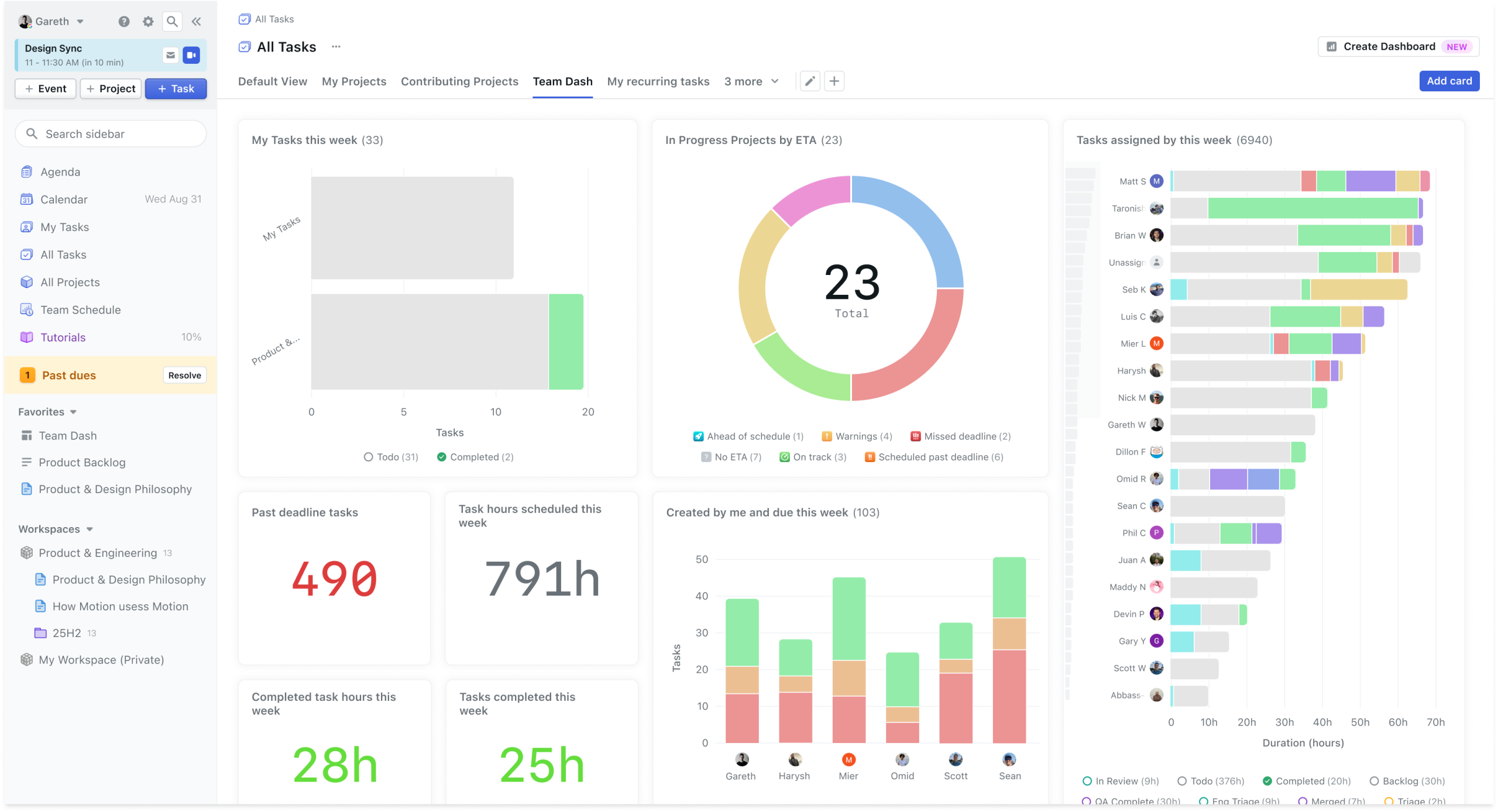
The platform launched in 2019 and has steadily expanded scope. In 2026 it is no longer just a calendar tool; the platform now bundles task management, project management with Gantt charts and dashboards, an AI meeting notetaker, AI Docs, AI Chat, and a set of “AI Employees” (specialized agents for sales, project management, executive assistant work). The core value, though, is still the auto-scheduling engine. Everything else is an addition built around that.
Motion explicitly positions itself for law firms, consulting businesses, IT service providers, marketing agencies, and real estate management on its own use-case pages. This is not a coincidence; professional service firms are exactly the buyers Motion’s pricing model is built for. Time is the billable unit, meetings dominate the day, and the cost of dropped tasks is high. That alignment matters when evaluating whether the premium price is justified.
Pricing in 2026
Motion has two main tiers for individuals and small teams, both billed per seat. There is no free plan, only a 7-day free trial with full feature access.
Pro AI is $19/seat/month on monthly billing or $12.73/seat/month on annual billing (annual saves 33%). It includes the full AI scheduling engine, projects and tasks, the AI calendar with meeting links, AI Docs and notes, AI Chat, the AI meeting notetaker, the mobile and desktop apps, integrations, and 7,500 AI credits per seat per month. This is the right tier for solo professionals and freelancers.
Business AI is $29/seat/month monthly or $19.43/seat/month annual. It adds team capacity planning, advanced dashboards and reports, timeline and Gantt charts, time tracking, permissions and access controls, central billing, priority support, and 15,000 AI credits per seat per month. This is the right tier for firms with 3+ team members who need shared project visibility or time tracking for billable work.
For larger teams, Motion offers AI Employees plans (Light, Standard, Plus) with fixed seat counts (3, 10, 25) starting around $99/month for 3 seats annual. These tiers add more AI credit allocations and AI Employee features but are most relevant for firms running multiple service lines. Enterprise pricing is custom.
One pricing note worth flagging: credits do not roll over month to month. Heavy use of AI Chat, the meeting notetaker, or AI Docs can deplete your monthly allocation. Auto-scheduling itself does not consume credits, but the broader “AI Super App” features do. For a solo professional using Motion primarily as a calendar tool, 7,500 credits is more than enough. For someone using AI features aggressively, monitor consumption in the first month.
Where Motion Stands Out
Auto-scheduling actually works
This is what Motion is genuinely best at. You add a task with a deadline and priority, and it lands in a real calendar slot without you deciding when. When your day blows up (an unexpected client call, a hearing running late, a meeting moved), Motion reshuffles everything affected automatically. For solo professionals juggling multiple matters or clients, this removes the constant mental overhead of “what should I be doing right now?” Motion answers that question continuously.
Built-in project management for client work
Motion includes kanban boards, Gantt charts, and dashboard views alongside the calendar. For service firms running matters or engagements, you can organize tasks by client or project, assign them, and watch progress against deadlines in one place. This is meaningful because it replaces what often becomes a separate stack (Trello or Asana for task management + Google Calendar for scheduling + a spreadsheet for deadlines). Everything lives in one platform with consistent context.
Dynamic rescheduling around meetings
Most calendar tools assume meetings are fixed and tasks are flexible, but you still have to manually move tasks when meetings change. Motion treats every task as a moveable block that the AI continuously repositions based on what’s actually in your day. This is the workflow that genuinely saves time for meeting-heavy professionals. A solo lawyer with 5 client calls, 3 court filings to draft, and a deposition prep due Friday will see Motion auto-rebuild the week as each piece shifts.
Calendar and tool integrations
Motion connects to Google Calendar, Microsoft Outlook 365, iCloud Calendar, Zoom, Microsoft Teams, Google Meet, Slack, and Zapier (with access to 7,000+ apps through Zapier). The Slack integration is useful for small firms where partners or staff need quick scheduling visibility. Calendar sync is bidirectional and works reliably across all major platforms.
Meeting notetaker built in
The AI meeting notetaker records, transcribes, and summarizes meetings, then generates follow-up tasks automatically. For client consultations, intake calls, or internal team meetings, this eliminates the need for a separate tool like Fireflies.ai or Fathom. It’s worth knowing this is included before paying for both, though dedicated notetakers still tend to win on transcription accuracy and language support.
Where Motion Falls Short
Steep learning curve and setup time
Motion requires real upfront effort before it pays off. You have to enter realistic task durations, set priorities accurately, configure work hours and personal time, and let the AI learn your patterns. Most professional users report 2 to 4 weeks before Motion feels intuitive. The 7-day free trial is genuinely tight for evaluation; plan to be patient through the first month or skip the tool entirely.
Mobile app lags the desktop experience
The desktop and web apps are strong, but the mobile experience is consistently rated lower by users. For solo professionals who need to check or adjust schedules from their phone (between client meetings, in court, on site visits), this is a real limitation. Treat Motion as a desktop-primary tool with mobile as a viewing companion rather than expecting full feature parity.
Aggressive rescheduling can be disorienting
The same feature that makes Motion powerful (constant auto-reshuffling) is what some users dislike most. Tasks move around your calendar frequently, which works fine if you trust the AI’s prioritization but is disorienting if you prefer to plan your day yourself. Motion is built for users who want to hand off scheduling decisions entirely, not for people who prefer manual control. If you’re someone who builds a deliberate morning plan and follows it, Motion may fight you.
Cost adds up at firm scale
For a solo professional at $12.73/month annual, Motion is fairly priced. For a 5-person firm at $19.43/seat/month annual, you’re looking at roughly $1,166/year. That’s reasonable if Motion replaces multiple tools (project management, meeting notes, scheduling) but expensive if it’s just a calendar layer on top of what you already use. Run the consolidation math before signing up a full team.
No quick-capture workflow
Motion requires context for every task: duration, deadline, priority. This is what makes the AI scheduling work, but it’s also friction. If you tend to brain-dump tasks quickly and triage later, Motion will fight you. Tools like Todoist or Things handle quick capture better; Motion expects you to invest a moment of thought in every entry.
Who Motion Is Best For
Motion fits solo professionals and small firms in client-service industries where time is billable and meetings dominate the day. Solo attorneys, consultants, accountants, real estate agents, and agency owners running multiple matters or clients simultaneously get the clearest value. The auto-rescheduling alone saves several hours per week of calendar wrangling for the right kind of user.
Small partnerships and 3 to 10-person service firms are the strongest team fit. The Business AI tier with shared project visibility, time tracking, and Gantt charts replaces what often becomes a sprawl of Trello, Toggl, and a shared Google Calendar. The consolidation case is genuinely strong here.
Executives, principals, and partners with packed schedules and frequent meeting changes benefit most. If your day is at least 50% meetings and you struggle to find blocks for deep work, Motion’s protection of focus time is meaningful.
Motion is not the right tool for professionals whose main bottleneck is email triage rather than scheduling (a tool focused on inbox triage will help more), for anyone who prefers manual control of their calendar, or for firms with simple workflows where a basic calendar plus a to-do list already works. Don’t pay for AI scheduling if you don’t actually need scheduling automated.
How Motion Compares
| Tool | Starting Price (Annual) | Best For |
|---|---|---|
| Motion | $12.73/seat/month | Solo pros and small firms needing automated time-blocking |
| Reclaim AI | $8/month | Lighter AI scheduling with more manual control |
| Sunsama | $16/month | Mindful daily planning, manual time-blocking |
| Akiflow | $19/month | Calendar + email + task aggregation in one inbox |
Final Verdict
Motion is the right tool for solo professionals and small service firms whose work is genuinely meeting-driven and deadline-driven. Pro AI at $12.73/month annual is justifiable for an individual practitioner if you’ll actually use auto-scheduling rather than fight it, and Business AI at $19.43/seat/month annual makes sense for small partnerships that need shared project visibility.
For everyone else, Motion is harder to justify. The setup investment is real, the learning curve is steep, and the price is meaningfully higher than basic AI calendar tools. Start with the 7-day trial but plan to give it the full month if you commit. Motion’s value emerges only after you’ve trained it on your work patterns. If the trial week leaves you frustrated, that’s data; don’t sign an annual contract hoping it will click later.
Frequently Asked Questions
How much does Motion cost?
Pro AI is $19/seat/month monthly or $12.73/seat/month on annual billing. Business AI is $29/seat/month monthly or $19.43/seat/month annual. Annual saves 33%. There is no free plan; only a 7-day trial.
Does Motion have a free trial?
Yes, a 7-day free trial with full feature access. No credit card is required to start, but the trial period is genuinely short; most users need 2 to 4 weeks before Motion feels intuitive, so plan accordingly.
How does Motion’s auto-scheduling actually work?
You add a task with a deadline, priority level, and estimated duration. Motion’s AI looks at your existing calendar (meetings, focus blocks, working hours, personal commitments) and places the task in the best available slot. When something changes (a meeting added or moved, a task overrunning), Motion reshuffles affected tasks automatically.
Is Motion good for law firms or accounting practices?
Yes, particularly for solo practitioners and small partnerships. Motion explicitly markets to law firms, accounting practices, and consulting businesses on its own use-case pages. The combination of deadline-driven scheduling, client/matter-level project organization, and time tracking on Business AI fits how professional services run. Larger firms with existing practice management systems should evaluate whether Motion complements or duplicates their stack.
Can Motion track billable time?
Yes, on the Business AI tier. Time tracking is included alongside project management features. For firms billing by the hour, this can replace standalone tools like Toggl or Harvest. The Pro AI tier does not include time tracking; if billable hours are central to your work, plan for Business AI.
What integrations does Motion support?
Motion connects to Google Calendar, Microsoft Outlook, iCloud Calendar, Zoom, Microsoft Teams, Google Meet, Slack, and Zapier. Through Zapier you can connect to 7,000+ additional apps. Calendar sync is bidirectional and reliable across major platforms.
How long does Motion take to set up?
Plan for 2 to 4 weeks before Motion feels natural. The initial setup (connecting calendars, entering tasks, configuring work hours and priorities) takes a few hours. The AI then needs time to learn your patterns and your rescheduling preferences. Users who give up in week 1 typically don’t see the value; users who push through to week 3 or 4 usually do.
Does Motion replace my project management tool?
For solo professionals and small firms, yes. Motion’s kanban boards, Gantt charts, dashboards, and time tracking cover what most service firms need. For firms with complex workflows, dependencies across multiple teams, or specialized practice management requirements, Motion may not fully replace dedicated PM software. Run a trial with real work before consolidating.
What if Motion’s scheduling decisions are wrong?
You can manually override any task placement, drag tasks to different slots, or adjust priority and deadline to influence the AI. The system learns from your overrides over time. Some users find the AI’s aggressive rescheduling disorienting; if you prefer to plan your day deliberately and stick to it, Motion may fight you. The auto-rescheduling cannot currently be disabled; it is core to how Motion works.
Can I cancel Motion anytime?
Monthly billing can be canceled at any time. Annual plans are locked for the 12-month term but can be set to not auto-renew. Motion does not currently offer prorated refunds for mid-term cancellations on annual plans, so commit to annual only after the trial confirms the fit.
This article is informational only and not legal, financial, or professional advice. Software features and pricing may change; verify current details with the vendor before purchasing.Last updated on May 13, 2026