ADVERTISING DISCLOSURE: THIS POST CONTAINS AFFILIATE LINKS. READ FULL DISCLAIMER
Last updated: May 2026
Quick verdict: CaseFleet is litigation case management software built specifically for organizing facts, evidence, and chronologies. The Advanced AI plan at $75 per user per month is where the product genuinely earns its keep, with document summarization, semantic search, and AI-suggested facts that can shave hours off document review. It is a sharp, focused tool for trial lawyers, not a full practice management platform. If you need trust accounting or billing, look elsewhere. If you live in discovery and timelines, this is among the strongest options on the market.
What CaseFleet Is
CaseFleet is a cloud-based litigation case management platform designed for one core job: helping lawyers and legal teams organize the facts of a case and connect them to the evidence that proves them. The product was built by litigators, and that focus shows. It is not trying to be Clio. It is not trying to replace your billing system. It is trying to make the messy work of building a case chronology faster and more defensible.
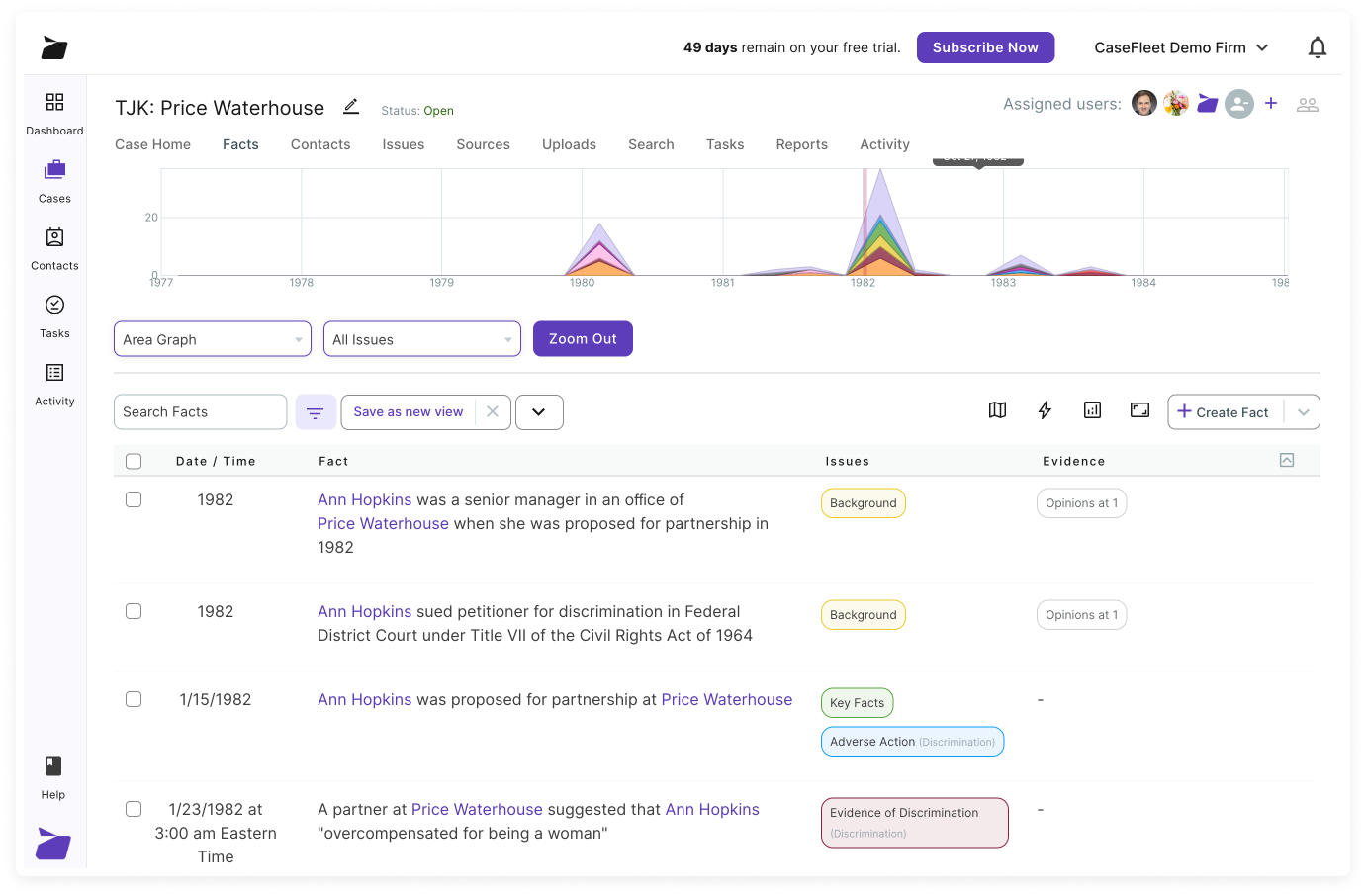
The platform centers on three things: a fact chronology builder that lets you create dated facts and link each one to source documents, a document reviewer that lets you highlight text in a PDF or transcript and turn that highlight into a linked fact, and a reporting engine that exports everything into deposition outlines, summary judgment statements, and trial-ready chronologies.
In 2025 and 2026, CaseFleet added a meaningful layer of AI capabilities, including document summarization, semantic indexing, named entity recognition, and an AI Assistant that can extract facts and answer natural-language questions about the case file. These are bundled under the Advanced AI plan and represent the most significant change to the product in years. Headquartered in Atlanta and operated by LAWPRCT, Inc., CaseFleet positions itself as a modern alternative to legacy tools like CaseMap and Case Notebook.
Pricing
CaseFleet runs on a simple two-tier structure with an Enterprise option for larger firms. Both plans offer a 25% discount when billed annually rather than month-to-month.
Starter: $30/user/month (annual)
The Starter plan covers core case organization: chronology building, fact-to-evidence linking, document review, witness and contact organization, and case outlines. It comes with a 20-document-per-case cap, which is the meaningful constraint here. For a small case with a contained set of records, that ceiling is workable. For most litigation matters that involve substantial discovery, you will hit it quickly. Starter includes 3,000 free OCR pages per user per month and three free hours of media transcription. It does not include full-text search or any AI features.
Advanced AI: $75/user/month (annual)
This is the plan most litigators will actually use, and CaseFleet flags it as Most Popular for a reason. You get unlimited documents per case, full-text search across all uploaded documents, and the full AI suite: Document Intelligence (summarization, semantic indexing, entity recognition), the AI Assistant for natural-language case queries, Suggested Facts that surface candidate facts directly from documents you are reviewing, AI-generated issues and tasks, and a HIPAA agreement option for medical records work. The plan includes 500 free Document Intelligence pages per user per month and 10,000 free AI credits per user per month.
Enterprise: Custom (20+ users)
Enterprise adds SSO, data migration services, advanced user management, dedicated account management, and priority support. Pricing requires a conversation with sales.
Overage and add-on costs to watch
This is where the real budgeting work lives. CaseFleet uses a metered model on top of the seat license, and the numbers are easy to miss when you compare plans on price alone.
- OCR: $1 per 100 pages after the 3,000-page monthly allowance
- Media transcription: $0.06 per minute after the three-hour monthly allowance
- Document Intelligence (AI): $0.02 per page after the 500-page allowance
- AI credits: $0.001 per credit after the 10,000-credit allowance
- Document storage: $10 per GB per month, on every plan
For a typical small firm running two or three active matters, the included allowances cover most months. For a complex case with thousands of pages of medical records or hours of deposition video, you can spend several hundred dollars on overages in a single month. Worth modeling before you commit, particularly if you are pricing this against alternatives like Clio or other legal platforms that bundle storage differently.
Where CaseFleet Stands Out
Chronology building that genuinely works
The core feature, building a fact chronology with linked evidence, is the cleanest implementation in the legal tech market. You highlight a sentence in a deposition transcript, click to create a fact, assign a date and an issue tag, and CaseFleet stores the link back to that exact location in the document. When you later generate a deposition outline or summary judgment statement, every fact carries a citation back to the source. For litigators who have spent years cobbling this together in Word, Excel, and a folder of PDFs, the time saved on a single complex matter can pay for the subscription many times over.
The AI features are actually useful
AI in legal software has been overhyped for the better part of three years. CaseFleet’s implementation is one of the more grounded attempts. Document Intelligence summarizes a 50-page deposition into a one-page summary with timestamps. Suggested Facts reads through uploaded documents and proposes candidate facts you can accept or reject into your chronology. The AI Assistant answers questions like “what dates does the plaintiff allege the harassment occurred” by pulling directly from your case file. None of this replaces a careful lawyer reading the documents, but as a triage layer on large discovery productions, it is meaningful.
Document review feels modern
CaseFleet’s document reviewer handles PDFs, audio, and video. You can timestamp notes on a video deposition, highlight text in a PDF and turn it into a linked fact, and search across all uploaded documents on the Advanced AI plan. The interface feels closer to a modern web application than the legacy desktop tools many litigators still use.
Reporting that produces real work product
Pre-built report templates generate cross-examination outlines, mediation statements, statements of material fact, and initial disclosures. Each report can be exported to Word or PDF with citations intact. The “Facts by Issues” report in particular is a useful organizing tool when you are heading into trial or summary judgment.
Customer support is unusually responsive
This comes up in nearly every user review, and it is a real differentiator in legal software. CaseFleet’s chat support is fast, the people answering know the product, and complex questions tend to get human responses rather than canned scripts. For a small firm without internal IT support, that matters.
Where CaseFleet Falls Short
It is not a practice management platform
CaseFleet is explicit about this, but it is worth restating. You will not run your trust accounting, billing, client intake, or calendaring through CaseFleet. If you want one platform to handle the entire business of running a law firm, look at Clio, Lawmatics, or another all-in-one solution. CaseFleet sits alongside those tools as your litigation workspace, not in place of them.
No native integrations
CaseFleet does not integrate with Microsoft 365, Google Workspace, or most other tools in a typical legal stack. Documents move in and out by upload and export. For firms used to deep integrations between their case management and email or calendar, this is a genuine workflow friction.
The 20-document Starter cap is restrictive
Twenty documents per case is enough for a simple matter but unworkable for almost any litigation file involving meaningful discovery. In practice, this pushes most serious users to Advanced AI, which is fine if you want the AI features but feels like an artificial constraint if you are just trying to organize a small set of documents at the lower price point.
Audio transcription quality is uneven
Several user reviews note that audio transcription, while included, is not always accurate enough for deposition-grade work. For high-stakes transcripts, most firms will still use a dedicated court reporting service and import the official transcript rather than rely on CaseFleet’s AI transcription as the source of record.
Pricing complexity from overages
The metered overage model on OCR, transcription, AI processing, and storage is reasonable on a per-unit basis, but it can produce surprising monthly bills on document-heavy cases. Firms accustomed to flat-fee software pricing should model expected usage before committing, especially on cases that involve large medical record sets or extensive video evidence.
How It Compares
CaseFleet sits in a specific niche: dedicated litigation case management with strong chronology and document review features. The closest legacy comparisons are LexisNexis’s CaseMap and Thomson Reuters Case Notebook, both of which CaseFleet actively positions against on its website. For a broader view of how it fits the legal tech stack, here is how it compares to commonly considered alternatives.
| Tool | Best for | Starting price |
|---|---|---|
| CaseFleet | Litigation chronologies, document review, AI fact extraction | $30/user/month |
| Clio | Full practice management (billing, intake, matters) | $49/user/month |
| Lawmatics | Client intake, marketing automation, CRM | Quote-based |
| Westlaw | Legal research, case law, citators | Quote-based |
| Fastcase | Affordable legal research alternative | $95/month |
The honest framing: CaseFleet does not replace any of these tools, and none of them replaces CaseFleet. A working trial lawyer’s stack might reasonably include all of them. CaseFleet’s competitive position is against legacy chronology software, not against practice management or research platforms.
Who CaseFleet Is For
The clearest fit is the trial lawyer or litigation team handling cases with meaningful document volume, multiple witnesses, and an evolving fact pattern that needs to be organized over weeks or months. Employment litigation, personal injury, complex commercial disputes, criminal defense with substantial discovery, and medical malpractice all sit squarely in CaseFleet’s wheelhouse. The product is particularly strong for solo and small firm litigators who cannot afford a dedicated litigation support staff and need a tool that compresses the work of one.
It is also worth noting that CaseFleet markets directly to journalists, investigators, and even writers who need to organize complex source material into timelines. Those use cases work, but the product is priced and built for the legal market.
Who should look elsewhere: solo transactional lawyers (no real fit), firms that need a single all-in-one platform (look at Clio), and large firms with established eDiscovery platforms like Relativity (CaseFleet is not designed for document productions at that scale).
FAQ
How much does CaseFleet cost?
CaseFleet starts at $30 per user per month for the Starter plan when billed annually, or $40 per user per month on month-to-month billing. The Advanced AI plan, which most users actually want, is $75 per user per month annually. Enterprise pricing for firms with 20 or more users is custom.
Is there a free trial?
Yes. CaseFleet offers a 14-day free trial with no credit card required. The trial includes access to all AI features but caps uploads at 10 documents per case during the trial period.
Does CaseFleet replace my practice management software?
No. CaseFleet does not handle billing, trust accounting, client intake, or calendar management. It is built to sit alongside a practice management platform, not replace one. Most firms run CaseFleet in addition to Clio, Lawmatics, or a similar tool.
What is the difference between the Starter and Advanced AI plans?
Starter limits you to 20 documents per case and excludes full-text search and all AI features. Advanced AI removes the document cap, adds full-text search, and unlocks Document Intelligence, the AI Assistant, Suggested Facts, and HIPAA support. For any matter beyond a small case, Advanced AI is the practical choice.
How does the AI work?
CaseFleet’s AI features include automated document summarization, named entity recognition that identifies people and organizations across your case file, semantic indexing that powers natural-language search, and Suggested Facts that propose candidate facts directly from documents. The AI Assistant lets you ask plain-English questions about the case and pulls answers from your uploaded documents with citations.
Is CaseFleet HIPAA compliant?
CaseFleet offers a HIPAA Business Associate Agreement option on the Advanced AI and Enterprise plans. This matters for firms handling medical records in personal injury, medical malpractice, or workers’ compensation matters.
Can I import data from CaseMap or Case Notebook?
CaseFleet positions itself as an alternative to both CaseMap and Case Notebook and supports migration from each. Enterprise plans include dedicated data migration services. For Starter and Advanced AI customers, migration tools and guidance are available through CaseFleet support.
What happens if I exceed the included AI credits or OCR pages?
Overages are billed per unit: $1 per 100 OCR pages, $0.06 per minute of media transcription, $0.02 per Document Intelligence page, and $0.001 per AI credit. Storage costs $10 per GB per month on every plan. For document-heavy cases, these add up, so it is worth modeling expected usage in advance.
Does CaseFleet integrate with my email or calendar?
No. CaseFleet does not currently integrate with Microsoft 365, Google Workspace, or other email and calendar tools. Documents and data move via upload and export. This is one of the product’s clearer limitations.
Is CaseFleet secure?
CaseFleet uses bank-level encryption at rest and in transit, hosts on AWS, and offers two-factor authentication, role-based permissions, and SSO on Enterprise. The platform meets the security expectations of most legal practice settings, though firms with specific regulatory or court-mandated requirements should review CaseFleet’s security documentation directly.
Can I cancel anytime?
Yes. Month-to-month subscribers can cancel any time by contacting CaseFleet support. Annual subscribers are committed for the year but receive a 25% discount in exchange.
Final Verdict
CaseFleet is a focused, well-built tool that does one thing exceptionally well: helping litigators organize the facts of a case and connect them to evidence. The Advanced AI plan at $75 per user per month is the version of the product worth paying for, and the AI features added in 2025 and 2026 are among the more practical implementations in legal tech. The product is not trying to be everything, and that discipline is part of why it works.
It is not a replacement for practice management software. It does not integrate with the rest of a typical legal stack. It can produce unexpected overage bills on document-heavy cases. Those are real constraints, but they are knowable in advance and reasonable trade-offs for what the platform delivers.
For trial lawyers and litigation teams who spend their days building chronologies and reviewing discovery, CaseFleet is among the strongest options on the market and worth the trial.
This article is informational only and is not legal advice. Software features, pricing, and terms change frequently and may differ from what is described here. Verify current details directly with CaseFleet before purchasing.
Last updated on May 13, 2026