ADVERTISING DISCLOSURE: THIS POST CONTAINS AFFILIATE LINKS. READ FULL DISCLAIMER
The Verdict: Expensify is the most recognized name in small business expense management for a reason. SmartScan receipt capture, one-click reimbursement, and clean accounting integrations make it a strong fit for bookkeepers managing employee spend. The Collect plan at $5 per member per month is genuinely affordable. The main friction points are SmartScan accuracy, a billing history that has frustrated some users, and a Control plan that gets expensive as teams grow.
Last updated May 3, 2026.
In This Review
What Expensify Is
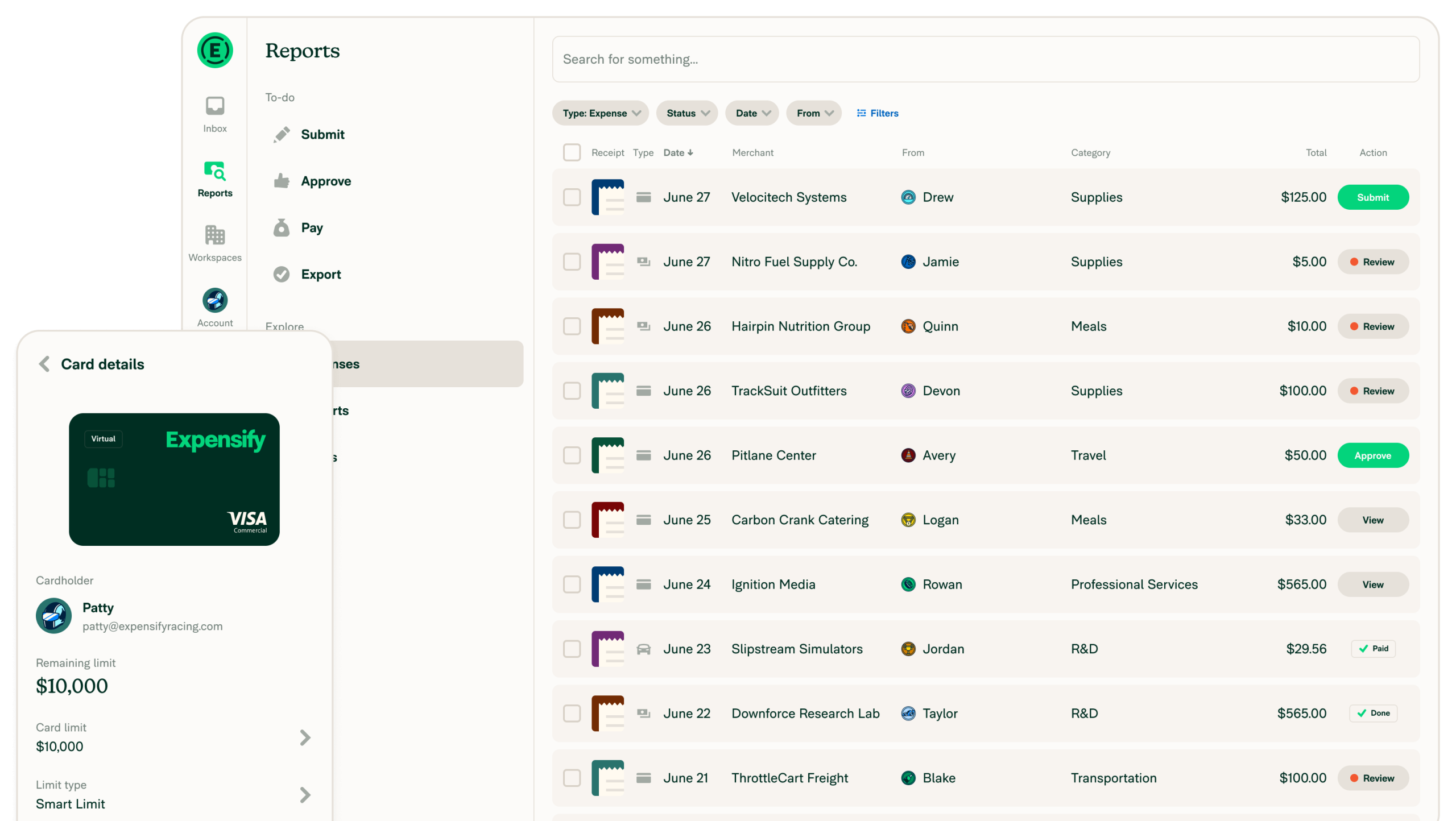
Expensify is an expense management platform built around one core promise: eliminating the receipt pile. Employees snap a photo of a receipt on their phone, Expensify’s SmartScan technology reads the vendor, amount, and date, and the expense lands in a report ready for approval. No spreadsheets, no end-of-month receipt archaeology, no emailing photos to a bookkeeper.
The platform covers the full expense workflow from capture to reimbursement. It is used by more than 15 million people worldwide, ranging from solo operators tracking personal business expenses to mid-market teams with multi-level approval workflows. The sweet spot is small to mid-sized teams of 5 to 100 employees where manual expense reporting has become a real administrative burden but enterprise-grade software like SAP Concur feels like overkill.
What Expensify Is Not
Expensify is an expense management and reimbursement tool, not a full accounting platform. It does not produce financial statements, manage accounts payable in depth, or serve as a general ledger. It is designed to sit alongside your accounting software (QuickBooks, Xero, NetSuite, Sage Intacct) and sync expense data into it, not replace it.
It also does not handle payroll, invoicing in depth, or project-level budget tracking. If those are your primary needs, you are looking at a different category of tool.
Expensify Pricing
Expensify simplified its pricing significantly in April 2025, moving to a flat per-member rate for its entry-level plan. There are now two paid business plans, plus a free tier.
| Plan | Price | Best For |
|---|---|---|
| Free | $0 | Individuals. Includes Expensify Card, cash reimbursement, invoice sending, bill pay. Up to 25 SmartScans per month. |
| Collect | $5/member/month | Small teams. Unlimited SmartScans, expense approval workflows, corporate cards, travel booking, Expensify Chat. No annual contract required. |
| Control | $9/member/month | Larger teams. Everything in Collect, plus advanced accounting integrations (NetSuite, Sage Intacct), multi-level approval, custom expense policies, and enhanced reporting. |
Expensify Card discount: If your team settles 50% or more of expenses on the Expensify corporate card, both the Collect and Control plans can drop to $0 per member per month (with card cash back offsetting the subscription cost). For US-based teams willing to consolidate card spend, this is a meaningful cost reduction. International teams do not qualify for the same structure.
For a team of 10 on the Collect plan, the monthly cost is $50 with no annual commitment. That is a reasonable price point for what the platform delivers, particularly compared to SAP Concur, which requires enterprise pricing conversations and annual contracts.
Key Features
SmartScan Receipt Capture
SmartScan is Expensify’s headline feature and the reason most people try the platform in the first place. Take a photo of a receipt with your phone and SmartScan extracts the merchant name, date, and total automatically. No manual data entry. The expense lands in your report, categorized and ready for review.
In practice, SmartScan works well for clean, standard receipts from restaurants, hotels, and retail. It is less reliable on handwritten receipts, faded thermal paper, or international receipts with non-standard formatting. When SmartScan misreads a receipt, someone has to fix it manually, which is the most common complaint across G2 and Capterra reviews. It is still faster than typing everything in, but it is not the flawless automation the marketing implies.
Expense Reports and Approval Workflows
Expensify organizes expenses into reports, which employees submit to a manager or finance administrator for approval. Approval workflows are configurable on both Collect and Control plans, with multi-level approval available on Control for organizations that need more than one sign-off layer.
The system supports expense policies, meaning you can set rules around which categories are reimbursable, flag out-of-policy spend automatically, and require receipts above a certain dollar threshold. This is where Expensify earns its keep for bookkeepers: it enforces the rules before expenses reach the accounting system, reducing back-and-forth corrections.
Expensify Corporate Card
The Expensify Visa commercial card integrates directly with the platform. Card transactions feed into expense reports automatically, which eliminates the step of employees manually logging spend they put on a company card. Receipts can be matched to card transactions, and unmatched transactions are flagged for follow-up.
The card is free to issue and has no annual fee. Cash back earned on card spend can offset or eliminate the subscription cost if your team meets the spend threshold. For US-based teams that are comfortable consolidating card spend, this is one of the more compelling value propositions in the category.
Accounting Integrations
This is where the Collect vs. Control distinction matters most. Control unlocks the deeper accounting integrations that most finance teams actually need: QuickBooks Online, QuickBooks Desktop, Xero, NetSuite, Sage Intacct, and FinancialForce. Collect offers QuickBooks Online and Xero integration, but not the others.
Expenses approved in Expensify can be exported directly to the accounting platform, mapped to the correct accounts and cost centers. For a bookkeeper closing the books at month end, this is the difference between a clean export and a manual reconciliation job.
Travel Booking
The Collect plan includes a built-in travel booking tool for flights, hotels, cars, and trains. Booked travel syncs directly into Expensify reports, so travel expenses are captured at the point of booking rather than after the fact. This is a meaningful add for teams whose primary expense category is travel. It is not a replacement for a dedicated travel management platform, but it is functional for straightforward travel booking.
Mileage Tracking
Employees can log mileage directly in the app using GPS tracking or manual entry. Expensify applies the current IRS mileage rate automatically. For field-based staff who drive for client visits or site work, this removes a common accounting headache.
Where Expensify Stands Out
Receipt Capture Is Genuinely Fast
The mobile experience for submitting receipts is one of the strongest in the category. Employees open the app, take a photo, and they are done in under 30 seconds. There is no logging in on a desktop, no downloading a template, no waiting until the end of the month. For organizations where expense reporting compliance is a consistent problem, this matters more than almost any other feature.
Collect Plan Pricing Is Competitive
The April 2025 pricing simplification to a flat $5 per member per month with no annual commitment made Expensify meaningfully more accessible for small teams. There is no minimum seat count, no annual lock-in, and no hidden activation fees on the Collect plan. For a 5-person team, that is $25 per month for real expense automation, which is hard to argue with.
Accounting Integration Depth
For bookkeepers who live in QuickBooks, Xero, or NetSuite, Expensify’s export workflow is the cleaner than most competitors at this price point. Expense categories, cost centers, and employee records can be mapped directly to your chart of accounts. When it works well, month-end close involves reviewing the Expensify export rather than manually entering individual expense lines.
Where Expensify Falls Short
SmartScan Is Reliable, Not Perfect
SmartScan is the feature most people buy Expensify for, and it delivers most of the time. But “most of the time” is not “always”, and the exceptions create friction. Thermal receipts, handwritten totals, poorly lit photos, and multi-page receipts are all scenarios where SmartScan struggles and manual correction is required. G2 reviewers cite this as the most common pain point by a wide margin.
This is not a dealbreaker. The alternative is manual data entry for every receipt, which is worse. But if you are expecting a hands-off automation experience, set expectations accordingly.
Billing Practices Have Generated Complaints
This is a real issue that appears consistently in Capterra reviews and deserves to be named directly. Multiple users report unexpected charges, unauthorized plan upgrades, and difficulty canceling accounts. One Capterra reviewer described being upgraded to a more expensive plan without notification and being unable to reach support to resolve it.
Watch your billing: Before signing up, confirm which plan and seat count you are on, review your billing settings after any change to your team size, and document your subscription terms. The billing complaints in reviews are not universal, but they are frequent enough to warrant attention.
Control Plan Cost Scales Up Quickly
The $5 Collect plan is attractive, but teams that need multi-level approvals, NetSuite or Sage Intacct integration, or advanced reporting will need the Control plan at $9 per member per month. For a 50-person team on Control, that is $450 per month, $5,400 per year. At that price point, competitors like Ramp (which includes a free expense management tier) and Navan become more relevant alternatives worth evaluating.
Initial Setup Can Feel Clunky
Getting Expensify configured for a team is not difficult, but the initial setup experience is more technical than the day-to-day employee experience. Connecting accounting integrations, setting up expense categories, defining approval workflows, and issuing corporate cards all require administrator attention. Reviewers with an accounting background report the setup is manageable. Non-technical administrators sometimes find the process less intuitive.
What Real Users Say
Expensify holds a 4.5/5 rating on G2 across more than 5,500 verified reviews, and a 4.4/5 on Capterra. The review volume is one of the largest in the expense management category, which makes the pattern data reliable.
Common praise: Reviewers consistently highlight the mobile receipt capture experience, the speed of going from photo to submitted expense, and the ease of use for non-accounting employees. The approval workflow and accounting integrations receive specific praise from finance administrators who say Expensify has meaningfully reduced month-end reconciliation time.
Common complaints: SmartScan accuracy on non-standard receipts is the most frequently cited frustration. A recurring pattern in Capterra reviews involves billing disputes, unexpected charges, and difficulty resolving account issues with support. Some users also report that the navigation in the desktop interface has become less intuitive since Expensify launched its “New Expensify” redesign.
Who Should Use Expensify
- Bookkeepers managing employee expense reports for small to mid-sized teams who want a cleaner, faster alternative to email-and-spreadsheet workflows.
- Teams with frequent travel expenses who need receipt capture, mileage logging, and travel booking in one place that syncs to their accounting system.
- QuickBooks Online or Xero users who want expense data to flow directly into their accounting platform with minimal manual intervention.
- Finance administrators who need to enforce expense policies and multi-level approvals without building a custom system.
- US-based teams willing to use the Expensify Card who want to offset or eliminate the subscription cost through card cash back.
Who Should Not Use Expensify
- Sole proprietors and freelancers tracking personal business expenses for tax purposes. Wave, FreshBooks, or even the Expensify free tier may be sufficient without a paid plan.
- Teams on NetSuite or Sage Intacct who are not prepared to move to the Control plan. The deeper ERP integrations require the higher tier.
- Organizations with very high receipt volumes and inconsistent receipt quality, where SmartScan accuracy issues would create significant manual correction overhead.
- Teams outside the US who want to take advantage of the Expensify Card pricing structure. International pricing does not work the same way.
Expensify vs. Alternatives
| Platform | Best For | Starting Price | Key Difference |
|---|---|---|---|
| Expensify | Small teams, travel-heavy businesses | $5/member/month | Strongest receipt capture UX; largest user base in SMB segment |
| Ramp | Teams wanting free expense management with corporate cards | Free (card-based model) | No subscription fee; expense management is free when using Ramp cards |
| SAP Concur | Enterprise teams with complex global needs | Custom pricing | Industry standard for enterprise; significantly more complex and expensive |
| QuickBooks Online | Teams that want expense tracking inside their accounting software | $35/month | Built-in expense tracking with full accounting; less specialized than Expensify for team workflows |
Quick Pick Guide
- You have 5 to 20 employees and want to stop chasing paper receipts: Expensify Collect at $5/member/month is the right starting point.
- Your team uses NetSuite or Sage Intacct and you need a clean integration: You will need the Control plan at $9/member/month. Budget accordingly.
- Your team is entirely US-based and willing to put spend on a corporate card: Look at the Expensify Card discount, which can bring your effective plan cost to $0.
- You want free expense management and are comfortable on a card-based model: Ramp is worth comparing before you commit to Expensify.
- You are a solo bookkeeper tracking your own expenses, not managing a team: The Expensify free tier or a simple tool like Wave may be all you need.
Popular Integrations
Expensify’s integration list is one of its stronger selling points for finance teams. Key connections include:
- Accounting (Control plan): QuickBooks Online, QuickBooks Desktop, Xero, NetSuite, Sage Intacct, FinancialForce
- Accounting (Collect plan): QuickBooks Online, Xero
- HR and Payroll: Gusto, Workday, BambooHR
- Travel: Built-in travel booking for flights, hotels, cars, and trains
- Payments: ACH direct deposit for reimbursements, Expensify Card (Visa)
- Other: Slack (expense notifications and approvals), Uber, Lyft (ride receipts)
Frequently Asked Questions
Does Expensify offer a free trial?
Yes. Expensify offers a free trial of both the Collect and Control plans. There is also a permanently free tier for individuals that includes up to 25 SmartScans per month, the Expensify Card, and basic reimbursement features.
How much does Expensify cost for a 10-person team?
On the Collect plan, a 10-person team pays $50 per month with no annual commitment. On the Control plan, the same team pays $90 per month. If the team uses the Expensify Card for 50% or more of settled US spend, the subscription cost can drop to $0.
Is Expensify worth it, or should I use Ramp instead?
Ramp offers free expense management for teams willing to use Ramp corporate cards, which makes the comparison primarily a card program decision rather than a feature decision. Expensify has a longer track record in the SMB segment and a larger integration library. Ramp is the stronger choice if zero subscription cost is the priority and you want modern spend controls. Expensify is the stronger choice if SmartScan receipt capture and accounting integrations are your primary requirements.
Does Expensify integrate with QuickBooks?
Yes. QuickBooks Online integration is available on both the Collect and Control plans. QuickBooks Desktop integration requires the Control plan. Expense categories, vendors, and accounts can be mapped to your QuickBooks chart of accounts for direct export.
Does Expensify integrate with NetSuite or Sage Intacct?
Yes, but only on the Control plan at $9 per member per month. If NetSuite or Sage Intacct integration is a hard requirement, factor that into your plan selection before signing up.
How accurate is SmartScan?
SmartScan performs well on clear, standard receipts from retailers, restaurants, and hotels. Accuracy drops on handwritten receipts, faded thermal paper, and non-standard international receipt formats. Most reviewers describe it as a significant time-saver overall, with occasional manual corrections required rather than constant intervention.
Is Expensify good for international teams?
Expensify supports multiple currencies and has users outside the US. The main limitation for international teams is that the Expensify Card pricing discount (which can reduce subscription costs to $0) is structured around US card spend. International teams pay the standard per-member rate without access to the same card-based discount.
Does Expensify work for mileage reimbursement?
Yes. Employees can log mileage via GPS tracking or manual entry, and Expensify applies the current IRS mileage rate automatically. Mileage expenses appear in reports alongside receipt-based expenses for a unified reimbursement workflow.
Can Expensify replace an accountant or bookkeeper?
No. Expensify automates expense capture and reporting, but it is not accounting software. A bookkeeper or accountant is still needed to review, categorize, and reconcile expenses in the accounting platform. Expensify reduces the administrative workload significantly, but it does not replace the human judgment required in the accounting process.
What is Expensify’s cancellation policy?
The Collect plan has no annual commitment and can be canceled at any time. The Control plan billing terms should be confirmed at signup. Based on user reviews, it is worth documenting your plan terms and monitoring billing carefully around any team size changes, as billing adjustments have been a source of complaints.
Is Expensify SOC 2 compliant?
Expensify maintains SOC 1 Type II and SOC 2 Type II compliance. For organizations in regulated industries that have specific data security requirements, Expensify publishes compliance documentation that can be reviewed before purchase.
Is Expensify right for a small accounting firm?
Expensify is designed for businesses managing employee expense reimbursement, not for accounting firms managing client books. If you are a bookkeeper looking for a tool to recommend to your small business clients for employee expense management, Expensify is a reasonable recommendation. If you are looking for practice management software for the firm itself, that is a different category.
Final Verdict
Expensify has earned its position as one of the most widely used expense management platforms in the SMB segment. The mobile receipt capture experience is genuinely fast, the accounting integrations are solid, and the Collect plan at $5 per member per month is one of the better value propositions in the category.
The honest picture includes some friction. SmartScan is reliable but not infallible, and any receipt that comes back misread requires manual correction. The billing complaints in user reviews are consistent enough to take seriously. And teams that need advanced integrations with NetSuite or Sage Intacct will pay $9 per member per month on the Control plan, which adds up for larger teams.
For a bookkeeper managing expense reports for a 5 to 50 person team, Expensify is a reasonable default choice with a proven track record. Compare it against Ramp if your team is US-based and card-centric, and against SAP Concur only if you are operating at enterprise scale with complex global requirements.
Visit Expensify’s Official Site
Last updated on May 4, 2026