ADVERTISING DISCLOSURE: THIS POST CONTAINS AFFILIATE LINKS. READ FULL DISCLAIMER
The Verdict: Ignition is the best proposal and engagement letter platform for accounting firms that want to automate client onboarding, collect payment details upfront, and eliminate accounts receivable chasing. Not ideal if you’re a solo practitioner with under $150K annual revenue on a tight budget, need deep project management features, or require instant payment processing (deposits take 5 to 7 business days). Pricing starts at $39/month for solo practitioners, scaling to $229/month for established firms.
Last updated May 1, 2026.
In This Review
What Ignition Is
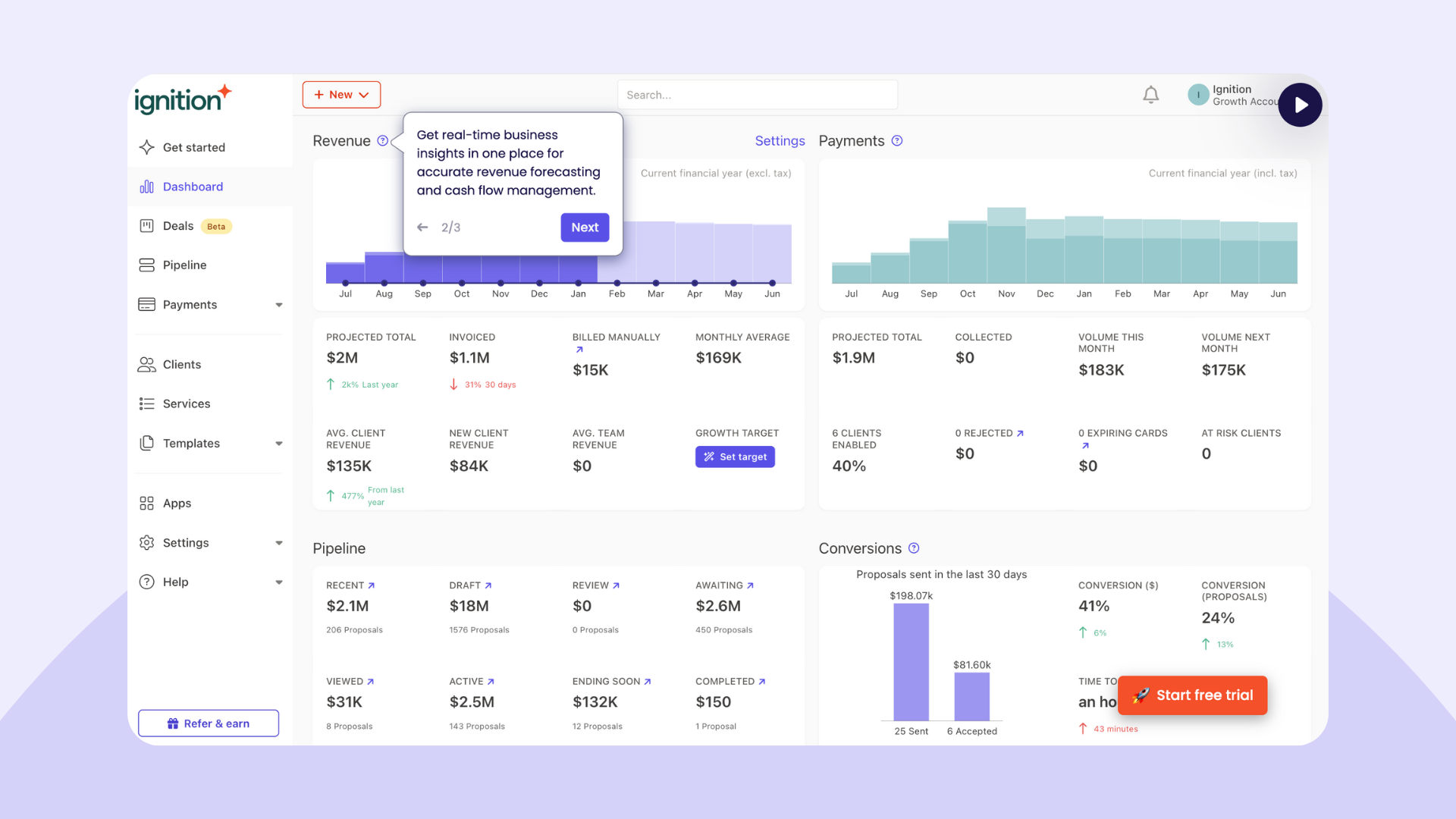
Ignition is a proposal, engagement letter, and billing automation platform built specifically for accounting firms and professional services businesses. The platform automates the entire client onboarding workflow, from sending branded proposals to collecting e-signatures, capturing payment details, and processing recurring invoices.
Over 8,500 businesses worldwide use Ignition to manage client engagements. The platform has powered more than 2.4 million client relationships and helped firms generate over $13 billion in revenue through automated billing and payment collection.
Ignition positions itself as the solution to three core problems accounting firms face: doing work for free because scope wasn’t clear upfront, wasting time on proposal admin, and chasing clients for late payments. The platform bundles proposals, engagement letters, payment collection, and recurring billing into a single workflow that runs on autopilot after initial setup.
Ignition Pricing
Ignition offers four pricing tiers based on business size and feature requirements. All plans include proposal creation, e-signatures, engagement letters, and automated payment collection. Pricing is per month with discounts for annual billing.
| Plan | Price | What’s Included |
|---|---|---|
| Solo | $39/month (annual) or $49/month (monthly) | 20 active clients max, single user, single e-signature per proposal, basic templates, automated payments, invoicing. For solopreneurs under $150K annual revenue. |
| Core | $99/month (annual) or $119/month (monthly) | Unlimited clients, multiple users, up to 5 e-signatures per proposal, customizable templates, QuickBooks/Xero sync, advanced reporting |
| Pro | $229/month (annual) or $279/month (monthly) | Everything in Core plus up to 10 e-signatures per proposal, priority support, custom branding, workflow automation, advanced integrations |
| Pro+ | $399/month (annual) or $499/month (monthly) | Everything in Pro plus unlimited e-signatures, API access, premium onboarding, dedicated account manager, white-label options |
The Solo plan caps active clients at 20 and charges $7 per additional client over that limit. Core, Pro, and Pro+ support unlimited clients. All plans charge separate payment processing fees (typically 2.9% plus $0.30 per transaction for credit cards, varying by region).
Important: Payment deposits take 5 to 7 business days to reach your bank account. Ignition does not offer next-day or same-day deposit options. Factor this into cash flow planning when switching from manual billing.
Key Features
Branded Proposals and Engagement Letters
Ignition provides industry-standard templates for proposals and engagement letters that accounting firms can customize with their branding, pricing, scope of work, and terms. The platform includes pre-built templates for tax preparation, bookkeeping, advisory services, and audit engagements.
You can create proposals from scratch or duplicate existing ones for similar clients. Proposals include embedded pricing tables, service descriptions, and customizable terms. Up to 10 decision-makers can review and sign a single engagement letter (depending on plan tier), ensuring all stakeholders are aligned before work begins.
Automated Payment Collection
When a client signs a proposal, Ignition captures their payment details (credit card or ACH) automatically. You can set up one-time payments, recurring monthly billing, or hybrid models (upfront retainer plus monthly fees).
Payments process automatically on the schedule you define. If a payment fails, Ignition notifies the client and provides a secure link to update their payment method. The platform handles PCI compliance, so you never see or store raw credit card numbers.
Scope Change Management
Ignition allows you to bill for scope changes and ad hoc work without creating a new proposal. If a client requests additional services mid-engagement, you can send a scope change request through the platform, collect their approval, and bill instantly for the extra work.
This feature addresses one of the biggest revenue leaks in professional services: doing extra work without getting paid because the original agreement didn’t cover it.
Accounting Software Integration
Ignition syncs with QuickBooks Online, Xero, and MYOB. When a client signs a proposal, Ignition creates a customer record in your accounting software. When payments process, Ignition posts invoices and payment transactions automatically, eliminating manual data entry and reconciliation.
The sync is bidirectional for some data. If you update a client’s contact information in QuickBooks, it flows back to Ignition, keeping records consistent across systems.
Workflow Automation
Ignition sends automated reminders when proposals go unsigned, payments fail, or renewals approach. You can customize reminder timing and messaging. The platform also automates follow-up tasks like sending welcome emails after a client signs or triggering onboarding workflows in connected tools.
Pro and Pro+ plans include advanced automation rules that trigger based on client actions, payment status, or custom conditions you define.
Where Ignition Stands Out
Purpose-Built for Accounting Firms
Ignition isn’t a generic proposal tool adapted for accounting. It’s designed specifically for accounting and professional services workflows. The engagement letter templates, compliance language, and billing structures reflect how accounting firms actually sell and deliver services.
The platform understands concepts like retainers, value billing, fixed-fee engagements, and scope adjustments because those workflows are baked into the product from the ground up.
Payment Details Captured Upfront
Most proposal tools stop at the signature. Ignition captures payment details as part of the acceptance flow, so billing starts automatically the moment a client signs. This eliminates the gap between “client agreed” and “client paid” that creates cash flow problems for many firms.
For recurring services (monthly bookkeeping, ongoing advisory), this means you never chase payments. The client’s card is charged automatically on the schedule you defined in the proposal.
Multi-Signature Support
Accounting engagements often require sign-off from multiple stakeholders (CFO, controller, CEO, board member). Ignition supports up to 10 signers on a single proposal (on higher-tier plans), each receiving their own review and signature link.
This is rare in the proposal software category, where most tools assume one decision-maker per deal.
Strong Customer Support
Ignition’s customer support receives consistently high marks in reviews. The onboarding process includes hands-on help from the Ignition team to set up templates, configure workflows, and migrate existing clients. Reviewers frequently mention support agents who understand accounting firm operations and provide relevant, actionable guidance.
Where Ignition Falls Short
Expensive for Solo Practitioners
At $39/month (annual) for the Solo plan, Ignition is one of the more expensive proposal tools for individual practitioners. Competitors like PandaDoc, Better Proposals, and HoneyBook offer lower entry prices with similar core features.
For solo accountants doing under $150K in annual revenue, Ignition’s cost can feel high relative to the value delivered. The platform justifies its price at scale (multiple clients, recurring billing, team workflows) but feels expensive when you’re just starting out.
Payment Processing Delays
Ignition takes 5 to 7 business days to deposit funds into your bank account. This is standard for payment processors, but it’s longer than some competitors who offer 1 to 2 day deposits. For firms with tight cash flow, the delay can create friction.
There is no option to pay extra for faster deposits. The 5 to 7 day window is fixed.
Limited Project Management Features
Ignition handles proposals, engagement letters, and billing. It does not replace practice management software for task tracking, project timelines, or team collaboration. If you need to manage who’s doing what work and when, you’ll still need tools like Karbon, Financial Cents, or ClickUp alongside Ignition.
The platform integrates with some practice management tools, but the integration is basic (creating tasks when proposals are signed, syncing client names). It’s not a unified workflow.
Client Rejection Isn’t Streamlined
Clients can’t formally reject a proposal through Ignition. They simply don’t sign it. This creates ambiguity for the firm. Did the client decide no, or did they just not get around to reviewing it yet? You end up following up manually to find out.
Some competitors allow clients to decline proposals with optional feedback, giving the firm closure and insight into why deals don’t close.
What Real Users Say
Ignition holds a 4.6 out of 5 rating on both G2 and Capterra. The platform is heavily reviewed by accounting professionals, with 85% of Capterra reviewers working in accounting firms.
Common praise: Users consistently highlight time savings from proposal automation, elimination of accounts receivable chasing through automated billing, and strong customer support during onboarding. Many reviewers mention switching from manual processes (Word docs, DocuSign, manual invoicing) and reclaiming hours per week. The QuickBooks and Xero integrations receive positive mentions for keeping accounting data synchronized without exports.
Common complaints: Pricing is the most frequent criticism, particularly from solo practitioners and small firms. Several reviewers mention the 5 to 7 day payment processing delay as a cash flow issue. Template customization limitations frustrate firms wanting more control over proposal design and wording. A smaller subset of reviews cite billing errors (duplicate charges, failed cancellations) and slow refund processing when issues occur.
The review sentiment is positive overall, with most criticism focused on cost rather than product quality or reliability.
Who Should Use Ignition
- Accounting firms with 5 to 50 clients offering recurring services (bookkeeping, advisory, compliance) who want to automate billing
- Growing practices tired of chasing clients for payments and want to eliminate accounts receivable management
- Firms transitioning from hourly billing to value-based or fixed-fee pricing who need clear scope definition upfront
- Multi-partner firms requiring multiple stakeholders to review and sign engagement letters before work begins
- Practices using QuickBooks Online or Xero who want proposal and billing data to sync automatically with their accounting system
- Firms doing significant scope creep work for free who need a system to bill for additional services as they arise
Who Should Use Ignition
- Solo practitioners with under $150K annual revenue on tight budgets who find the Solo plan expensive relative to value delivered
- Firms requiring instant or next-day payment deposits for cash flow management (Ignition’s 5 to 7 day window is fixed)
- Practices needing full project management (task tracking, team collaboration, time tracking) in addition to proposals and billing
- Firms using accounting software other than QuickBooks, Xero, or MYOB who won’t benefit from native integration
- Creative agencies and non-accounting service businesses who may find better value in general-purpose proposal tools with lower pricing
- Organizations requiring immediate refunds or flexible cancellation policies (several reviews cite slow refund processing and rigid terms)
Ignition vs. Alternatives
| Platform | Best For | Starting Price | Key Difference |
|---|---|---|---|
| Ignition | Accounting firms wanting proposals, engagement letters, and automated recurring billing in one platform | $39/month (Solo plan) | Purpose-built for accounting, captures payment details upfront, strong QuickBooks/Xero sync |
| PandaDoc | Sales teams needing CPQ and contract management across multiple industries | $19/user/month | Cheaper, broader use cases, but weaker accounting-specific features and no built-in recurring billing |
| HoneyBook | Freelancers and creative professionals | $16/month (Starter) | Much cheaper, stronger CRM and pipeline management, but lacks engagement letter compliance and accounting integrations |
| Better Proposals | Businesses wanting beautiful proposals without payment automation | $19/month | Cheaper with polished design templates, but no automated payment collection or engagement letter features |
| FigsFlow | UK accounting firms needing proposals and AML compliance | Custom pricing | Newer entrant, accounting-specific, includes AML checks, but smaller integration ecosystem |
Quick Pick Guide
- Choose Ignition if you’re an accounting firm that wants proposals, engagement letters, and automated recurring billing in one platform with QuickBooks/Xero sync
- Choose PandaDoc if you need CPQ (configure-price-quote) features, work across multiple industries, or want a lower entry price
- Choose HoneyBook if you’re a creative professional or freelancer who needs CRM, pipeline management, and proposals at a much lower price point
- Choose Better Proposals if you only need beautiful proposal documents without payment automation or engagement letter compliance
- Choose FigsFlow if you’re a UK-based accounting firm needing proposals plus AML verification in one tool
Popular Integrations
Ignition integrates with accounting software, practice management tools, and productivity apps used by accounting firms.
Accounting: QuickBooks Online, Xero, MYOB
Practice Management: Karbon, Financial Cents, Canopy, XPM (Xero Practice Manager)
Payment Processing: Stripe (built-in), ACH direct debit
Productivity: Zapier (for custom workflows), Slack, Microsoft Teams
Document Management: Google Drive, Dropbox
The QuickBooks Online and Xero integrations are the most mature. When a client signs a proposal, Ignition creates a customer record in your accounting software. When payments process, invoices and payment transactions post automatically to your general ledger.
Frequently Asked Questions
Does Ignition offer a free trial?
Yes. Ignition offers a 14-day free trial with no credit card required. The trial includes full access to all features so you can test proposal creation, payment collection, and accounting software integration before committing.
How much does Ignition cost for a 10-client accounting firm?
For a firm with 10 active clients, the Solo plan ($39/month annual) won’t work because it caps at 20 clients and offers limited features. You’d need the Core plan at $99/month (annual) or $119/month (monthly), which supports unlimited clients and multiple users.
Is Ignition worth it, or should I use PandaDoc?
Ignition is better if you’re an accounting firm that needs engagement letter templates, multi-signature support, and automated recurring billing with QuickBooks/Xero sync. PandaDoc is better if you’re a sales-heavy organization needing CPQ features or if you want a lower entry price ($19/user/month vs. Ignition’s $39/month Solo).
Can Ignition handle scope changes and additional billing?
Yes. Ignition allows you to bill for scope changes and ad hoc work mid-engagement. You send a scope change request through the platform, the client approves it, and you bill instantly for the additional services without creating a new proposal from scratch.
How long does Ignition take to implement?
Most firms complete setup in 1 to 3 days. You create proposal templates, connect your accounting software, and configure payment settings. Ignition provides onboarding support to help set up templates and migrate existing client data. Pro and Pro+ customers get dedicated onboarding assistance.
Does Ignition integrate with QuickBooks Desktop?
No. Ignition integrates with QuickBooks Online, Xero, and MYOB. It does not support QuickBooks Desktop. If you’re on Desktop, you’d need to export data manually or use a third-party integration tool like Zapier.
How many people can sign an Ignition proposal?
Solo plan allows 1 signature per proposal. Core allows up to 5 signers. Pro allows up to 10 signers. Pro+ allows unlimited signers. This is useful for accounting engagements requiring sign-off from multiple stakeholders (CFO, CEO, board members).
Is Ignition compliant for engagement letters?
Yes. Ignition’s engagement letter templates are designed to meet professional standards for accounting firms. The platform includes standard terms, scope definitions, and compliance language. However, you should have your legal or professional liability advisor review templates before use to ensure they meet your specific jurisdiction and practice requirements.
Does Ignition offer discounts for startups or small firms?
Ignition does not have a formal startup or small firm discount program. Pricing is the same for all customers. The main way to reduce cost is by choosing annual billing, which offers approximately 20% savings compared to monthly billing.
What is Ignition’s cancellation policy?
Ignition subscriptions auto-renew monthly or annually depending on your billing cycle. You can cancel at any time, but you will not receive a prorated refund for the current billing period. Your subscription remains active until the end of the paid term. Several reviews mention difficulty obtaining refunds after cancellation, so factor this into your decision.
Can Ignition replace my practice management software?
No. Ignition handles proposals, engagement letters, and billing. It does not replace practice management software for task tracking, project timelines, team collaboration, or time tracking. You’ll still need tools like Karbon or Financial Cents for managing who does what work and when.
How long does it take to receive payments through Ignition?
Payments take 5 to 7 business days to reach your bank account after processing. This is standard for payment processors but longer than some competitors. There is no option to pay for faster deposits.
Final Verdict
Ignition solves a real problem for accounting firms: the gap between client agreement and client payment. By capturing payment details upfront and automating recurring billing, the platform eliminates accounts receivable chasing and ensures firms get paid for the work they scope.
For established practices with recurring client relationships, Ignition’s value is clear. The time saved on proposal creation, payment collection, and accounting software reconciliation justifies the cost. Reviewers frequently mention reclaiming hours per week and improving cash flow predictability.
For solo practitioners and startups, the value equation is tighter. At $39/month for the Solo plan with a 20-client cap, Ignition is expensive compared to alternatives that offer similar core features at lower prices. The platform’s accounting-specific features (engagement letter templates, multi-signature support, QuickBooks sync) matter most to firms operating at scale.
The 5 to 7 day payment processing delay is a friction point for firms with tight cash flow. If your practice depends on immediate access to client payments, factor this delay into your decision.
Customer support quality is a genuine differentiator. Ignition’s team understands accounting firm workflows and provides hands-on help during onboarding. This matters when you’re migrating from manual processes and need guidance on how to structure proposals and billing for your specific practice.
Ignition is one of the best tools in its category for accounting firms. Just make sure your firm size, revenue, and workflow complexity justify the investment.
Related Reads
- QuickBooks Review: Accounting Software for Small Business
- Xero Review: Cloud Accounting for Growing Teams
- Karbon Review: Practice Management for Accounting Firms
- Financial Cents Review: Client Accounting Services Platform
- Best Accounting Software for Firms 2026
Last updated on May 2, 2026