ADVERTISING DISCLOSURE: THIS POST CONTAINS AFFILIATE LINKS. READ FULL DISCLAIMER
Last updated: May 2026
Quick verdict: Dext is the incumbent in receipt and invoice capture for bookkeepers and accounting firms, with deep integrations into Xero, QuickBooks, and Sage. It saves real hours on data entry, but pricing has climbed and the credit-based add-ons can surprise growing firms.
What Dext Is
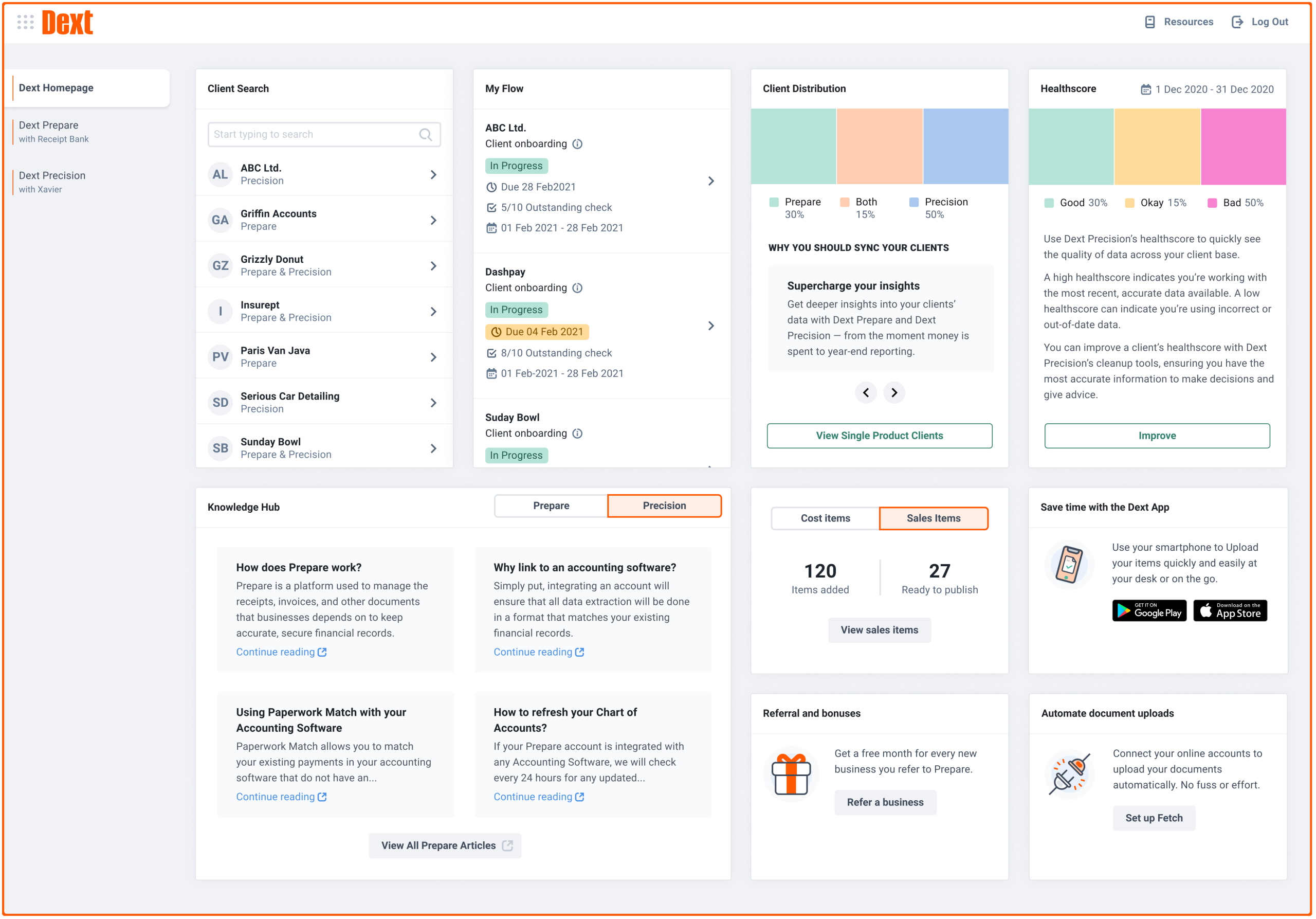
Dext, formerly Receipt Bank, is a pre-accounting platform that automates the capture and data extraction of receipts, invoices, and bank statements. Documents enter the system through a mobile app, email forwarding, web upload, WhatsApp, Dropbox, or direct bank feeds. OCR and AI then extract supplier, line item, tax, and payment details and push the cleaned data into your accounting software.
The product is built around two user types. The Business plans serve small and mid-sized companies that want to eliminate manual receipt entry inside their own accounting workflow. The Practice plans serve accounting firms and bookkeepers managing multiple clients from a single dashboard, with each client’s documents flowing to their respective accounting software connections.
Dext claims roughly 99.9% data extraction accuracy, integrations with over 11,500 banks and platforms, and a user base spanning 700,000+ businesses and 12,000+ accounting firms. In March 2026 the company launched AI Assist, which learns categorization patterns and suggests tax treatment on top of the OCR layer. The product family also includes Dext Precision for data health checks and audit trails, and Dext Commerce for reconciling sales data from e-commerce and POS platforms.
For most practices, Dext sits between the receipt and the general ledger. It is not an accounting platform on its own, and it is not an expense management tool in the Expensify sense. It is a capture and extraction layer that feeds clean data into whatever core ledger you already use.
Dext Pricing
Dext separates pricing into two tracks: Business plans for end-user companies and Practice plans for accounting firms. Business pricing is published; Practice pricing is custom and built around the number and type of clients a firm supports.
The published Business tiers in 2026 are roughly as follows. Pricing can change and may vary by region, so confirm directly with Dext before committing.
| Plan | Monthly cost (approx.) | Users | Documents |
|---|---|---|---|
| Business Plus | $34 | 5 | 300 |
| Premium | $67 | 20 | 3,000 |
| Enterprise | $100 | 30 | 4,000 |
Annual billing typically saves 20% across all tiers. Dext also offers a 14-day free trial with full feature access and no credit card required.
Practice plans are quoted per client and scale down on a per-client basis as the firm grows. Published reference pricing starts around $208 per month (annual billing) for roughly 10 clients, though the actual quote depends on the feature set, the mix of Essentials vs. Advanced client tiers, and the credit allowance for bank statement extraction, line item extraction, and supplier statement reconciliation.
The credit system is where Dext pricing gets unpredictable. Features like bank statement extraction, line item extraction on long invoices, and supplier statement reconciliation are credit-gated. Each plan includes a base allowance, and additional credits are billed on top. Firms processing high volumes of bank statements or line-itemized invoices have reported the effective monthly cost running well above the headline tier price. Build that into any ROI calculation before signing.
Where Dext Stands Out
Multi-client infrastructure built for accounting firms
The Practice dashboard is the strongest reason most accounting firms pick Dext over alternatives. A bookkeeper can switch between dozens of client organizations from a single interface, with each client’s documents flowing into their respective Xero or QuickBooks connection. Permissions, approval workflows, and document handoff between client and bookkeeper are designed around the practice workflow rather than retrofitted from a single-business product.
Integration depth and reliability
Dext connects to more than 11,500 banks, e-commerce platforms, and payment systems, and syncs with over 30 accounting platforms. The integration with Xero in particular is considered the gold standard among receipt capture tools and has been refined for over a decade. Direct bank feeds and e-commerce connections (Shopify, Stripe, Amazon) reduce duplicate data entry significantly for firms whose clients sell online.
Extraction accuracy on standard documents
For typical printed or PDF receipts and invoices, Dext’s OCR performs reliably. Supplier rules and smart splits let firms configure how a given vendor’s documents should be categorized, and the system remembers those rules going forward. Once configured, recurring documents from known suppliers post with minimal intervention.
Multiple capture methods
Users can submit documents via mobile app, email forwarding to a unique Dext address, WhatsApp, Dropbox, drag-and-drop, or direct bank feeds. For client-facing firms, this flexibility matters: every client has a preferred workflow, and Dext accommodates most of them without forcing a single submission path.
Mobile app polish
The mobile app is one of the more refined in the category. Bulk capture, mileage tracking, size adjustment, and expense claim management are built in. Field-heavy users like construction or hospitality businesses tend to rate the mobile experience well.
Where Dext Falls Short
Pricing has climbed, and the credit system adds unpredictability
Dext is no longer the budget option in receipt capture. Hubdoc is free with most Xero subscriptions. AutoEntry and Datamolino price below Dext for similar core functionality. The credit-gated features (line item extraction, bank statement extraction, supplier statement reconciliation) can push the effective monthly cost well above the tier price for firms with high document volume. Build a realistic credit estimate into the comparison before signing.
Handwritten and non-standard receipts still need manual correction
The 99.9% accuracy claim applies to clean printed documents. Handwritten receipts, faded thermal paper, or non-standard invoice layouts often need manual correction. The “unknown supplier” issue, where a vendor name on the receipt fails to match, is a recurring complaint among heavy users.
Customer support response times are inconsistent
Multiple recent reviewers have flagged slow customer support, with response times stretching beyond 24 hours and several issues requiring multi-email follow-up. For a firm running client billing cycles on Dext throughput, support latency matters more than most buyers anticipate.
Settings are powerful but cannot be hidden from non-finance users
The depth of configuration is a strength for bookkeepers and a weakness for businesses where non-finance staff capture receipts. There is no way to restrict the interface to a simplified view for casual users, which can lead to misconfigured submissions or confusion at the client end.
Not a true expense management replacement
Dext captures receipts and invoices for bookkeeping purposes. It is not designed to replace a dedicated expense management platform with reimbursement workflows, corporate card reconciliation, and policy enforcement. Firms looking for that side of the workflow typically pair Dext with Expensify, Ramp, or a similar tool rather than replace them.
How Dext Compares
The receipt and invoice capture category has consolidated around a handful of tools, each with a clear positioning angle.
| Tool | Best for | Starting price | Key tradeoff |
|---|---|---|---|
| Dext | Multi-client accounting firms | ~$34/mo (Business) | Credit add-ons can inflate cost |
| Hubdoc | Single-business Xero users | Free with Xero | No line item extraction |
| AutoEntry | Sage-first practices | Credit-based | Less polished mobile app |
| Expensify | Employee expense reports | $5/user/mo | Different problem space |
| Bill.com | AP workflow and payments | $45/user/mo | Heavier than pure capture |
The clearest comparison is Dext vs. Hubdoc. If your practice runs primarily on Xero and you have moderate document volume with no line item extraction needs, Hubdoc is free and adequate. If you need line items, multi-client dashboards, supplier rules at scale, or you work across Xero and QuickBooks clients, Dext earns the premium. Hubdoc lacks the practice-level infrastructure and the extraction depth.
AutoEntry vs. Dext comes down to integration preference. AutoEntry is Sage-owned and tends to be the default among Sage-first practices. Dext’s Xero integration is more polished. Pricing is roughly comparable once credits are factored in.
Expensify and Bill.com solve different problems. Expensify handles employee expense reimbursement; Bill.com handles AP workflow and bill payment. Neither is a direct Dext replacement, and many firms run Dext alongside one or both.
Who Should Use Dext
Dext is the strongest fit for accounting firms and bookkeepers managing multiple client books. The Practice dashboard, integration depth, and supplier rule system are built for that workflow. If you are running 10+ clients on a mix of Xero, QuickBooks, and Sage and you need a unified capture layer, Dext is the category default for a reason.
For single-business users, the calculus is different. If you already pay for Xero, Hubdoc is included and may cover your needs. If you need line item extraction, multi-platform integrations, or e-commerce reconciliation through Dext Commerce, the Business plans are worth considering. If your primary problem is employee expense reports rather than receipt capture for bookkeeping, look at Expensify or Ramp first.
Dext is probably not the right tool if your document volume is low (under 50 documents per month), if you handle mostly handwritten or non-standard receipts where OCR struggles, or if budget is the primary constraint and you do not need the firm-grade infrastructure.
Final Verdict
Dext remains the category leader in receipt and invoice capture for accounting practices, and the multi-client infrastructure is genuinely hard to match. The integration with Xero alone justifies the cost for many Xero-first firms. The product does what it claims, the mobile app is polished, and the supplier rule system pays for itself once configured.
The reservations are real but bounded. Pricing has climbed, the credit system adds unpredictability, and support response times have slipped from where they used to be. For a practice running 10+ clients with meaningful document volume, those are tolerable tradeoffs. For a small business with a single Xero subscription and modest document flow, Hubdoc is the more sensible starting point.
The honest read: if you are an accounting firm or bookkeeper, Dext is probably worth the cost. If you are a single business shopping for receipt capture, run the numbers with credits included before assuming Dext is your best option.
Frequently Asked Questions
Is Dext the same as Receipt Bank?
Yes. Receipt Bank rebranded to Dext in 2021 and expanded the product suite to include bookkeeping automation, e-commerce data integration via Dext Commerce, and document health monitoring via Dext Precision.
Does Dext work with QuickBooks and Xero?
Yes. Dext integrates directly with QuickBooks, Xero, Sage, and over 30 other accounting platforms. The Xero integration is generally considered the most refined.
How accurate is Dext’s OCR?
Dext claims 99.9% data extraction accuracy. In practice this holds well for clean printed receipts and PDF invoices. Handwritten receipts, faded thermal paper, and non-standard layouts often need manual correction.
Does Dext offer a free plan?
No. Dext offers a 14-day free trial with full feature access and no credit card required, but there is no permanent free tier.
What is the difference between Dext Business and Dext Practice plans?
Business plans are designed for individual companies managing their own books. Practice plans are designed for accounting firms managing multiple client organizations, with a per-client pricing model and a centralized firm dashboard.
What are Dext credits and why do they matter?
Credits are consumed by certain extraction features, including bank statement extraction, line item extraction on long invoices, and supplier statement reconciliation. Each plan includes a base credit allowance. Firms with high document volume may need to purchase additional credits, which can increase the effective monthly cost beyond the headline tier price.
How does Dext compare to Hubdoc?
Hubdoc is free with most Xero subscriptions and handles basic receipt capture, but does not extract line items and lacks the multi-client dashboard for firms. Dext is more capable and more expensive. The choice usually comes down to whether you need line items, practice-level infrastructure, or e-commerce reconciliation.
Can Dext capture handwritten receipts?
Dext can attempt to read handwritten receipts, but accuracy drops compared to printed documents. Expect to manually correct or re-enter some fields for handwritten submissions.
Does Dext integrate with bank feeds?
Yes. Dext connects to over 11,500 banks and financial institutions for direct bank feeds, plus integrations with e-commerce platforms like Shopify, Stripe, and Amazon for sales data extraction.
How long does Dext implementation typically take?
Most teams onboard within one to two weeks. Practice and Enterprise accounts typically receive dedicated onboarding assistance. Configuration of supplier rules and integration setup is the bulk of the initial work.
Is Dext suitable for very small businesses?
It can be, but the value proposition is weaker for businesses processing fewer than 50 documents per month. At low volume, the per-document cost runs high, and Hubdoc or a simpler tool may be more economical.
Does Dext handle multi-currency receipts?
Yes. Dext supports automatic currency detection and multi-language receipts, which is useful for businesses operating across borders or with international suppliers.
Last updated on May 13, 2026