ADVERTISING DISCLOSURE: THIS POST CONTAINS AFFILIATE LINKS. READ FULL DISCLAIMER
The Verdict: Zoho Books delivers professional-grade accounting features at entry-level pricing, starting at $15/month for the Standard plan (3 users, 5,000 invoices/year) or free for businesses under $50,000 annual revenue. The platform handles invoicing, expense tracking, bank reconciliation, inventory management, and project-based billing with strong automation features and deep integration across 55+ Zoho apps. Best for small businesses and service firms that value affordability and ecosystem integration over brand recognition. The interface is clean and intuitive. Customer support can be slow to respond. Bank reconciliation works but lacks the polish of QuickBooks or Xero. Multi-currency and project accounting unlock at lower price points than competitors. If your accountant already uses QuickBooks, switching costs may outweigh savings. If you are building your own tech stack or already use other Zoho products (CRM, Projects, Campaigns), the pricing and integration advantages are hard to ignore.
Last updated May 2, 2026.
In This Review
What Zoho Books Is
Zoho Books is a cloud-based accounting platform designed for small and medium-sized businesses. Founded in 1996, Zoho Corporation now serves over 100 million users globally across 55+ software products.
Zoho Books handles the full accounting cycle: invoicing, expense tracking, bank reconciliation, inventory management, project billing, tax compliance (GST, VAT, sales tax), and financial reporting. It is accessible via web browser and mobile apps (iOS and Android), with offline access for viewing reports and invoices when internet connectivity drops.
The platform positions itself as an affordable alternative to QuickBooks and Xero. Pricing starts at $15/month for the Standard plan (billed annually) or free for businesses earning under $50,000/year. This free tier is not a trial. It is a permanent plan with usage caps (1,000 invoices/year, 1 user, 1 automated workflow).
How Zoho Books Fits Into the Zoho Ecosystem
Zoho Books is one piece of a 55-app suite. If you already use Zoho CRM, Zoho Projects, Zoho Campaigns, or Zoho Desk, the integration value multiplies.
For example: a project in Zoho Projects can automatically sync time entries to Zoho Books for client billing. A deal closed in Zoho CRM can trigger an invoice in Zoho Books. Customer support tickets in Zoho Desk can link to payment history in Zoho Books.
Zoho One bundles all 55 apps for approximately $37/user/month (All Employee plan, billed annually). If you need 3+ Zoho products at paid tiers, Zoho One becomes cheaper than buying standalone subscriptions.
Who Typically Uses Zoho Books
The user base skews toward service-based small businesses: freelancers, consultants, agencies, IT services, marketing firms, and professional services.
Industries with inventory needs (retail, e-commerce, manufacturing) also use Zoho Books, but the inventory features unlock at the Professional plan ($50/month), not the entry-level Standard plan. Product-based businesses often compare Zoho Books against QuickBooks Plus or Xero Premium before committing.
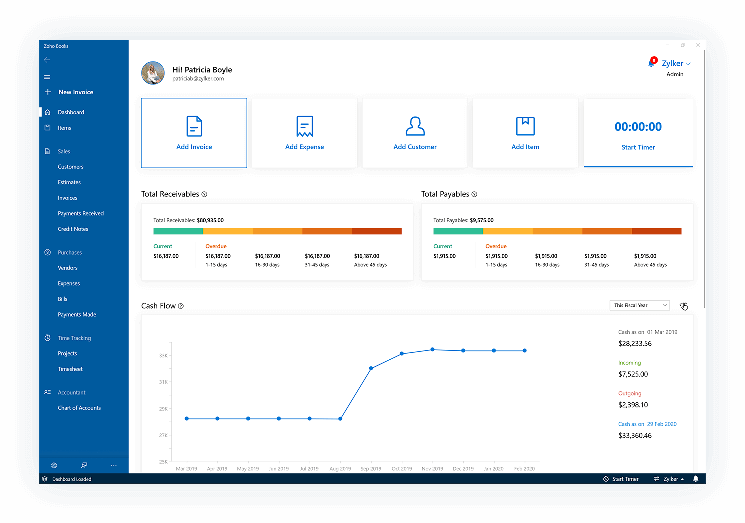
Source: Zoho Books web application (logged-in dashboard view)
Show: Main dashboard interface showing the financial overview panel with cash flow chart, accounts receivable and accounts payable summary cards, income vs expenses graph, and quick action buttons (Create Invoice, Record Expense, Add Transaction).
Alt text: Zoho Books dashboard displaying financial overview with cash flow chart and receivables summary.
Caption: The dashboard gives real-time visibility into business financial health with customizable widgets.
Zoho Books Pricing
Zoho Books offers six pricing tiers. All prices are per organization (not per user), with user limits increasing at higher tiers.
| Plan | Price | What’s Included |
|---|---|---|
| Free | $0 | 1,000 invoices/year, 1 user, 1 automated workflow, core accounting features (for businesses under $50K annual revenue) |
| Standard | $20/month (billed monthly) or $15/month (billed annually) | 5,000 invoices/year, 3 users, 5 automated workflows, multi-currency invoicing (single currency per customer) |
| Professional | $50/month (billed monthly) or $40/month (billed annually) | 10,000 invoices/year, 5 users, 10 workflows, inventory tracking, purchase orders, multi-currency (multiple currencies per customer) |
| Premium | $70/month (billed monthly) or $60/month (billed annually) | Unlimited invoices, 10 users, 25 workflows, retainer invoices, budgeting, custom domain for client portal, revenue recognition |
| Elite | $150/month (billed annually only) | Unlimited invoices, 15 users, 50 workflows, custom modules, record locking, report builder |
| Ultimate | $275/month (billed annually only) | Unlimited invoices, 25 users, 100 workflows, Zia AI assistant, advanced analytics, dedicated account manager |
Add-Ons (Available for Paid Plans Only)
- Additional users: $2.50/user/month (billed annually)
- Advanced Autoscans: $8 per 50 scans/month (OCR for receipts and bills)
- Additional locations: $10/location/month (for multi-location inventory tracking)
- Expense claim module: $7/active user/month (employee expense reimbursement workflows)
- Billpay: $59/month (vendor payment automation)
Free Trial
Zoho Books offers a 14-day free trial of the Premium plan by default. You can switch to any other paid plan during the trial by clicking the organization logo and selecting “Change Trial Plan.”
No credit card is required to start the trial. After 14 days, you choose a paid plan or revert to the Free tier if your revenue qualifies (under $50,000/year).
Pricing comparison: Zoho Books Standard ($15/month annual, 3 users) is 73% cheaper than QuickBooks Essentials ($30/month with 50% off for 3 months, then $60/month). By the time you scale to 10 users and need inventory, Zoho Elite ($150/month) and QuickBooks Advanced ($235/month with discount, then $275/month full price) land at similar price points, but QuickBooks caps users at 25 while Zoho Ultimate allows 25 users at $275/month with more advanced features.
Start Free Trial (No Credit Card Required)
Key Features
Zoho Books covers standard accounting workflows plus project billing, inventory management, and workflow automation. Feature availability scales with plan tier.
Invoicing and Recurring Billing
Invoicing is Zoho Books’ strongest feature. The system supports customizable invoice templates with your logo, colors, and layout preferences.
You can create estimates (quotes) that convert to invoices with one click. Recurring invoices automate subscription billing or retainer arrangements. The client portal allows customers to view invoices, download statements, and pay online via integrated payment gateways (Stripe, PayPal, Authorize.Net, Razorpay, others).
Automatic payment reminders reduce manual follow-up. You schedule reminder emails before, on, or after the due date. Zoho Books sends them automatically and logs delivery status.
Expense Tracking and Receipt Capture
Expenses can be entered manually or auto-imported from bank feeds and credit card accounts. The mobile app includes receipt scanning (OCR) that extracts vendor name, amount, date, and category from photos.
You can categorize expenses by project or client for accurate job costing. Billable expenses flow directly into customer invoices. Non-billable expenses go to your profit and loss statement without client visibility.
Mileage tracking is built in. Record trips with start/end locations and calculated mileage rates (IRS standard or custom). The mobile app uses GPS to auto-track mileage in the background.
Bank Reconciliation and Feeds
Zoho Books connects to bank accounts and credit cards via automatic feeds. Transactions import daily (not real-time). Some users report a 24-hour lag between transaction posting at the bank and appearing in Zoho Books.
The reconciliation interface shows unmatched transactions on the left, matched transactions on the right. You drag-and-drop to match or create rules for automatic categorization. Statement auto-forwarding lets you email bank statements directly to Zoho Books, which parses them and imports transactions if your bank’s feed is unavailable.
Bank reconciliation is functional but less polished than QuickBooks or Xero. High-volume accounts (100+ transactions/day) require more manual review because auto-matching rules are less sophisticated.
Project-Based Billing and Time Tracking
Project accounting is a standout feature that QuickBooks does not offer at comparable price points (QuickBooks requires Advanced plan at $235/month with discount).
You create projects, assign tasks, track time via built-in timesheets or Zoho Projects integration, and bill clients based on hourly rates or fixed fees. Time entries link to specific tasks and employees. Billable hours auto-populate invoices. Non-billable hours go to project reports for internal cost tracking.
Retainer invoices (Professional plan and above) let you bill clients upfront, then draw down against the retainer as work is completed. The system tracks remaining retainer balance and alerts you when it runs low.
Inventory Management
Inventory tracking unlocks at the Professional plan ($40/month annual). It covers stock levels, reorder points, purchase orders, and FIFO/LIFO cost calculations.
You can manage composite items (products assembled from components), track inventory across multiple warehouses (requires Additional Locations add-on), and generate stock reports showing movement, aging, and valuation.
Serial number and batch tracking are supported. This matters for industries with expiration dates (food, cosmetics) or warranty tracking (electronics, appliances).
Multi-Currency Support
Multi-currency invoicing starts at the Standard plan, but you can only assign one currency per customer. If a customer pays in USD for some invoices and EUR for others, you need the Professional plan.
The system auto-updates exchange rates daily (you can override manually). Foreign currency transactions create unrealized gain/loss entries that adjust when payments clear. Multi-currency bank accounts are supported. You reconcile in the account’s native currency, and Zoho Books handles conversions for reporting.
Financial Reporting
Standard reports include profit and loss, balance sheet, cash flow statement, aged receivables, aged payables, and tax summaries. Reports are customizable by date range, accounting method (cash or accrual), and comparison periods (month-over-month, year-over-year).
The Report Builder (Elite plan and above) lets you create custom reports from scratch using data from any module. This is useful for metrics that standard templates do not cover (revenue by project type, expense trends by client, custom KPIs).
Reports export to PDF, Excel, or print directly. You can schedule automated email delivery to stakeholders (board members, investors, accountants) on a recurring basis.
Workflow Automation
Zoho Books includes workflow automation at every paid tier, with limits increasing by plan (5 workflows on Standard, 100 workflows on Ultimate).
Workflows trigger actions based on conditions. Examples: when an invoice is overdue by 7 days, send a reminder email and create a task for the collections team. When a new expense over $500 is recorded, notify the manager for approval. When inventory for SKU X drops below 10 units, email the purchasing team.
You build workflows with a visual editor (no coding required). Triggers include time-based conditions, field updates, and external events via webhooks.
Where Zoho Books Stands Out
Pricing Is Aggressively Competitive
Zoho Books is 40 to 70% cheaper than QuickBooks and Xero at the entry and mid-tier levels. The Free plan for sub-$50K businesses is the most generous accounting free tier on the market.
Standard at $15/month (3 users, 5,000 invoices/year) undercuts QuickBooks Simple Start ($15/month for 1 user after discounts expire, then $30/month) and Xero Starter ($15/month for 1 user, limited features).
Professional at $40/month (5 users, inventory, multi-currency) beats QuickBooks Plus ($30/month promo then $60/month, 5 users, no project accounting) and Xero Standard ($38/month, unlimited users but no inventory).
The pricing advantage narrows at Elite and Ultimate tiers, where Zoho lands close to QuickBooks Advanced ($235 to $275/month). But by then, you are getting features like custom modules, report builder, and AI assistant that QuickBooks does not include at any price.
Deep Integration Across Zoho Ecosystem
If you already use other Zoho products, the integration value is unmatched. Zoho CRM syncs deals to invoices. Zoho Projects syncs time entries to billing. Zoho Expense syncs employee reimbursements. Zoho Inventory (standalone or embedded in Books) syncs stock across sales channels.
Third-party platforms require Zapier or API middleware to achieve this level of sync. Zoho products talk to each other natively, with no per-integration fees or data mapping friction.
For businesses committed to the Zoho ecosystem (or evaluating Zoho One), this eliminates the “integration tax” of stitching together best-of-breed tools from different vendors.
Project Accounting at Lower Price Points
Zoho Books includes project billing, time tracking, and job costing starting at the Free plan. QuickBooks requires Advanced ($235 promo, $275 full price) to get project profitability tracking.
For service-based businesses (agencies, consultancies, professional services), this is a massive cost advantage. You can track time, bill clients, and analyze project margins without upgrading to Enterprise-tier accounting software.
Automation Features Rival Enterprise Platforms
Workflow automation and custom fields (Elite and above) give Zoho Books flexibility that QuickBooks and Xero do not offer at comparable prices. You can build custom approval chains, automate vendor payments, trigger alerts based on financial thresholds, and create custom data fields for tracking metrics unique to your business.
This matters for businesses with operational complexity (multi-location retail, project-based services, subscription businesses with usage-based billing).
Tax Compliance (GST, VAT, Sales Tax)
Zoho Books handles global tax regimes better than most competitors. GST compliance in India, Australia, and New Zealand is fully automated. VAT in the UK and EU includes MOSS reporting. US sales tax supports nexus tracking and automated filing (via integration with Avalara or TaxJar).
For international businesses or companies operating across jurisdictions, this reduces reliance on external tax software.
Where Zoho Books Falls Short
Customer Support Is Inconsistent
This is the most common complaint across G2, Capterra, and Reddit reviews. Support is available via email, live chat, and phone, but response times vary widely (same-day to 72 hours).
Users report that support agents often lack product knowledge and escalate issues to senior teams, adding days to resolution. Some reviews mention support closing tickets without resolving the problem, requiring the user to re-open and escalate again.
The documentation and community forums are strong, so self-service works well for experienced users. But if you need hand-holding or urgent troubleshooting, the support experience can be frustrating.
Bank Reconciliation Lags Behind Competitors
Zoho Books’ bank feeds import transactions with a 24-hour delay, not real-time. QuickBooks and Xero update throughout the day.
The auto-matching rules are functional but less intelligent than Xero’s JAX feature or QuickBooks’ machine learning. You spend more time manually categorizing recurring vendors or correcting mismatches.
For high-volume accounts (e-commerce businesses processing 200+ daily transactions), this adds manual work that competitors automate better.
Limited Third-Party Integrations Compared to QuickBooks
Zoho Books integrates with 50+ apps (Stripe, PayPal, Shopify, WooCommerce, Zapier, Google Workspace, Microsoft 365). QuickBooks integrates with 750+ apps.
If your business relies on niche industry-specific tools (construction project management, medical practice software, law firm billing), QuickBooks likely has a native integration. Zoho Books may require Zapier workarounds or manual data exports.
Interface Feels Basic
Zoho Books works well, but it does not feel modern. The UI uses a standard web-app layout with left sidebar navigation and tabular data views. It is functional, not delightful.
QuickBooks and Xero have cleaner interfaces with better use of visual hierarchy, charts, and white space. Zoho Books feels more utilitarian. This does not affect functionality, but it matters to users who care about software aesthetics.
Mobile App Lacks Feature Parity
The iOS and Android apps support core functions (create invoices, record expenses, scan receipts, view reports). They do not support bank reconciliation, payroll, or workflow automation.
For businesses where bookkeepers work primarily from mobile devices (retail, field services), this limits utility. Desktop access is required for full accounting workflows.
Payroll Is Separate (US Only)
Zoho Books does not include payroll. US-based businesses can add Zoho Payroll as a separate subscription ($19/month + $4/employee). Payroll is only available in the US, India, and Australia.
QuickBooks includes payroll in some plans and offers it as an add-on in others, with broader geographic coverage. Xero integrates with third-party payroll providers globally.
What Real Users Say
Zoho Books has a 4.4 out of 5 rating on G2 (302 reviews) and Capterra (672 reviews). User feedback is generally positive, with recurring themes around affordability and ease of use, balanced by frustration with support and bank reconciliation.
Common praise: Users love the pricing, especially the Free plan for startups and the Standard plan for small teams. The invoicing and recurring billing features are called out as fast and customizable. Integration with other Zoho apps (CRM, Projects, Expense) is cited as a major workflow advantage. Automation features (recurring invoices, payment reminders, workflows) save time. Multi-currency and project billing unlock at lower price points than competitors. The mobile app’s receipt scanning works well.
Common complaints: Customer support is slow and inconsistent, with agents often unable to resolve issues without escalation. Bank feeds lag by 24 hours and require more manual review than QuickBooks or Xero. The interface feels dated and basic compared to competitors. Third-party integrations are limited (50+ apps vs 750+ for QuickBooks). Payroll is US-only and costs extra. Some users report difficulty canceling subscriptions, requiring multiple emails to support.
G2 and Capterra Highlights
G2: 4.4 out of 5 stars (302 reviews). Top-rated for value for money, ease of use, and quality of support (despite mixed sentiment in narrative reviews). Criticism focuses on bank reconciliation and limited reporting customization on lower-tier plans.
Capterra: 4.4 out of 5 stars (672 reviews). Users appreciate straightforward setup and invoice automation. Bank feed disruptions and slow support are recurring complaints.
Who Should Use Zoho Books
Zoho Books makes sense for:
- Small service-based businesses (freelancers, consultants, agencies, professional services) that need project billing, time tracking, and client invoicing without enterprise-level complexity.
- Startups and businesses under $50,000 annual revenue where the Free plan covers basic accounting needs at zero cost.
- Companies already using other Zoho products (CRM, Projects, Campaigns, Desk) where native integrations eliminate third-party middleware and reduce overall software costs.
- International businesses that need multi-currency invoicing, GST/VAT compliance, and global tax support at affordable prices.
- Businesses with moderate inventory needs (e-commerce, retail, light manufacturing) where the Professional plan ($40/month) provides stock tracking, purchase orders, and FIFO costing.
- Budget-conscious teams that prioritize cost savings over brand recognition and can tolerate slower customer support.
Who Should Not Use Zoho Books
Skip Zoho Books if:
- Your accountant or bookkeeper already uses QuickBooks and you plan to work closely with them. Switching costs (training, migration, accountant fees) may exceed software savings.
- You need real-time bank feeds and high-volume transaction automation. Zoho Books’ 24-hour lag and manual reconciliation workflows slow down businesses processing 100+ daily transactions.
- You rely on niche third-party integrations. QuickBooks supports 750+ apps. Zoho Books supports 50+. If your business depends on industry-specific tools (construction management, legal billing, medical practice software), QuickBooks likely integrates natively.
- You need payroll outside the US, India, or Australia. Zoho Payroll is only available in three countries. QuickBooks and Xero support broader geographies.
- You prioritize fast, high-quality customer support. Zoho Books support is email-first with inconsistent response times. If you need same-day resolutions or dedicated phone support, QuickBooks or Xero are safer bets.
- You prefer modern, polished software design. Zoho Books works well but feels basic. If UI/UX matters to your team, test the trial before committing.
Zoho Books vs. Alternatives
| Platform | Best For | Starting Price | Key Difference |
|---|---|---|---|
| Zoho Books | Budget-conscious small businesses, service firms, Zoho ecosystem users | Free (under $50K revenue) or $15/month annual (Standard, 3 users) | Lowest entry price, project billing at all tiers, deep Zoho integration, strong automation features |
| QuickBooks Online | US-based businesses prioritizing brand recognition and accountant familiarity | $15/month promo (Simple Start, 1 user), then $30/month full price | 750+ third-party integrations, largest accountant network, real-time bank feeds, advanced reporting, US payroll included |
| Xero | Teams needing unlimited users and clean interface | $15/month (Starter, 1 user, limited features) | Unlimited users on all plans, superior bank reconciliation (JAX auto-matching), cleaner UI, strong international bank coverage |
| FreshBooks | Service businesses prioritizing invoicing and client communication over full accounting | $19/month (Lite, 5 billable clients) | Simpler invoicing, better client portal experience, time tracking, lacks double-entry accounting and inventory |
| Wave | Solopreneurs and micro-businesses needing completely free accounting | Free (unlimited, revenue-based fees on payments and payroll) | 100% free core accounting, invoicing, receipt scanning; monetizes via 2.9% + $0.60 payment processing and $40/month payroll |
Quick Pick Guide
- If you need the cheapest option with project billing: Zoho Books. No competitor offers time tracking and job costing at $15/month.
- If your accountant uses QuickBooks: QuickBooks Online. Switching costs and accountant collaboration friction outweigh software savings.
- If you need unlimited users: Xero. Every Xero plan includes unlimited users. Zoho Books caps users by tier.
- If you want 100% free accounting forever: Wave. No revenue cap, no user cap, no feature limits. Just pay 2.9% on payments.
- If you already use 2+ Zoho products: Zoho Books or Zoho One. Native integration eliminates third-party middleware fees.
Popular Integrations
Zoho Books integrates with payment gateways, e-commerce platforms, CRMs, and productivity tools. All Zoho-to-Zoho integrations are native (no API middleware). Third-party integrations use Zapier or direct API connections.
- Payment Gateways: Stripe, PayPal, Square, Authorize.Net, Razorpay, Braintree, Mollie, GoCardless (recurring payments)
- E-commerce: Shopify, WooCommerce, BigCommerce, Amazon Seller Central
- CRM: Zoho CRM (native), Salesforce (via Zapier), HubSpot (via Zapier)
- Project Management: Zoho Projects (native), Asana (via Zapier), Monday.com (via Zapier)
- Expense Management: Zoho Expense (native), Expensify (via Zapier)
- Inventory: Zoho Inventory (native), TradeGecko/QuickBooks Commerce (via API)
- Communication: Zoho Cliq (native chat), Slack (via Zapier), Microsoft Teams (via Zapier)
- Tax Compliance: Avalara (sales tax), TaxJar (sales tax), Vertex (sales tax)
- Payroll: Zoho Payroll (native, US/India/Australia only), Gusto (via Zapier), ADP (via API)
Zapier webhook support (Premium plan and above) enables custom integrations with 5,000+ apps. Incoming Zapier actions (create invoice, record expense) work on all plans. Outgoing Zapier actions (trigger when invoice is paid) require Premium or higher.
Frequently Asked Questions
Does Zoho Books offer a free plan?
Yes. The Free plan is permanent for businesses earning under $50,000/year. It includes 1,000 invoices/year, 1 user, 1 automated workflow, and core accounting features (invoicing, expense tracking, bank reconciliation, basic reports).
Once your revenue exceeds $50,000, you upgrade to a paid plan. The Free plan is not a trial. It does not expire.
How much does Zoho Books cost for a 10-person team?
For 10 users, you need the Premium plan ($60/month annual) which includes 10 users, or the Elite plan ($150/month annual) which includes 15 users.
If you need exactly 10 users and unlimited invoices, Premium at $60/month ($720/year) is the right tier. If you need advanced features (custom modules, report builder, record locking), Elite at $150/month ($1,800/year) is the next step.
QuickBooks Plus (5 users max) costs $60/month after promos expire. To get 10 users, you need QuickBooks Advanced at $235/month promo ($275/month full price), making Zoho Books significantly cheaper at scale.
Is Zoho Books worth it, or should I use QuickBooks?
Use Zoho Books if you prioritize cost savings, project billing, and ecosystem integration. Use QuickBooks if your accountant already uses it, you need real-time bank feeds, or you rely on third-party app integrations (QuickBooks has 750+, Zoho has 50+).
Zoho Books saves 40 to 70% compared to QuickBooks at entry and mid-tier levels. The tradeoff is slower customer support, 24-hour bank feed lag, and fewer integrations.
Most accountants know QuickBooks. If you work closely with an external bookkeeper or CPA, switching to Zoho Books may cost more in accountant training and collaboration friction than you save on software.
Can Zoho Books handle inventory management?
Yes, starting at the Professional plan ($40/month annual). Inventory features include stock tracking, reorder points, purchase orders, FIFO/LIFO costing, serial number tracking, and batch tracking.
For multi-location inventory (track stock across warehouses or retail stores), you need the Additional Locations add-on ($10/location/month).
If inventory is your primary need, compare Zoho Books Professional against QuickBooks Plus ($60/month after promos) and Xero Standard ($38/month, but inventory requires third-party app).
How long does Zoho Books take to implement?
Basic setup (company profile, chart of accounts, bank connection, first invoice) takes 1 to 2 hours. Most users are operational within a day.
Data migration from QuickBooks or Xero takes longer (1 to 3 days for manual CSV imports, or use Zoho’s free migration service which handles it in 3 to 5 business days).
Training is minimal for users familiar with accounting software. The interface is intuitive. Zoho offers free onboarding webinars and documentation.
Does Zoho Books integrate with QuickBooks or Xero?
No. Zoho Books does not sync data with QuickBooks or Xero. If you are migrating, you export data from the old system and import it into Zoho Books via CSV files or use Zoho’s migration service.
You cannot run both systems in parallel with automated sync. It is an either/or decision.
Is Zoho Books compliant with US tax regulations (1099, sales tax)?
Yes. Zoho Books supports 1099 contractor reporting (collect W-9 forms, generate 1099-NEC, file electronically with the IRS). Sales tax tracking is built in, with support for nexus-based tax rules and automated rate updates.
For automated sales tax filing, integrate Avalara, TaxJar, or Vertex. Zoho Books calculates tax; the integration handles filing and remittance.
Does Zoho Books offer payroll?
Zoho Payroll is a separate subscription ($19/month + $4/employee, US only). It integrates with Zoho Books to sync payroll expenses, tax liabilities, and employee reimbursements.
Payroll is also available in India and Australia via separate Zoho Payroll subscriptions. It is not available in other countries.
For international payroll, use third-party providers (Gusto, ADP, Deel) and integrate via Zapier or manual journal entries.
What is Zoho Books’ cancellation policy?
You can cancel anytime. Monthly subscriptions end at the current billing cycle. Annual subscriptions are non-refundable for unused months (standard SaaS practice).
Some users report difficulty canceling via the dashboard and needing to email support. Zoho’s official process: Settings > Manage Subscriptions > Cancel Plan. If the button is missing, contact support@zohobooks.com.
Can Zoho Books replace my accountant?
No. Zoho Books is accounting software, not accounting advice. It automates data entry, invoicing, and reporting, but it does not replace a CPA’s expertise in tax planning, compliance, or financial strategy.
The software reduces your accountant’s data-entry workload, which may lower their fees. You still need professional guidance for tax filings, year-end close, and financial decisions.
Zoho Books includes accountant access (invite your CPA or bookkeeper at no extra cost). They can log in, review transactions, and prepare reports without needing their own subscription.
Is Zoho Books right for e-commerce businesses?
Yes, with caveats. Zoho Books integrates with Shopify, WooCommerce, BigCommerce, and Amazon Seller Central to import orders, sync inventory, and track revenue.
For high-volume e-commerce (500+ daily orders), test the bank reconciliation workflow during the 14-day trial. Some users report that Zoho Books’ auto-matching struggles with high transaction volumes compared to QuickBooks or Xero.
If you sell across multiple channels and need real-time inventory sync, compare Zoho Books + Zoho Inventory (native integration) against dedicated e-commerce accounting platforms like A2X + Xero or QuickBooks Commerce.
Final Verdict
Zoho Books delivers strong value for small businesses that prioritize affordability and ecosystem integration over brand recognition and premium support.
The Free plan is the most generous in the market. The Standard and Professional tiers undercut QuickBooks and Xero by 40 to 70%. Project billing, time tracking, and workflow automation at entry-level prices make Zoho Books particularly attractive for service-based businesses (agencies, consultancies, professional services).
The Zoho ecosystem integration (CRM, Projects, Expense, Campaigns) eliminates third-party middleware and reduces total software costs. If you already use 2+ Zoho products, the pricing and workflow advantages are hard to ignore.
The tradeoffs are real. Customer support is slower and less consistent than QuickBooks or Xero. Bank feeds lag by 24 hours. The interface feels basic. Third-party integrations are limited (50+ apps vs 750+ for QuickBooks).
If your accountant already uses QuickBooks, switching costs may outweigh software savings. Accountant training, migration effort, and collaboration friction add hidden costs that the $15/month price tag does not reflect.
For startups, solopreneurs, and small teams building their own tech stack or already using Zoho products, Zoho Books is an excellent choice. For businesses prioritizing brand familiarity, premium support, or complex third-party integrations, QuickBooks or Xero are safer bets despite higher costs.
Visit Zoho Books Official Site
Last updated on May 3, 2026