ADVERTISING DISCLOSURE: THIS POST CONTAINS AFFILIATE LINKS. READ FULL DISCLAIMER
The Verdict: QuickBooks Online is the industry default for good reason. It handles everything from basic invoicing to inventory tracking, integrates with nearly every third-party tool, and is preferred by the vast majority of accountants. But the May 2026 price hikes (15 to 25 percent across all plans) force a harder question: are you actually using what you’re paying for? If you need payroll integration, inventory management, or deep reporting customization, QuickBooks justifies its cost. If you’re using it to send invoices and track expenses, you’re likely overpaying. Plans range from $38/month (Simple Start) to $275/month (Advanced), with payroll, payment processing fees, and annual price increases adding significantly to total cost.
Last updated May 1, 2026.
In This Review
What QuickBooks Online Is
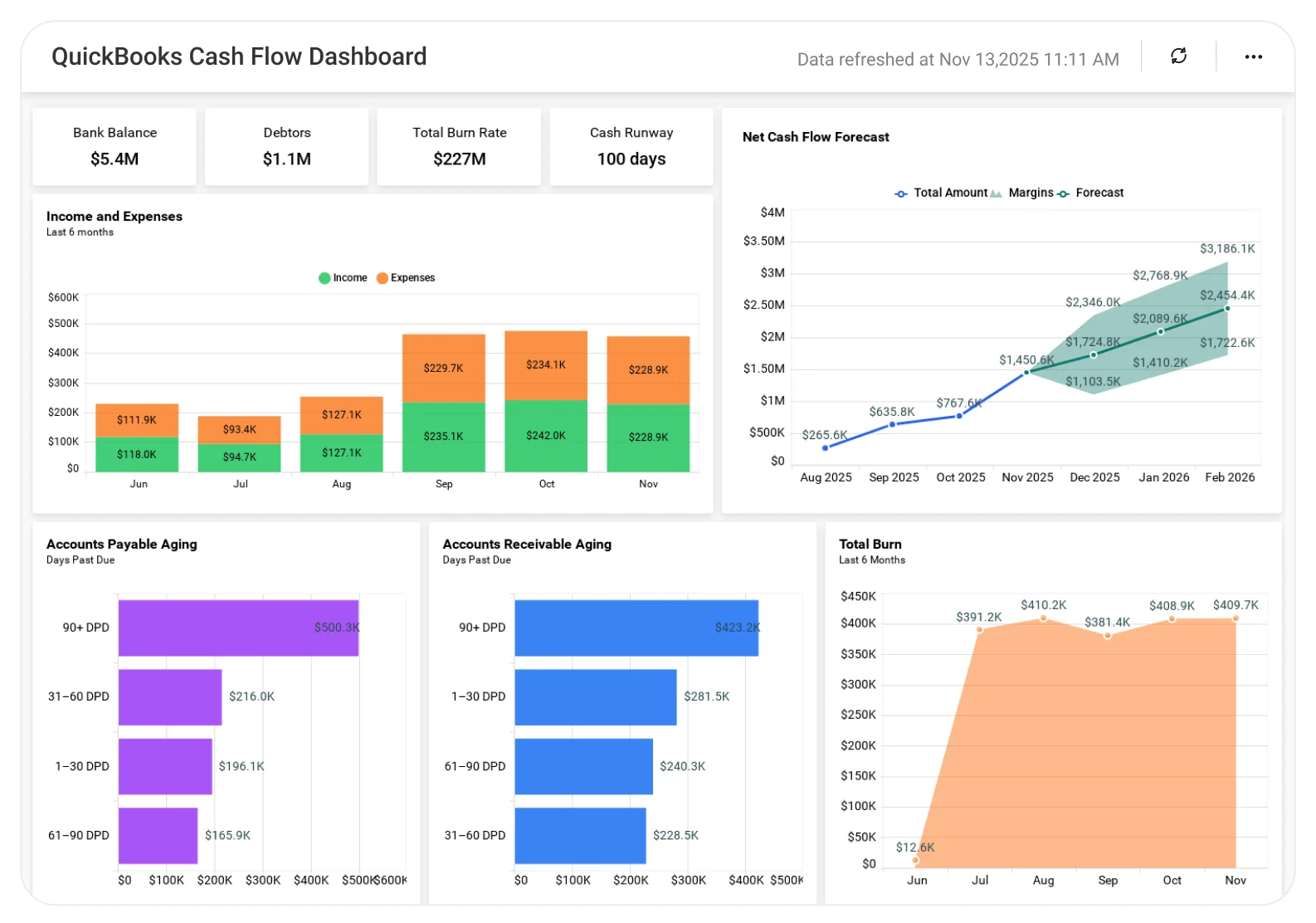
QuickBooks Online is cloud-based accounting software built by Intuit for small to midsize businesses. It handles the full spectrum of accounting tasks: invoicing, expense tracking, bank reconciliation, payroll (via add-on), inventory management, sales tax calculation, and financial reporting.
QuickBooks Online serves approximately 7.5 million subscribers in the U.S. alone, making it the most widely adopted accounting platform in the small business market.
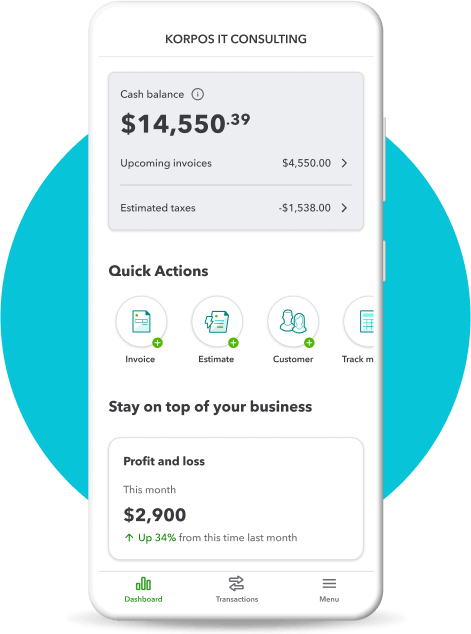
The platform is accessible via web browser or mobile app (iOS and Android), with real-time data syncing across devices. Unlike QuickBooks Desktop (which requires local installation and has limited multi-user capabilities), QuickBooks Online is designed for remote access, collaboration with accountants, and integration with third-party apps.
The software has five pricing tiers ranging from Solopreneur ($20/month for Schedule C filers only) to Advanced ($275/month for up to 25 users and enterprise-level features).
QuickBooks Online competes directly with Xero and FreshBooks in the small business accounting space, and with NetSuite and Sage Intacct at the higher end. Its dominant market position stems from two factors: accountant familiarity (nearly every CPA and bookkeeper in the U.S. is trained on QuickBooks) and integration breadth (over 750 third-party apps connect natively to the platform).
The software is feature-rich but increasingly expensive, with Intuit implementing 15 to 25 percent price increases across all plans effective May 1, 2026.
Source: QuickBooks
QuickBooks Online Pricing
QuickBooks Online pricing increased significantly in May 2026, with all plans seeing 15 to 25 percent hikes. The five current tiers are Solopreneur, Simple Start, Essentials, Plus, and Advanced.
Each tier bundles a fixed number of users with specific features. You cannot purchase additional user seats individually, which forces tier upgrades once you hit user limits.
| Plan | Price | What’s Included |
|---|---|---|
| Solopreneur | $20/month | 1 user, Schedule C filers only, income and expense tracking, invoicing, mileage tracking, quarterly tax estimates. Not double-entry accounting. |
| Simple Start | $38/month | 1 user, income and expense tracking, invoicing, sales tax calculation, basic reports, bank reconciliation, receipt capture. |
| Essentials | $75/month | 3 users, everything in Simple Start, plus bill management, time tracking, multi-currency support. |
| Plus | $115/month | 5 users, everything in Essentials, plus inventory tracking, project profitability tracking, budgeting, class and location tracking. Most popular plan. |
| Advanced | $275/month | 25 users, everything in Plus, plus custom user permissions, batch invoicing, smart workflow automation, advanced reporting, dedicated account team. |
Promotional Pricing and Discounts
Intuit offers promotional pricing for new subscribers (typically 50 percent off for the first three months), but these promos expire in month four, and the full price applies. Annual billing saves approximately 10 percent, but you’re locked in for a full year.
If your accountant uses QuickBooks Online Accountant (a free platform for accounting professionals), your subscription may qualify for an ongoing 50 percent discount, which represents significant savings for businesses already working with a bookkeeper or CPA.
Hidden Costs Beyond List Price
Hidden Cost Warning: The list price is only the starting point. Payroll adds $45 to $125/month base fee plus $5 to $10 per employee. Payment processing adds 2.9% per transaction. Annual price increases of 10 to 17% are the documented norm. A 10-person business on Plus with Premium payroll pays $4,000 to $5,000 annually when you factor in all costs.
Payroll: QuickBooks Payroll add-on costs $45 to $125/month base fee, plus $5 to $10 per employee per month, depending on the payroll tier (Core, Premium, or Elite). A 10-employee business on Premium payroll pays approximately $160/month on top of the base QuickBooks subscription.
Payment processing: QuickBooks Payments charges 2.9 percent plus $0.25 per transaction for card payments, and 1 percent (max $10) for ACH bank transfers. These fees add up quickly for businesses processing significant revenue through the platform.
Annual price increases: Intuit has a documented pattern of raising prices 10 to 17 percent annually. Multiple verified user reviews on Trustpilot, Capterra, and G2 report unexpected renewal increases ranging from modest $60/year bumps to extreme cases exceeding $2,500/year.
QuickBooks does not publish a price increase schedule, but the pattern is consistent enough to factor into multi-year budgeting.
The median QuickBooks Online customer pays approximately $900/year based on 309 verified purchases tracked by third-party pricing platforms. When factoring in payroll, payment processing, and annual price increases, total cost of ownership for a 10-person business on Plus with Premium payroll approaches $4,000 to $5,000 annually.
Get a Custom Quote from QuickBooks
Key Features
Bank Reconciliation and Transaction Management
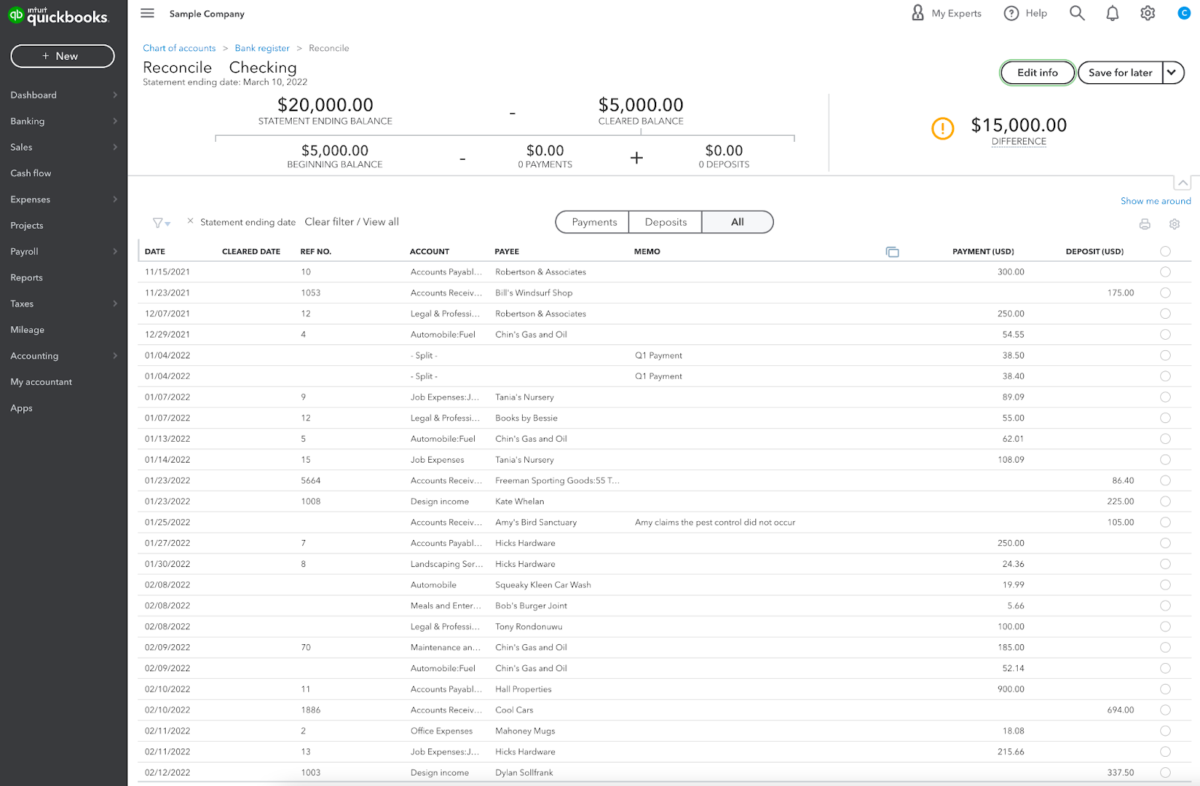
QuickBooks Online connects to over 14,000 financial institutions for automatic transaction downloads. The platform imports bank and credit card transactions daily, categorizes them using machine learning (which improves over time as you correct its suggestions), and flags duplicates.
Reconciliation is a core workflow: you match downloaded transactions to invoices, bills, or expenses, and QuickBooks marks them as cleared.
The AI-powered reconciliation feature (introduced in 2025 and improved in March 2026) accelerates this process by approximately three times according to Intuit’s internal data, though you retain manual control over categorization and posting.
The bank feed system works well for most standard business checking and credit card accounts. However, users report occasional sync failures, duplicate transaction imports, and frustrating delays when financial institutions change their APIs.
When a bank feed breaks, fixing it typically requires contacting QuickBooks support, which can take hours or days depending on your plan tier.
Source: QuickBooks
Invoicing and Payments
QuickBooks generates professional invoices with customizable templates, automatic payment reminders, and online payment acceptance (via QuickBooks Payments). You can create recurring invoices for subscription or retainer clients, set up progress invoicing for milestone-based billing, and track invoice status in real time (sent, viewed, paid, overdue).
The mobile app allows you to create and send invoices from your phone, which is useful for field service businesses.
Invoice customization is strong. You can add your logo, adjust colors and fonts, include item descriptions and quantities, apply discounts, and attach files. The platform also supports estimates (which convert to invoices with one click) and allows clients to approve estimates electronically.
The primary invoicing limitation is speed. Creating an invoice in QuickBooks involves more clicks and navigation than competitors like FreshBooks, which was purpose-built around invoicing workflows. QuickBooks also lacks the invoice-viewed notifications that FreshBooks provides, which many service-based businesses find valuable for timing follow-ups.
Reporting and Financial Insights
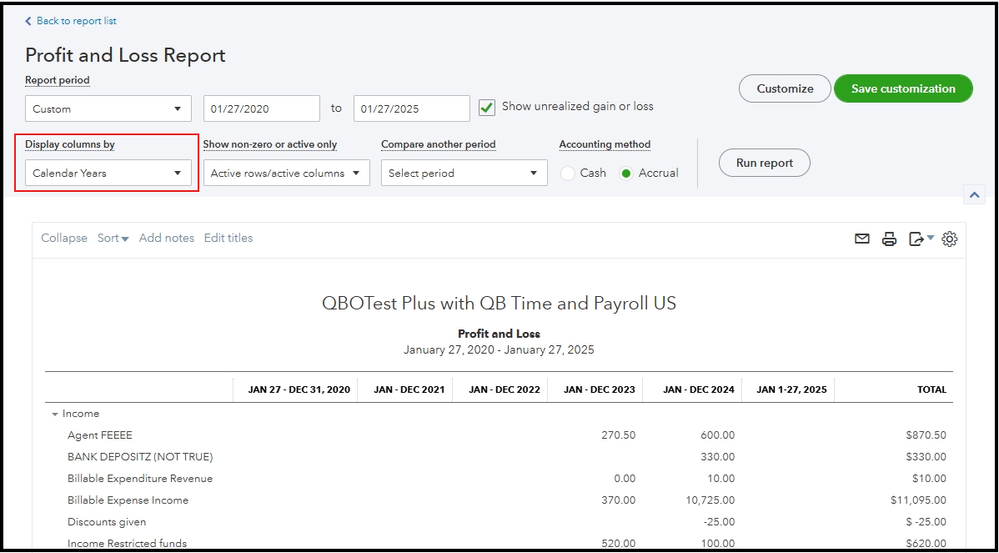
QuickBooks Online offers over 60 standard reports, including profit and loss, balance sheet, cash flow statement, accounts receivable aging, sales by customer, expense reports, and tax summaries.
Reporting is one of the platform’s genuine strengths. You can customize reports by date range, comparison period (this year vs. last year, this quarter vs. last quarter), accounting method (cash or accrual), and filter by customer, vendor, product, class, or location.
The customization sidebar allows you to adjust number formats, show or hide columns, collapse subaccounts, and export to Excel or PDF. You can also save customized reports and “star” them for quick access from your dashboard.
The drill-down functionality is excellent: clicking any line item in a report shows the underlying transactions that compose that number, which makes auditing and error-checking straightforward.
Advanced tier subscribers gain access to custom report building, Fathom-style dashboards, and multi-company consolidated reporting (useful for franchises, holding companies, or agencies managing multiple entities). The Advanced tier also includes performance center tools that compare actual results to budgets and forecasts.
Inventory Management
Inventory tracking is available on Plus and Advanced plans. QuickBooks tracks inventory quantities, costs, and values in real time, adjusts stock levels automatically when you create invoices or purchase orders, and alerts you when items fall below reorder points.
The system supports FIFO (first-in, first-out) costing by default, with average cost as an alternative.
For product-based businesses, the inventory feature is functional but not exceptional. It handles basic stock tracking and cost of goods sold calculations, but lacks the depth of dedicated inventory platforms like Fishbowl or Cin7.
Multi-location inventory tracking exists but is cumbersome. Barcode scanning requires third-party integrations. Manufacturing businesses with bill-of-materials workflows will find QuickBooks inventory too basic and typically integrate with a dedicated manufacturing ERP.
Sales Tax Calculation and Filing
QuickBooks automatically calculates sales tax based on your nexus jurisdictions (the states and localities where you’re required to collect tax). The system applies the correct tax rate to each transaction based on the customer’s location and the product or service being sold.
For businesses operating across multiple states, this feature saves significant time and reduces compliance risk.
Select states now support direct filing from QuickBooks (introduced in 2026), allowing you to submit sales tax returns without visiting state revenue websites. This feature is still rolling out and is not yet available in all jurisdictions, but where it works, it eliminates a major administrative headache.
AI-Powered Features (Intuit Assist)
QuickBooks introduced Intuit Assist AI agents in 2025 and expanded them significantly in 2026. The current AI features include:
- Automated transaction categorization (which learns from your corrections)
- Anomaly detection (flags unusual transactions or deviations from historical patterns)
- Natural language query answering (you can ask “What’s driving my profit this month?” and receive a contextual answer)
- Invoice payment follow-up drafting
The AI categorization works well after a training period of a few weeks. Early adopters report 70 to 80 percent accuracy out of the box, improving to 90 percent or higher as the system learns your business.
The anomaly detection is hit-or-miss; it sometimes flags legitimate transactions as unusual, creating unnecessary review work.
The natural language query feature is helpful for non-accountants who struggle with traditional report navigation. Instead of searching for the right report and customizing it, you can type a question in plain English and receive an answer with supporting data.
The feature is still being refined and occasionally misinterprets complex queries, but it represents a genuine productivity boost for small business owners who find traditional accounting interfaces intimidating.
Where QuickBooks Online Stands Out
Accountant and Bookkeeper Compatibility
QuickBooks Online dominates the small business accounting market because nearly every accountant and bookkeeper in the U.S. is trained on it. This creates a powerful network effect.
If you hire a CPA, they almost certainly know QuickBooks. If you switch accountants, the new one will also know QuickBooks. If you need temporary bookkeeping help, freelance bookkeepers on Upwork and other platforms list QuickBooks proficiency as a standard skill.
This compatibility advantage is difficult to overstate. Choosing an alternative platform like Xero or FreshBooks often means higher accounting bills because your CPA has to spend extra time learning the software or manually translating your books into a format they can work with.
For businesses that rely on professional accounting support, QuickBooks compatibility alone justifies the cost.
Integration Ecosystem
QuickBooks integrates with over 750 third-party apps, covering payroll (Gusto, ADP, Paychex), payment processing (Stripe, Square, PayPal), e-commerce (Shopify, WooCommerce, Amazon, eBay), CRM (Salesforce, HubSpot), project management (Asana, Monday.com), time tracking (TSheets, Toggl), inventory (Fishbowl, Cin7), and specialized industry tools (construction job costing, legal billing, medical practice management).
This breadth means QuickBooks can serve as the financial hub for almost any business model. If you’re running an e-commerce store on Shopify, orders and payouts sync automatically to QuickBooks. If you’re using Gusto for payroll, wage and tax data flows directly into your books. If you’re managing projects in Asana, time entries can feed into QuickBooks invoices.
The integration quality varies. Native Intuit integrations (like QuickBooks Time and QuickBooks Payments) are generally reliable. Third-party integrations range from excellent to frustrating, depending on the vendor.
When an integration breaks, troubleshooting responsibility often falls into a gray area between QuickBooks support and the third-party vendor, which can delay resolution.
Depth of Features for Complex Businesses
QuickBooks handles business complexity better than most competitors. If you need multi-currency support for international clients, class and location tracking for departmental P&L reporting, project profitability analysis, job costing, or consolidated reporting across multiple entities, QuickBooks provides these features natively (on the appropriate tier).
Competitors like FreshBooks don’t support these workflows at all, and even Xero’s implementation of some advanced features is less robust than QuickBooks.
For businesses selling physical products, QuickBooks Plus and Advanced provide sufficient inventory management for most small to midsize operations. For service businesses with complex billing (retainers, milestones, time and materials, recurring subscriptions), QuickBooks handles all of these scenarios within the core platform.
Where QuickBooks Online Falls Short
Relentless Price Increases
QuickBooks users consistently cite price increases as their top frustration. Intuit raised prices 15 to 25 percent across all plans in May 2026, marking the latest in a pattern of annual or biannual hikes.
The Plus plan, which serves an estimated 3 million businesses in the U.S., jumped from $90/month to $115/month, adding $300/year to software costs. Advanced increased from $200/month to $275/month, a 37.5 percent jump.
These increases are not accompanied by proportional feature improvements. Intuit frames them as funding AI development, but users report that many AI features feel half-baked or create additional work rather than reducing it.
The price hikes hit hardest on businesses with $500,000 to $2 million in revenue, where $300 to $500/year in unexpected software cost increases are noticeable but not catastrophic enough to justify the pain of switching platforms.
Customer Support Quality Decline
User reviews across G2, Capterra, Trustpilot, and Reddit consistently report declining customer support quality. Common complaints include:
- Long wait times (30 to 60 minutes on hold)
- Frequent transfers between support agents who cannot resolve the issue
- Language barriers with offshore support teams
- Scripted troubleshooting that doesn’t address the actual problem
Phone support is theoretically available on all plans (except Solopreneur), but the quality varies dramatically depending on which agent you reach. Some users report excellent experiences; others describe spending hours on multiple calls without resolution.
Email support is slow, often taking 24 to 48 hours for a first response and requiring multiple back-and-forth exchanges to reach resolution.
The contrast with earlier QuickBooks support (circa 2015 to 2020) is stark. Long-time users note that support responsiveness and technical competence have degraded as Intuit has scaled the user base without proportionally scaling support infrastructure.
Time Tracking Requires Add-On
Unlike FreshBooks (which includes native time tracking) and Xero (which has built-in time tracking on higher tiers), QuickBooks Online requires a separate subscription to QuickBooks Time (formerly TSheets) for robust time tracking.
The base plans include only basic manual time entry, which is insufficient for service businesses billing by the hour or managing employee time for payroll.
QuickBooks Time costs an additional $20/month base fee plus $8/user/month, adding $100 to $200/month for a 10-person team. For businesses where time tracking is a core workflow, this add-on cost pushes total QuickBooks expense significantly higher than competitors.
What Real Users Say
QuickBooks Online holds a 4.3 out of 5 rating on G2 (based on over 3,000 reviews) and 4.3 out of 5 on Capterra (based on over 6,500 reviews). The platform benefits from its dominant market position and feature breadth, but user sentiment has shifted noticeably negative around pricing and support.
Common praise: Users consistently highlight ease of bank account integration, automated transaction categorization, comprehensive reporting, and the ability to collaborate with accountants in real time. The mobile app receives positive ratings for allowing invoice creation and expense tracking on the go. Small business owners appreciate that QuickBooks handles complexity (inventory, multi-currency, project tracking) that competitors cannot.
Common complaints: Price increases dominate negative reviews. Users report frustration with frequent, unannounced price hikes, limited features on lower-tier plans that force upgrades, and costly add-ons for essential functionality like payroll and time tracking. Customer support quality is a recurring pain point, with long wait times, unresponsive agents, and unresolved technical issues cited repeatedly. Interface changes and dashboard redesigns frustrate long-time users who have to relearn navigation. Payment processing holds and account freezes create significant business disruption for affected users.
A recurring theme in reviews is resigned acceptance. Users often say some version of “QuickBooks is expensive and support is terrible, but switching would be worse.” This reflects the platform’s strong lock-in effect: once your accountant, integrations, and historical data are in QuickBooks, migrating to a competitor involves significant time, cost, and risk.
Who Should Use QuickBooks Online
- Businesses working with accountants or bookkeepers. If your CPA, bookkeeper, or tax preparer uses QuickBooks (and most do), staying on the same platform eliminates translation work and reduces accounting fees.
- Product-based businesses needing inventory tracking. QuickBooks Plus and Advanced provide solid inventory management for retail, wholesale, and light manufacturing operations. E-commerce businesses benefit from native integrations with Shopify, Amazon, WooCommerce, and eBay.
- Businesses requiring payroll integration. QuickBooks Payroll (despite being an add-on) integrates more tightly with QuickBooks Online than third-party payroll providers integrate with competitors. If payroll is a core workflow, the seamless data flow justifies the additional cost.
- Multi-location or multi-entity businesses. Class and location tracking (Plus and Advanced) allow departmental P&L reporting. Advanced tier supports consolidated reporting across multiple company files, which is valuable for franchises, holding companies, and agencies managing multiple client entities.
- Businesses scaling past $1 million in revenue. QuickBooks handles complexity well. As your business grows and accounting needs become more sophisticated, QuickBooks provides the depth required without forcing a platform migration.
- Businesses already locked into the QuickBooks ecosystem. If you have years of historical data, established integrations, and an accountant who lives in QuickBooks, the switching cost is high enough that staying often makes sense despite price frustrations.
Who Should Not Use QuickBooks Online
- Freelancers and solopreneurs who primarily send invoices. FreshBooks is faster, simpler, and cheaper for service providers who bill by the hour or project and don’t need inventory, payroll, or complex reporting.
- Businesses with tight budgets sensitive to price increases. If $300 to $500/year in unexpected cost increases would create financial strain, QuickBooks’ pricing trajectory is a risk. Xero offers more predictable pricing with unlimited users on all plans.
- Businesses requiring excellent customer support. If you anticipate needing frequent support or have low tolerance for long hold times and offshore call centers, QuickBooks will frustrate you. Smaller platforms like FreshBooks and Xero provide better support experiences.
- International businesses with multi-currency as a core workflow. QuickBooks handles multi-currency, but Xero does it better. If you invoice in multiple currencies regularly or manage foreign exchange gains and losses, Xero is the stronger choice.
- Teams prioritizing unlimited user access. Xero offers unlimited users on all plans. QuickBooks charges per user or forces tier upgrades. For growing teams, Xero’s user model often results in lower total cost.
- Businesses using QuickBooks primarily as a glorified spreadsheet. If you’re only tracking income and expenses with basic categorization, you’re paying for features you’re not using. Wave (free) or Zoho Books (cheaper) handle simple bookkeeping at a fraction of the cost.
QuickBooks Online vs. Alternatives
| Platform | Best For | Starting Price | Key Difference |
|---|---|---|---|
| QuickBooks Online | CPA-led businesses, inventory, payroll | $38/month | Industry standard, deepest integration ecosystem |
| Xero | Growing teams, multi-currency, modern UI | $15/month | Unlimited users on all plans, cleaner interface, stronger multi-currency support |
| FreshBooks | Freelancers, service businesses, hourly billing | $19/month | Best invoicing and time tracking experience, purpose-built for service providers |
| Wave | Micro-businesses, basic bookkeeping | Free | Completely free for core accounting (makes money on payment processing and payroll) |
| Zoho Books | Cost-conscious small businesses | $0 (revenue under $50k/year) | Free plan for qualifying businesses, strong value on paid tiers |
Quick Pick Guide
- Your accountant uses QuickBooks: Stay on QuickBooks. Switching costs more in higher accounting fees than you’ll save on software.
- You sell physical products and need inventory tracking: QuickBooks Plus. The inventory feature justifies the cost.
- You’re a freelancer or consultant billing by the hour: FreshBooks. Faster invoicing and native time tracking beat QuickBooks for this use case.
- You’re growing a team and need unlimited user access: Xero. Pay for features, not user seats.
- You need rock-bottom pricing and only track basic income/expenses: Wave or Zoho Books. You’re overpaying for QuickBooks features you don’t use.
- You’re scaling past $1M revenue with complex accounting needs: QuickBooks Advanced or upgrade to NetSuite. QuickBooks handles mid-market complexity better than competitors.
Popular Integrations
QuickBooks Online integrates with over 750 third-party apps across the following categories:
Payroll: QuickBooks Payroll (native), Gusto, ADP, Paychex, OnPay, Justworks
Payments: QuickBooks Payments (native), Stripe, Square, PayPal, Authorize.net, Bill.com
E-commerce: Shopify, WooCommerce, Amazon, eBay, BigCommerce, Etsy, Square Online
Time Tracking: QuickBooks Time/TSheets (native), Toggl, Harvest, Clockify, Time Doctor
CRM: Salesforce, HubSpot, Zoho CRM, Method CRM (QuickBooks-specific), Copper
Inventory Management: Fishbowl, Cin7, TradeGecko, SkuVault, Unleashed
Project Management: Asana, Monday.com, ClickUp, Trello, Basecamp
Expense Management: Expensify, Dext (Receipt Bank), Hubdoc (Xero-owned, but also integrates with QuickBooks), Concur
Point of Sale: Square, Clover, Toast, Lightspeed, Shopify POS
Tax Compliance: Avalara (sales tax), TaxJar, Sovos
Integration quality varies. Native Intuit integrations (QuickBooks Time, QuickBooks Payments, QuickBooks Payroll) are generally reliable. Third-party integrations range from seamless to frustrating.
Before committing to QuickBooks based on a specific integration, verify that the integration actually works as advertised (many app directory listings oversell capabilities).
Frequently Asked Questions
Does QuickBooks Online offer a free trial?
Yes. QuickBooks Online offers a 30-day free trial on all plans (Simple Start, Essentials, Plus, Advanced). The trial includes full access to features, and you can invite your accountant to collaborate during the trial period. Credit card is required to start the trial, and the subscription auto-converts to paid unless you cancel before the trial ends.
How much does QuickBooks Online cost for a 10-person company?
A 10-person company requires QuickBooks Advanced ($275/month), which supports up to 25 users. If you add QuickBooks Premium Payroll ($125/month base plus approximately $10/employee/month), total cost is approximately **$500/month or $6,000/year** before payment processing fees and annual price increases.
Is QuickBooks Online worth it, or should I use Xero?
QuickBooks is worth it if your accountant uses it, you need deep inventory tracking, or you rely heavily on the integration ecosystem. Xero is worth considering if you’re building a team (unlimited users), operate internationally (better multi-currency support), or want more predictable pricing. If your accountant is flexible on platform choice, Xero often delivers better value for growing businesses.
Can QuickBooks Online handle construction job costing?
Yes, but with limitations. QuickBooks Plus and Advanced support project tracking, class tracking, and expense categorization by job, which covers basic job costing. For complex construction workflows (change orders, subcontractor management, detailed progress billing, field labor tracking), dedicated construction accounting software like Foundation, Sage 300 CRE, or Viewpoint integrates with QuickBooks or replaces it entirely.
How long does QuickBooks Online take to implement?
For a simple business with one bank account and straightforward transactions, setup takes a few hours (connect bank, set up chart of accounts, import historical transactions, create first invoice). For complex businesses with inventory, multiple entities, or historical data migration from Desktop or another platform, implementation can take weeks and often requires hiring a QuickBooks ProAdvisor or bookkeeper to configure correctly.
Is QuickBooks’ built-in time tracking good enough to replace a dedicated time tracking tool?
No. QuickBooks Online includes only basic manual time entry. For robust time tracking (timers, mobile time entry, GPS tracking, employee scheduling, job site clock-in), you need **QuickBooks Time** (formerly TSheets), which is a separate subscription ($20/month base plus $8/user/month). If time tracking is a core workflow, factor this add-on cost into your decision.
Does QuickBooks Online integrate with Shopify?
Yes. The Shopify integration syncs orders, payouts, sales tax, fees, and refunds to QuickBooks. The integration is generally reliable but requires configuration to handle refunds, discounts, and multi-channel sales correctly. Some Shopify sellers use middleware apps like A2X or Link My Books to improve the sync accuracy and reduce manual reconciliation work.
Is QuickBooks Online HIPAA compliant?
QuickBooks Online is not HIPAA compliant out of the box. Intuit does not sign Business Associate Agreements (BAAs) for QuickBooks Online. Medical practices storing protected health information (PHI) should not use QuickBooks to store patient data. QuickBooks can handle billing and financial data, but patient records, diagnoses, and treatment details belong in a HIPAA-compliant practice management system.
Does QuickBooks Online offer a discount for nonprofits or startups?
Intuit does not offer formal nonprofit or startup discounts on QuickBooks Online. However, if your accountant or bookkeeper uses QuickBooks Online Accountant (a free platform for accounting professionals), your subscription may qualify for an **ongoing 50 percent discount**. This accountant referral discount is the most reliable way to reduce QuickBooks costs long-term.
What is QuickBooks Online’s cancellation policy?
QuickBooks Online subscriptions are month-to-month and can be canceled at any time. You retain access through the end of the billing period you’ve paid for, but no refunds are issued for partial months. After cancellation, QuickBooks retains your data for a period (allowing reactivation), but you should export all reports, transactions, and customer data before canceling to ensure you have offline copies.
Can QuickBooks Online replace a dedicated CRM like Salesforce?
No. QuickBooks tracks customer transactions, invoices, and payments, but it lacks core CRM features like lead management, opportunity tracking, email campaigns, and sales pipeline visualization. For businesses needing true CRM functionality, integrate QuickBooks with a dedicated CRM (Salesforce, HubSpot, Zoho CRM) or use Method CRM, which is purpose-built to work with QuickBooks.
Is QuickBooks Online right for freelancers and solopreneurs?
QuickBooks Solopreneur ($20/month) is designed for Schedule C filers and covers basic income/expense tracking, but it’s not double-entry accounting and lacks many features. QuickBooks Simple Start ($38/month) is overkill for most freelancers. **FreshBooks ($19/month for Lite) provides better invoicing, native time tracking, and a simpler interface** for service-based solopreneurs. QuickBooks makes sense for freelancers who need CPA compatibility or anticipate growing into a larger business.
Final Verdict
QuickBooks Online is the industry default for a reason. It handles complexity, integrates with nearly everything, and is preferred by the vast majority of accountants.
For businesses selling physical products, managing inventory, running payroll, or scaling past $1 million in revenue, QuickBooks provides the depth and reliability required to manage increasingly sophisticated financial operations.
But the May 2026 price increases (15 to 25 percent across all plans) force a harder question: **are you actually using what you’re paying for?**
If QuickBooks is your invoicing-and-expense-tracking tool, you’re overpaying. If you’re a freelancer billing by the hour, FreshBooks is faster and cheaper. If you’re building a team and want unlimited user access, Xero delivers better value. If you’re running basic bookkeeping for a micro-business, Wave or Zoho Books cost a fraction of QuickBooks.
The real lock-in isn’t features. It’s **accountant compatibility and integration ecosystem**.
If your CPA lives in QuickBooks, switching platforms means higher accounting bills. If you’ve integrated Shopify, Gusto, Stripe, and a dozen other tools, migrating to Xero or FreshBooks involves weeks of reconfiguration and testing. QuickBooks knows this, which is why they can raise prices 15 percent annually without mass defections.
So: if QuickBooks solves real problems for your business (inventory tracking, payroll integration, multi-entity reporting, accountant collaboration), the cost is justified.
If you’re on QuickBooks because it’s the default and you’re not sure what else is out there, take the time to evaluate whether you’re paying for features you’re actually using.
The difference between the right platform and the wrong platform is **$1,000 to $3,000/year, every year**, compounding as your business grows.
Visit QuickBooks Online Official Site