ADVERTISING DISCLOSURE: THIS POST CONTAINS AFFILIATE LINKS. READ FULL DISCLAIMER
The Verdict: Xero is the best accounting software for growing businesses that need unlimited users, clean multi-currency support, and seamless bank reconciliation without per-user licensing costs. Not ideal if you’re a very small business sending fewer than 20 invoices per month on a tight budget (the Early plan’s caps are restrictive), need advanced inventory management without third-party apps, or require same-day customer support during critical accounting periods. Pricing starts at $25/month for the Early plan, scaling to $90/month for Established.
Last updated May 1, 2026.
In This Review
What Xero Is
Xero is a cloud-based accounting platform designed for small to medium-sized businesses. The software handles core accounting workflows including invoicing, bill payment, bank reconciliation, financial reporting, inventory tracking, and payroll (through integrations).
Founded in New Zealand in 2006, Xero now serves millions of businesses globally. The platform runs entirely online, allowing users to access financial data from any device via web browser or mobile app. Unlike desktop accounting software, Xero stores data in the cloud with automatic backups and real-time updates across all users.
Xero positions itself as the accounting software for businesses that have outgrown spreadsheets but don’t need enterprise-grade ERP systems. The platform emphasizes collaboration through unlimited user access, bank feed automation to reduce manual data entry, and a massive integration ecosystem (1,000+ apps) to extend functionality without bloating the core product.
Xero Pricing
Xero offers three pricing tiers in the United States. All plans include unlimited users, bank reconciliation, and mobile app access. The main differences are transaction limits, feature depth, and reporting capabilities.
| Plan | Price | What’s Included |
|---|---|---|
| Early | $25/month | Up to 20 invoices and 5 bills per month, bank reconciliation, basic reporting, Hubdoc for receipt capture, sales tax support, unlimited users |
| Growing | $55/month | Unlimited invoices and bills, multi-currency support, project tracking, short-term cash flow forecasting, bulk reconciliation, 1099 contractor management |
| Established | $90/month | Everything in Growing plus multi-currency accounting, advanced analytics via Syft, batch payments, purchase orders, expense claims for multiple users, custom reporting |
The Early plan’s 20-invoice cap applies to both sending and approving invoices. For most active businesses, this limit is hit quickly, forcing an upgrade to Growing. Invoice limits for Early include transactions initiated by connected apps, which can consume your allowance faster than expected.
Payroll is not included in any plan. Xero partners with Gusto for U.S. payroll, which is billed separately starting at $49/month plus $6 per employee.
Important: Online invoice payments and bill payments carry transaction fees separate from your subscription (typically 1% for ACH, 2.9% plus $0.30 for credit cards). These fees apply when customers pay invoices online or when you pay bills through Xero. Factor payment processing costs into your total monthly spend.
Key Features
Bank Reconciliation and Feeds
Xero connects to over 14,000 financial institutions in the U.S. for automatic transaction downloads. Bank and credit card transactions import daily and appear in your reconciliation dashboard. The platform suggests matches between imported transactions and existing invoices or bills using machine learning.
You review suggested matches, confirm or adjust them, and click to reconcile. Xero flags duplicate transactions and allows you to create rules (for example, “Transactions from Comcast always categorize as Internet Expense”) to speed up future reconciliations.
When bank feeds break (due to bank system changes or security updates), Xero typically resolves the issue within days, though some users report longer delays requiring manual transaction uploads.
Invoicing and Payments
Xero creates customizable invoices with your logo, payment terms, and line items. You can send invoices directly from Xero via email, and customers receive a link to view and pay online. The platform tracks invoice status (draft, sent, viewed, paid, overdue) and sends automated payment reminders on schedules you define.
Online invoice payments accept credit cards and ACH. Customers click “Pay Now” on the invoice, enter payment details, and funds deposit to your account (minus processing fees). According to Xero’s data, invoices with online payment links and sent via SMS get paid 40% faster than email-only invoices without payment links.
Multi-Currency Support
Growing and Established plans support transactions in over 160 currencies. You can invoice international customers in their local currency, track foreign currency bank accounts, and Xero automatically updates exchange rates daily. The platform calculates realized and unrealized gains/losses on foreign transactions for accurate financial reporting.
This feature is locked behind the Growing plan ($55/month). Early plan users cannot access multi-currency functionality.
Project Tracking
Xero’s project tracking (available on Growing and Established plans) lets you assign income and expenses to specific projects or jobs. You can track project profitability by comparing budgeted vs. actual costs, bill customers based on time and materials, and run reports showing which projects are profitable and which are losing money.
The Established plan includes project tracking for up to 10 users, with additional users costing $5/month each. For agencies, consultancies, and service businesses billing multiple clients simultaneously, this feature provides visibility into per-project margins.
Financial Reporting
Xero generates standard financial reports including profit and loss, balance sheet, cash flow statement, aged receivables, aged payables, and tax summaries. Reports are customizable by date range, department, tracking category, and customer.
The Established plan includes Syft integration for advanced analytics. Syft provides visual dashboards, trend analysis, and benchmarking tools that transform Xero’s raw data into strategic insights. Early and Growing plan users can export reports to Excel for custom analysis.
Inventory Management
Xero tracks inventory quantities and costs for product-based businesses. You can create items, set reorder points, and track stock levels as you sell and replenish. When you create an invoice, Xero automatically reduces inventory quantities and updates cost of goods sold.
Inventory features are basic compared to dedicated inventory systems. For advanced needs (lot tracking, barcode scanning, multi-warehouse management), Xero integrates with third-party apps like TradeGecko, Cin7, and Unleashed.
Where Xero Stands Out
Unlimited Users on All Plans
Xero does not charge per user. Whether you have 2 employees or 20 accessing the platform, your subscription cost stays the same. This is rare in accounting software, where competitors like QuickBooks Online charge per user beyond a certain threshold.
For growing businesses adding team members frequently, Xero’s unlimited user model provides cost predictability. You can give access to your accountant, bookkeeper, managers, and admins without budget surprises.
Clean, Modern Interface
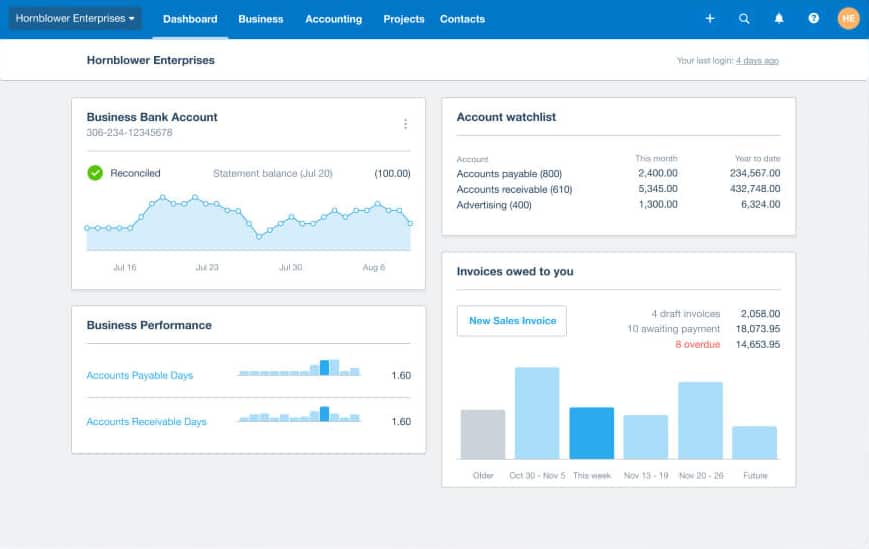
Xero’s interface is visually cleaner and more intuitive than many accounting platforms. The dashboard uses color-coded charts and simple navigation that reduces the learning curve for non-accountants. New users frequently mention getting up and running faster on Xero than on competitors with more cluttered interfaces.
Strong Integration Ecosystem
Xero integrates with over 1,000 third-party apps across categories including payroll (Gusto), inventory (TradeGecko, Cin7), e-commerce (Shopify, WooCommerce), time tracking (TSheets, Harvest), and expense management (Expensify, Dext). The integrations sync data automatically, eliminating manual exports and imports.
For businesses using specialized tools outside Xero’s core features, the integration marketplace extends functionality without forcing you to switch platforms entirely.
Accountant and Bookkeeper Network
Xero maintains a global directory of certified accountants and bookkeepers who specialize in the platform. If you need professional help with setup, cleanup, or ongoing bookkeeping, you can search the directory by location and expertise. Accountants get free access to Xero Practice Manager and discounted client pricing.
This makes Xero particularly attractive if you plan to outsource accounting work or collaborate closely with an external bookkeeper.
Where Xero Falls Short
Early Plan Limits Are Too Restrictive
The Early plan caps invoices at 20 per month and bills at 5 per month. For most businesses, these limits are hit quickly. Even a freelancer sending weekly invoices to 5 clients reaches the cap. The invoice limit also counts draft invoices and transactions created by connected apps, consuming your allowance faster than expected.
This effectively makes Early a trial tier rather than a viable long-term plan for active businesses. Most users upgrade to Growing within the first few months.
Customer Support Can Be Slow
Xero’s customer support receives mixed reviews. Users praise the quality of help articles and self-service resources but criticize slow response times when contacting support directly. Phone support is not available on any plan. You submit tickets via email or chat, and response times can stretch to 24 to 48 hours during busy periods.
For urgent accounting issues (payroll corrections, tax filing deadlines), the lack of immediate phone support creates friction.
Expense Tracking Limited on Lower Tiers
Expense tracking and claims (where employees submit expenses for reimbursement) are only available on the Established plan ($90/month). Early and Growing users can’t use Xero for employee expense management without upgrading or using third-party apps like Expensify.
This is an odd omission given that expense tracking is a basic accounting workflow many small businesses need.
Payroll Requires Third-Party Integration
Xero does not include built-in payroll in the U.S. You must integrate with Gusto (Xero’s recommended partner) or another payroll provider. Gusto integration works well, but it’s a separate subscription ($49/month base plus $6 per employee) that increases your total accounting stack cost.
QuickBooks Online includes payroll as an add-on within the same platform. For businesses wanting a single vendor for accounting and payroll, Xero’s approach adds complexity.
What Real Users Say
Xero holds a 4.4 out of 5 rating on Capterra (3,273 reviews) and similar ratings on G2. The platform receives high marks from small business owners and bookkeepers for ease of use and collaboration features.
Common praise: Users consistently highlight the clean interface, unlimited user access, bank reconciliation speed, and mobile app functionality. Many reviewers mention switching from QuickBooks and appreciating Xero’s simpler navigation and faster learning curve. The integration ecosystem receives positive mentions for connecting accounting to e-commerce, payroll, and inventory tools without complex setup.
Common complaints: Customer support responsiveness is the most frequent criticism. Users report long wait times for email responses and frustration with the lack of phone support. Several reviews mention bank feed disconnections requiring manual intervention and delays in reconnecting. The Early plan’s invoice and bill limits frustrate users who thought they were getting a full accounting platform at the entry price point. A smaller set of reviews cite limited reporting customization compared to QuickBooks and occasional slowness when loading large data sets.
Overall sentiment is positive, with most criticism focused on support quality and the Early plan’s restrictions rather than core accounting functionality.
Who Should Use Xero
- Growing businesses with 5 to 50 employees who need unlimited user access without per-seat licensing costs
- Service-based businesses (agencies, consultancies, professional services) needing project tracking and profitability analysis
- Companies with remote or distributed teams where multiple people need simultaneous access to accounting data
- Businesses operating internationally who invoice customers or pay vendors in multiple currencies (on Growing or Established plans)
- E-commerce businesses using Shopify, WooCommerce, or Amazon who need automatic order and inventory sync
- Teams working with external accountants or bookkeepers who want seamless collaboration and advisor access at no extra cost
Who Should Use Xero
- Very small businesses or freelancers sending fewer than 20 invoices per month on tight budgets (Early plan caps are too restrictive, Growing plan may be overkill)
- Businesses requiring same-day customer support during critical accounting periods (Xero offers email/chat only, no phone support)
- Companies needing advanced inventory management without third-party apps (Xero’s built-in inventory is basic)
- Organizations wanting accounting and payroll from a single vendor (Xero requires Gusto integration, adding cost and complexity)
- Businesses requiring extensive custom reporting beyond Xero’s standard templates (QuickBooks offers more flexibility here)
- Teams needing employee expense management without paying for Established plan or third-party expense tools
Xero vs. Alternatives
| Platform | Best For | Starting Price | Key Difference |
|---|---|---|---|
| Xero | Growing businesses needing unlimited users and clean multi-currency support | $25/month (Early) | Unlimited users on all plans, cleaner interface, 1,000+ integrations |
| QuickBooks Online | Businesses wanting accounting and payroll from one vendor with extensive reporting | $30/month (Simple Start) | Market leader, built-in payroll add-on, more advanced reporting, but charges per user |
| FreshBooks | Freelancers and service businesses prioritizing invoicing and time tracking | $19/month (Lite) | Cheaper entry price, better time tracking, but weaker for full accounting workflows |
| Wave | Budget-conscious very small businesses | Free (revenue from payment processing) | Completely free accounting, but limited features and no phone support |
| Sage Intacct | Mid-market and enterprise companies needing advanced financial management | Custom pricing | Much more expensive, built for larger organizations, overkill for small businesses |
Quick Pick Guide
- Choose Xero if you’re a growing business that needs unlimited users, operates internationally, or values clean UX and strong integrations
- Choose QuickBooks Online if you want accounting and payroll from one vendor, need advanced custom reporting, or prefer market-leader support infrastructure
- Choose FreshBooks if you’re a freelancer or service business where invoicing and time tracking matter more than full accounting features
- Choose Wave if you’re a very small business (under 10 transactions per week) on a tight budget willing to sacrifice features for free software
- Choose Sage Intacct if you’re a mid-market company ($10M+ revenue) needing enterprise-grade financial management and multi-entity consolidation
Popular Integrations
Xero integrates with over 1,000 third-party apps. The most commonly used integrations span payroll, e-commerce, inventory, time tracking, and expense management.
Payroll: Gusto (recommended), ADP, Paychex
E-commerce: Shopify, WooCommerce, Amazon, Stripe, Square
Inventory: TradeGecko, Cin7, Unleashed, Dear Inventory
Time Tracking: TSheets (QuickBooks Time), Harvest, Toggl, Clockify
Expense Management: Expensify, Dext (formerly Receipt Bank), Hubdoc (built-in)
Banking: Over 14,000 financial institutions for automatic bank feeds
Practice Management (for accounting firms): Karbon, Financial Cents, Ignition
The Gusto integration is particularly seamless. Payroll data from Gusto flows into Xero automatically, creating journal entries and updating payroll liabilities without manual posting. For businesses already using Gusto, the combination with Xero creates a unified payroll and accounting stack.
Frequently Asked Questions
Does Xero offer a free trial?
Yes. Xero offers a 30-day free trial on the Growing and Established plans. The trial includes full access to all features so you can test bank reconciliation, invoicing, reporting, and integrations before committing. No credit card is required to start the trial.
How much does Xero cost for a 20-person company?
Xero’s subscription cost is the same regardless of team size because all plans include unlimited users. A 20-person company on the Growing plan pays $55/month. On the Established plan, the same company pays $90/month. User count does not affect pricing.
Is Xero worth it, or should I use QuickBooks Online?
Xero is better if you need unlimited users without per-seat costs, prefer a cleaner interface, or operate internationally with multi-currency needs. QuickBooks Online is better if you want accounting and payroll from one vendor, need more advanced reporting customization, or prefer phone support availability. Both are strong platforms; the choice depends on your specific workflow and priorities.
Can Xero handle multi-currency accounting?
Yes, but only on the Growing ($55/month) and Established ($90/month) plans. Multi-currency features include invoicing in 160+ currencies, tracking foreign bank accounts, and automatic exchange rate updates. The Early plan does not support multi-currency transactions.
How long does Xero take to implement?
Most businesses complete basic setup in 1 to 3 days. You connect bank accounts, import opening balances, set up chart of accounts, and create invoice templates. For complex migrations from other accounting systems or businesses with historical data to import, implementation can take 1 to 2 weeks. Xero provides onboarding resources, and you can hire Xero-certified accountants for setup assistance.
Does Xero include payroll?
No. Xero does not include built-in payroll for U.S. businesses. You must integrate with a third-party payroll provider. Xero recommends Gusto, which charges separately ($49/month base plus $6 per employee). The Gusto integration syncs payroll data automatically into Xero’s general ledger.
Does Xero integrate with Shopify?
Yes. Xero integrates with Shopify through apps like A2X, Synder, and OneSaas. These integrations sync Shopify orders, payments, fees, and refunds into Xero automatically, updating revenue and inventory without manual entry. Most integrations charge separate fees ($10 to $50/month depending on transaction volume).
Is Xero GAAP compliant?
Yes. Xero supports Generally Accepted Accounting Principles (GAAP) for U.S. businesses. The platform handles accrual and cash-basis accounting, tracks accounts receivable and payable, and generates GAAP-compliant financial statements (balance sheet, income statement, cash flow statement).
Does Xero offer discounts for accountants or bookkeepers?
Yes. Xero-certified accountants and bookkeepers get free access to Xero Practice Manager and can offer discounted client pricing (typically 20% to 30% off standard rates). If you work with a Xero partner, ask about partner pricing before signing up directly.
What is Xero’s cancellation policy?
Xero subscriptions auto-renew monthly until canceled. You can cancel at any time with no termination fees. Your subscription remains active until the end of your current billing period. After cancellation, you lose access to Xero but can export your data (reports, transaction lists) before the subscription ends.
Can Xero handle project-based billing?
Yes. The Growing and Established plans include project tracking. You can create projects, assign income and expenses to each project, track time against projects, and bill customers based on project costs. This feature works well for agencies, consultancies, and service businesses managing multiple client engagements simultaneously.
How many users can access Xero?
Unlimited. All Xero plans (Early, Growing, Established) support unlimited users at no additional cost. You can give access to employees, managers, accountants, and bookkeepers without increasing your subscription price.
Final Verdict
Xero delivers on its promise of clean, collaborative cloud accounting for growing businesses. The platform’s greatest strength is unlimited user access at a flat monthly price, making it ideal for teams that need multiple people working in the books simultaneously without per-seat licensing costs.
The interface is genuinely easier to learn than QuickBooks Online for most users. New team members get up to speed faster, and the mobile app provides full functionality for on-the-go accounting. For businesses prioritizing user experience and team collaboration, Xero has a real edge.
The Early plan is a false entry point for most businesses. The 20-invoice and 5-bill monthly caps are hit quickly, and the lack of multi-currency support limits usefulness even for small businesses with any international activity. Most users should budget for the Growing plan ($55/month) as the true starting tier.
Customer support quality is the platform’s weakest area. The lack of phone support frustrates users dealing with urgent accounting issues, and email response times can stretch to 24 to 48 hours during busy periods. If you need immediate support availability, Xero’s support model creates risk.
The integration ecosystem is a genuine differentiator. With 1,000+ apps, you can extend Xero to handle payroll (Gusto), inventory (TradeGecko), e-commerce (Shopify), and time tracking (TSheets) without leaving the cloud accounting ecosystem. For businesses using specialized tools, Xero acts as the central hub connecting everything together.
Xero is one of the best accounting platforms for small to medium-sized businesses in 2026. It’s not the cheapest option, and it’s not the most feature-rich. But for growing teams that value clean UX, unlimited collaboration, and strong integrations, Xero delivers clear value.
Related Reads
Last updated on May 2, 2026