ADVERTISING DISCLOSURE: THIS POST CONTAINS AFFILIATE LINKS. READ FULL DISCLAIMER
Last updated: May 2026
Quick verdict: Bonsai is an all-in-one client management platform for freelancers, consultants, and small agencies, covering proposals, contracts, invoicing, time tracking, CRM, and basic accounting in a single subscription. It is strongest for solo operators and two-to-four-person teams that want a polished, unified workflow without stitching together separate apps. The two big caveats: Bonsai was acquired by Zoom in December 2025 and its long-term roadmap is now controlled by an enterprise communications company, and the per-user pricing structure escalates quickly past three or four seats. The $15 Basic plan is also misleadingly marketed since it does not include invoicing.
What Bonsai Is
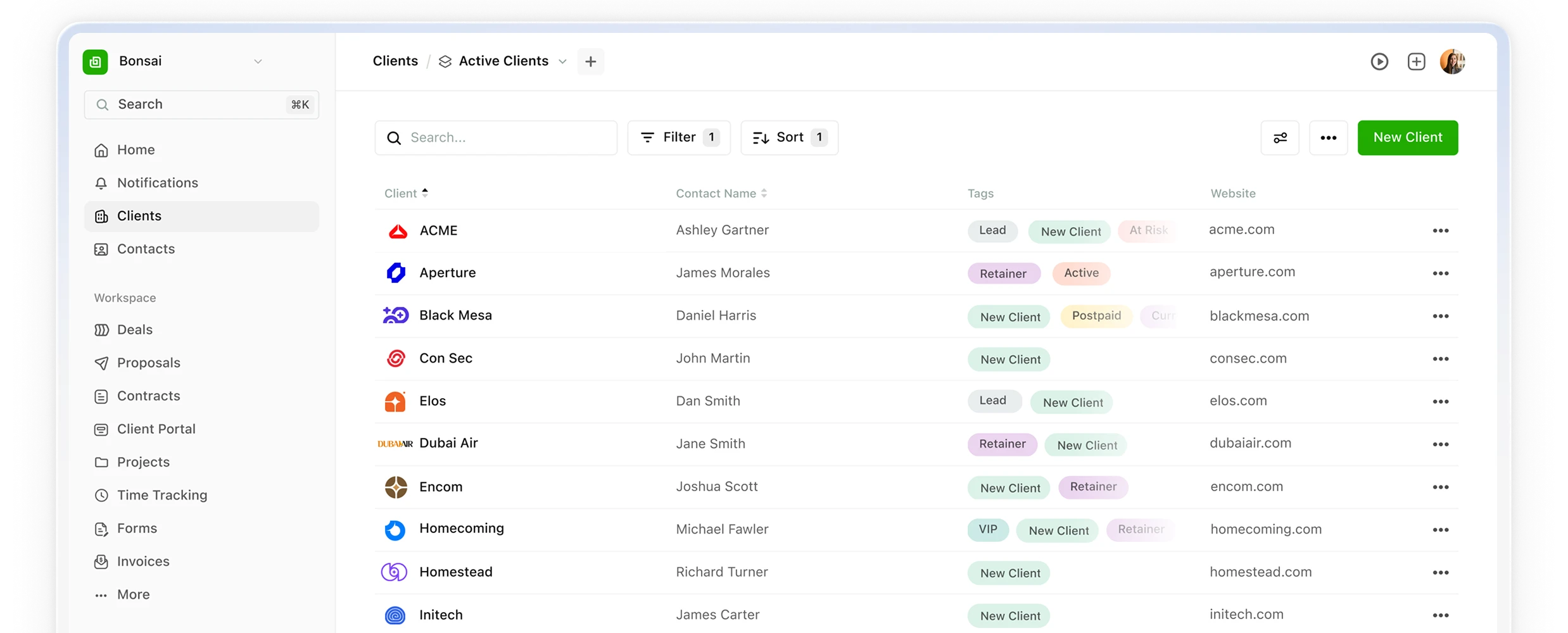
Bonsai is a business management platform built specifically for service professionals who run their own books. It bundles the tools a typical freelancer or boutique agency would otherwise pay for separately: a CRM and pipeline, proposal and contract templates with e-signature, a client portal, time tracking and timesheets, recurring invoicing, expense tracking, and lightweight project management. There is also a US-only tax module available as a paid add-on and a Bonsai-branded prepaid card for business spending.
The platform was founded in 2015 in San Francisco and grew steadily by targeting designers, developers, consultants, and marketing freelancers who needed something more polished than spreadsheets but less heavy than a true mid-market suite. In November 2025, Zoom announced its acquisition of Bonsai, and the deal closed in December 2025. Bonsai now operates as a standalone brand under Zoom, with Zoom signaling that Bonsai’s capabilities will eventually be folded into the broader Zoom Workplace ecosystem. This matters for buyers and is covered in detail later in this review.
The pitch Bonsai makes is simple: stop running your business across six tools when one will do. A proposal becomes a contract, signed hours become invoiced hours, paid invoices land in the books, and the client sees a single branded portal throughout. For service businesses where admin time is the silent tax on every engagement, that integration is the core value proposition.
Pricing
Bonsai uses per-user, per-month pricing across four tiers, with a 7-day free trial on all plans and meaningful discounts for annual billing. The published rates (monthly billing) are Basic at $15/user, Essentials at $25/user, Premium at $39/user, and Elite at $59/user with a 3-user minimum. Annual billing drops those rates to roughly $9, $19, $29, and $49 per user per month. Pricing can change, and Bonsai may run promotions outside these published rates, so confirm current pricing on the Bonsai site before committing.
The pricing structure has a quirk that is easy to miss. The Basic plan at $15/user does not include invoicing. It is a CRM, time-tracker, and basic project tool only. For most freelancers, the realistic entry point is Essentials at $25/user/month, because that is where proposals, contracts, invoicing, scheduling, and the client portal actually unlock. The “$15 plan” marketing exists, but it does not represent what most buyers are actually shopping for.
Premium at $39/user adds white-label client-facing branding, advanced automations, profitability reporting, and deeper integrations with tools like QuickBooks, Zapier, Slack, and Google Workspace. Elite at $59/user adds custom permissions, audit controls, Xero integration, and onboarding support, and is positioned for established agencies. The 3-user minimum on Elite means the floor is effectively $177/month even at the discounted annual rate.
The Bonsai Tax module, which used to be bundled in higher tiers, is now a separate $100/year add-on covering US tax tracking and self-employed deductions. International tax support is limited; automated expense tracking works in the US, Canada, UK, and Australia, but tax filing resources are US-focused. Payment processing fees apply on top of the subscription when clients pay through Bonsai Payments. Reviewers have flagged unexpected charges layered on top of standard Stripe rates, so verify the effective fee structure for your payment volume before relying on Bonsai for client payments.
Compared to alternatives, Bonsai sits in the premium-but-fair range for a single-user setup. FreshBooks and QuickBooks both have stronger pure-accounting features at comparable solo pricing, while Indy and HoneyBook compete more directly on the client-management workflow. Where Bonsai gets expensive is at team scale: a five-person agency on the Premium plan is paying $195/month, while flat-rate competitors like Plutio cover the same use case at $19/month total. The per-user model is the single biggest pricing decision a buyer makes.
Where Bonsai Stands Out
Genuinely connected workflow
Most “all-in-one” platforms are really three tools sharing a login. Bonsai’s integration runs deeper. Accepted proposals auto-generate contracts. Signed contracts unlock client portal access. Logged time rolls directly into invoices. Recurring invoices trigger automated payment reminders. For solo operators without an admin assistant, that continuity is the single biggest time saver, and it is the feature most consistently praised in user reviews.
Strong proposal and contract templates
Bonsai ships with a sizable template library covering proposals, contracts, NDAs, statements of work, scopes of work, and project briefs. Proposals support multiple pricing formats including tiered options and a la carte selections, which is useful for service businesses that want clients to self-select packages. The templates are also fully editable and reusable, so the time investment in customizing one proposal pays off on every subsequent client. E-signature is built in and works without needing a separate tool like DocuSign or HelloSign.
Client portal that looks professional
The branded client portal is one of Bonsai’s clearest selling points for solo freelancers. Clients log into a single space to see their proposals, contracts, invoices, project status, and message history. Done well, this makes a one-person operation look like an agency, which directly affects rates and retention. White-label branding (removing Bonsai’s logo and using your own domain) requires Premium or higher, which is a real upsell pressure for anyone who cares about presentation.
Reasonable learning curve
Bonsai’s interface is one of the cleaner ones in this category. Most users can have their first proposal sent and first invoice issued within an hour of signing up. The dashboard prioritizes the active work (open proposals, unpaid invoices, current projects) over feature inventory, which keeps new users from drowning in options. For freelancers who churn through SaaS trying to find something that does not feel like enterprise software, this matters.
Where Bonsai Falls Short
The Zoom acquisition creates real strategic uncertainty
This is the most important factor for any prospective buyer in 2026. Zoom completed the acquisition of Bonsai in December 2025, and while Bonsai will operate as a standalone brand for now, Zoom has stated that Bonsai’s capabilities will eventually be incorporated into the Zoom Workplace platform. The historical pattern with similar SMB acquisitions is integration announcements, followed by feature freezes, followed by absorption or quiet sunsetting. None of that has happened yet, but the long-term roadmap is now controlled by an enterprise communications company, not a freelancer software company.
The practical implication is that any business making a multi-year commitment to Bonsai should have an export plan documented and a backup tool identified. Bonsai exports client lists as CSV, invoices as PDFs, and time records as structured data, but proposal and contract templates do not export natively and would need to be recreated on a new platform. Test the export now, while it is a non-emergency.
Per-user pricing punishes growth
Bonsai’s per-user model works cleanly for solo operators and pairs. Once a team grows past three or four people, the math gets painful fast compared to flat-rate competitors. A five-person team on Premium ($39/user/month) pays $195/month; the same team on a flat-rate alternative like Plutio pays $19/month total. This is not a hidden cost, but it is a structural ceiling on how far Bonsai scales economically. Reviewers report long-term price increases exceeding 150% over several years, with features that used to be included at lower tiers (like the Tax module) moved into paid add-ons.
Project management is thin on the lower tiers
Bonsai’s Basic and Essentials plans offer task list views only. Kanban boards and Gantt-style timelines do not appear until the Premium plan, and even then task dependencies and milestone tracking are limited. For freelancers running simple linear projects, that is fine. For anyone managing multi-phase deliverables like website builds, brand identity systems, or content campaigns, Bonsai’s project management is genuinely weak compared to dedicated tools like ClickUp, Notion, or Plutio.
Payment processing complaints and support delays
Two recurring complaints surface in recent G2 and Trustpilot reviews. The first is payment holds of 7 to 10 days on Bonsai Payments, longer than what users expected based on Stripe’s standard 1-to-2-day window. The second is support response times averaging 9 or more days, which is below what most subscribers expect from a paid SaaS platform. Neither issue has been visibly addressed since the Zoom acquisition. If predictable cash flow and responsive support are critical, factor this in.
Who Should Use Bonsai
Bonsai is a clear fit for solo freelancers and consultants who want one platform handling proposals, contracts, invoicing, and a client portal without configuring or maintaining a stack of separate tools. Designers, developers, marketing consultants, copywriters, architects, and independent strategists are the sweet spot. If billable time is the inventory and admin time is the tax, Bonsai’s connected workflow pays for itself.
It is also a reasonable fit for two-to-three-person service agencies that want a unified client experience, white-label branding, and basic team workload visibility. Past four seats, the per-user model starts working against you, and a flat-rate alternative usually wins on price even if it is a slightly worse product fit.
It is not a strong fit for established agencies of five or more, businesses that need deep project management, or anyone whose accounting needs go beyond freelancer-level expense tracking. Pure-accounting use cases are better served by QuickBooks, FreshBooks, or Xero. Direct freelancer-platform competitors worth comparing include Indy (flat-rate, leaner feature set) and HoneyBook (stronger on client communication, weaker on time-billing-invoicing automation). The Bonsai vs HoneyBook decision usually comes down to whether your workflow is more proposal-and-billing heavy (Bonsai) or more inquiry-and-booking heavy (HoneyBook).
FAQ
Is Bonsai still independent after the Zoom acquisition?
Bonsai operates as a standalone brand under Zoom following the December 2025 acquisition. The product, pricing, and login remain Bonsai-branded, and the team is largely intact. Over time, Zoom has stated that Bonsai’s capabilities will be incorporated into the broader Zoom platform, but no timeline has been confirmed publicly. Existing users should monitor announcements and keep an export plan ready.
Does Bonsai really cost $15/month?
The $15 Basic plan exists, but it does not include invoicing, proposals, or contracts. Most freelancers shopping Bonsai actually need the Essentials plan at $25/user/month (or $19 annual) to access the features that make Bonsai useful. The $15 marketing line is technically accurate but practically misleading.
How does Bonsai compare to HoneyBook?
Both target service businesses but with different emphases. Bonsai leans toward the proposal-contract-invoice workflow with stronger time-billing automation. HoneyBook leans toward inquiry intake, client communication, and booking workflows. Photographers, event planners, and creative service businesses with heavy client-comms needs typically prefer HoneyBook. Designers, consultants, and developers with structured project billing typically prefer Bonsai.
Does Bonsai do real accounting?
Bonsai handles income and expense tracking, categorization, and basic financial reporting at a level appropriate for solo freelancers. It is not a substitute for double-entry accounting software. For tax filing, reconciliation, and serious bookkeeping, most Bonsai users export to or integrate with QuickBooks or Xero (Xero integration requires the Elite plan).
What does Bonsai Tax actually cover?
Bonsai Tax is a US-only add-on at roughly $100/year that tracks deductible business expenses, estimates quarterly taxes, and helps with self-employed tax categorization. It is not a substitute for a CPA and does not file returns. International users should not buy Bonsai for tax features.
Are there transaction fees on top of the subscription?
Yes. Bonsai Payments charges processing fees on top of the monthly subscription when clients pay through the platform. Effective rates depend on the payment method (card vs. ACH vs. bank transfer) and reviewers have reported fees layered on top of standard Stripe rates. Check the current fee schedule before relying on Bonsai for payment processing.
How long is the free trial?
Bonsai offers a 7-day free trial on all paid plans. The trial requires a credit card and rolls into a paid subscription automatically unless cancelled. There is no permanent free tier.
Can I export my data if I leave Bonsai?
Client lists export as CSV, invoices download as individual PDFs, and time records can be exported as structured data. Proposal and contract templates do not export natively and need to be copied manually or recreated on a new platform. Most users complete a full export in under an hour. Given the Zoom acquisition, testing the export workflow now is a reasonable precaution.
Does Bonsai integrate with QuickBooks?
Yes, on the Premium plan and above. The integration syncs invoices and payments to QuickBooks for accounting reconciliation. Xero integration is gated to the Elite plan. Both integrations are one-way (Bonsai to accounting tool) rather than fully bidirectional.
Is Bonsai suitable for an agency of 10+ people?
It works technically, but the per-user pricing model becomes economically uncompetitive at that scale. Most agencies of 10 or more either negotiate custom Elite pricing (Bonsai offers reduced rates above 30 users) or migrate to flat-rate alternatives. If you are at agency scale, request a custom quote rather than paying list pricing per seat.
Final Verdict
Bonsai remains one of the most cohesive client-management platforms for solo freelancers and small service teams. The connected workflow from proposal to payment is genuinely better than what you get stitching together separate tools, and the polished client portal does meaningful work in helping one-person businesses present like agencies.
The two reasons to hesitate are real but not disqualifying. The Zoom acquisition introduces strategic uncertainty that did not exist 18 months ago, and the per-user pricing makes Bonsai expensive past four seats. Neither is a reason to avoid Bonsai today, but both are reasons to test the export workflow, identify a backup tool, and reconsider every year or two whether the product still fits.
For a solo consultant or two-person studio building a sustainable service business, Bonsai is a strong choice in 2026. For an established five-plus-person agency, a flat-rate alternative usually wins on math alone. For anyone making a major commitment, do the 7-day trial with real client data before signing up annually.
Related Reads
- HoneyBook Review — The closest head-to-head. Stronger on client communication, weaker on time-billing.
- Indy Review — Flat-rate pricing instead of per-user. The Bonsai alternative if seat costs are the dealbreaker.
- FreshBooks Review — Better choice when accounting matters more than client management.
- QuickBooks Review — The upgrade path when Bonsai’s books outgrow the platform.
This article is informational only and not legal, tax, or financial advice. Pricing, features, and product ownership can change; verify current details on the vendor’s website before purchase. FirmTools is not affiliated with Bonsai or Zoom.Last updated on May 15, 2026